



Most teams pick a SaaS tool by demo polish or the longest feature list, then meet the real problems after the contract is signed: no clean data export, an SLA with no teeth, integrations that quietly break, a bill that triples at renewal. A SaaS tool selection checklist replaces that gut call with a side-by-side comparison, so the tool you choose wins on evidence, not on who gave the best demo.
This guide does three things a feature comparison never will. It names the critical tech specs to verify before anything else, it gives you a weighted matrix to score your shortlisted tools against each other, and it lists the dealbreakers and vendor questions that separate a safe choice from an expensive mistake.
Key takeaways
- A SaaS tool selection checklist compares your shortlisted tools against each other, rather than scoring one tool in isolation.
- Verify the critical tech specs first: security and compliance, uptime and SLA, and integrations and API.
- Use a weighted comparison matrix, because not every criterion matters equally, and security should outweigh a nice-to-have feature.
- Some findings are instant dealbreakers, so reject a tool on the spot when it hits one, no matter how good the demo was.
- Ask every vendor the same short set of hard questions, and always score at least one self-hosted option against the SaaS finalists.
Table of Contents
Why picking the wrong SaaS tool is expensive
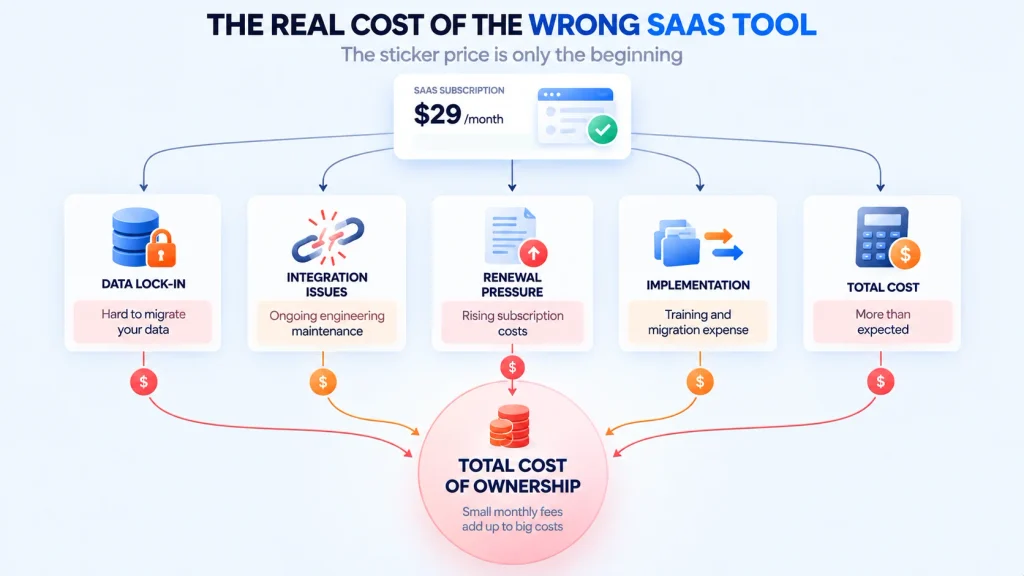
The tool you adopt shapes your team’s work for years, and the switching cost climbs the longer you stay. A weak choice rarely fails loudly on day one. It drains you slowly through costs that never showed up in the demo:
- Data lock-in. Your history is trapped in a vendor you cannot leave without losing it.
- Integration babysitting. A tool that fits your stack badly needs constant engineering time just to keep working.
- Lost renewal leverage. The renewal quote assumes you are too locked in to walk away, so the price climbs.
- Hidden implementation cost. Training, data migration, and the premium tier you need for security that should have been standard.
- Total cost of ownership. The sticker price turns out to be the smallest line once you add all of the above.
The trap most buyers fall into is comparing on features alone. Features are easy to demo and easy to match, so they rarely decide anything important. A SaaS tool selection checklist forces the quieter factors, exit risk and true cost, into the decision instead of letting the demo carry it.
Underneath every selection sits the build-versus-buy question. Sometimes the right move is not to rent any SaaS tool but to own one. For that wider framing, our guide on how to build a SaaS in 2026 covers when building or self-hosting beats subscribing.
The critical tech specs to check first
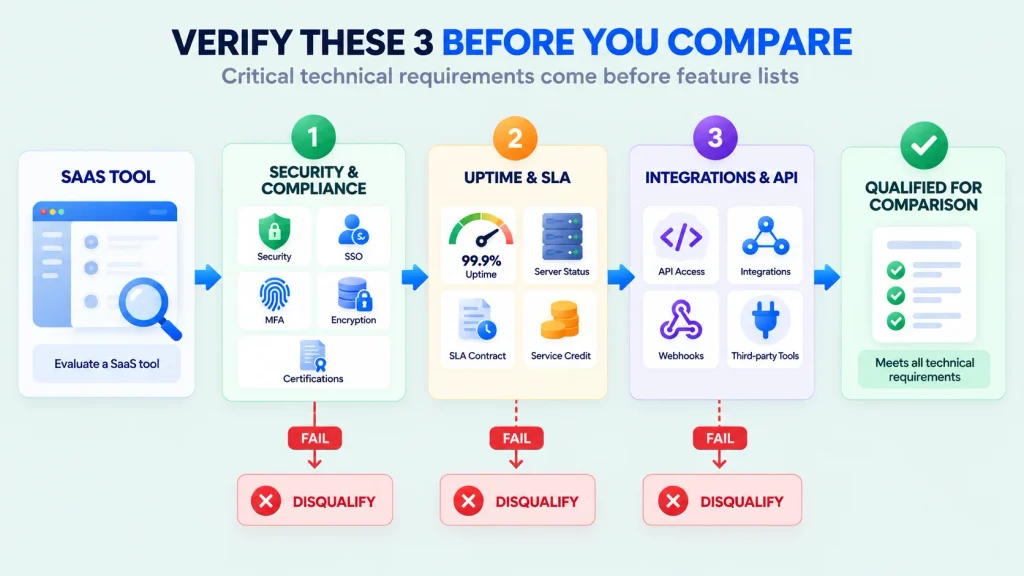
Before you compare anything else, verify the critical tech specs, because these decide whether a tool is even safe to build on. Feature gaps you can work around; a weak security posture or an SLA with no credits you cannot. Three specs sit at the top of any SaaS tool selection checklist, and a tool that fails one is disqualified before the comparison even starts.
- Security and compliance. Look for SOC 2 Type II and ISO 27001, plus GDPR, HIPAA, or PCI DSS coverage where your data demands it. Confirm SSO and MFA, encryption at rest and in transit, and a stated penetration-testing cadence. Verify certifications through documentation, not a sales claim.
- Uptime and SLA. A real SLA states an uptime target (99.9% or 99.95%), how it is measured, and financial credits when the vendor misses. Ask for a performance SLA too, because a system that is technically up but takes ten seconds to load is still failing your users. Check historical status pages, not the self-reported number.
- Integrations and API. Confirm pre-built connectors for the platforms you already run, a documented REST API with webhooks, sensible rate limits, and SSO via SAML or OIDC. Test the integration in a small proof of concept rather than trusting the logo wall.
For a vendor-side view of these checks, TechTarget’s SaaS evaluation checklist is a useful outside reference.
Build your weighted comparison matrix
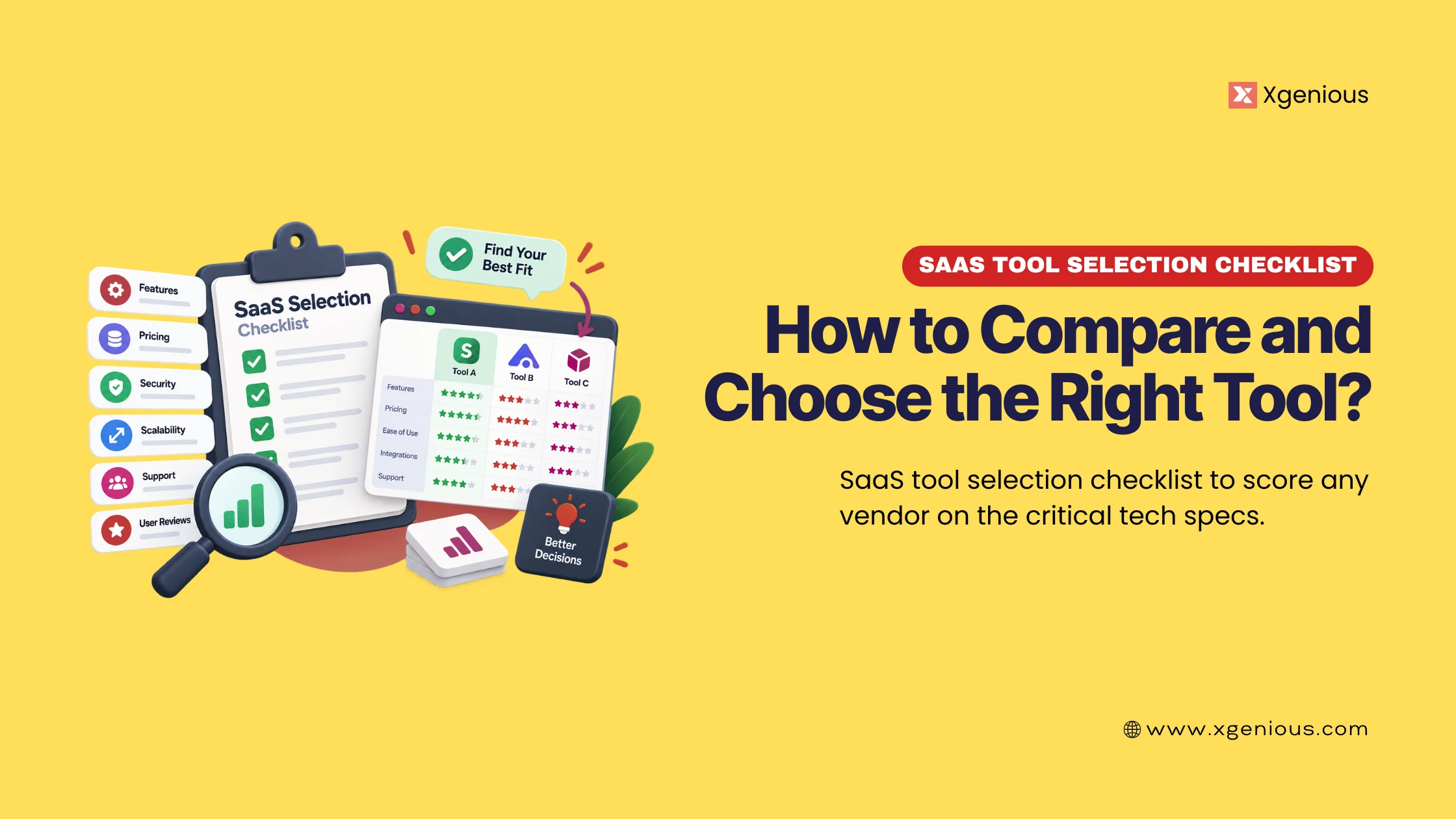
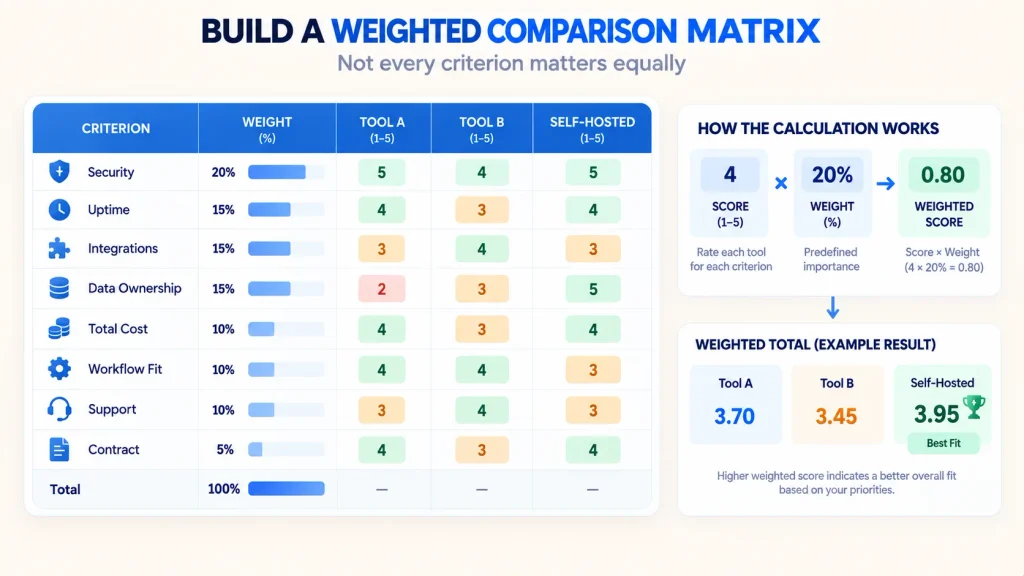
Here is where a SaaS tool selection checklist stops being a list and becomes a decision tool. Instead of scoring one tool against a fixed bar, you score your two or three finalists against each other, and you weight each criterion by how much it actually matters to you. Security should not carry the same weight as a nice-to-have feature, and a weighted matrix makes that explicit.
The method is simple. Pick the criteria that matter, assign each a weight that sums to 100, score every finalist 1 to 5 on each criterion, then multiply score by weight and total. The highest weighted total wins, and the math shows you exactly why.
Here is a suggested weighting, though you should adjust it to your own priorities. A tool handling sensitive customer data should push security higher; a tool your whole company lives in all day should push workflow fit higher.
| Criterion | Suggested weight | What it protects |
|---|---|---|
| Security and compliance | 20 | Trust and legal exposure |
| Uptime, SLA, and performance | 15 | Reliability |
| Integrations and API | 15 | Fit with your stack |
| Data ownership and portability | 12 | Freedom to leave |
| Total cost of ownership | 12 | True budget |
| Feature and workflow fit | 10 | Real productivity |
| Support and onboarding | 8 | Time to value |
| Contract and exit terms | 8 | Exit leverage |
And here is what a filled matrix looks like with three finalists, each scored 1 to 5, then weighted. The self-hosted option is included on purpose, because it belongs in every comparison.
| Criterion | Weight | SaaS Tool A | SaaS Tool B | Self-hosted |
|---|---|---|---|---|
| Security and compliance | 20 | 5 | 3 | 4 |
| Uptime, SLA, and performance | 15 | 4 | 4 | 3 |
| Integrations and API | 15 | 4 | 5 | 3 |
| Data ownership and portability | 12 | 2 | 2 | 5 |
| Total cost of ownership | 12 | 3 | 2 | 5 |
| Feature and workflow fit | 10 | 4 | 5 | 3 |
| Support and onboarding | 8 | 4 | 4 | 3 |
| Contract and exit terms | 8 | 3 | 2 | 5 |
| Weighted total (out of 5) | 100 | 3.75 | 3.45 | 3.90 |
The value is not the exact numbers, it is that the matrix makes trade-offs visible. Tool B has the best features but the worst data terms, and once data ownership is weighted, the self-hosted option quietly edges ahead. That is a conclusion a feature list would never surface.
What to score in each criterion
Use these notes to score each finalist 1 to 5 on the eight criteria of the SaaS tool selection checklist. A 5 means fully met and verified, a 3 means partial, a 1 means missing or a concern.
- Security and compliance. SOC 2 and ISO 27001, the right regime for your data, SSO and MFA, encryption, and a tested security process. Score high only when you have seen the documentation.
- Uptime, SLA, and performance. A stated target with credits, a performance SLA, and real status history. Score low when the SLA has no credits or no public track record.
- Integrations and API. Native connectors confirmed in a proof of concept, a full REST API with webhooks, and SSO via SAML or OIDC. The architecture behind good extensibility is covered in multi-tenant SaaS architecture.
- Data ownership and portability. Your data is yours, exportable in open formats, reachable through the API, with no throttling when you try to leave. This is where lock-in hides, so score it honestly.
- Total cost of ownership. License plus training, migration, the security tier you actually need, and integration debt. A structured buyer’s guide such as Spendflo’s software assessment checklist helps map the hidden lines.
- Feature and workflow fit. Core features that solve your real problem, mapped to your real workflow, ideally confirmed in a pilot with a small team rather than assumed from the demo.
- Support and onboarding. Response times by severity, real onboarding help, and a searchable knowledge base, matched to how critical the tool is to you.
- Contract and exit terms. Fair renewal, a cap on price hikes, reasonable exit fees, and a clean data-out on termination.
Dealbreakers: reject on sight
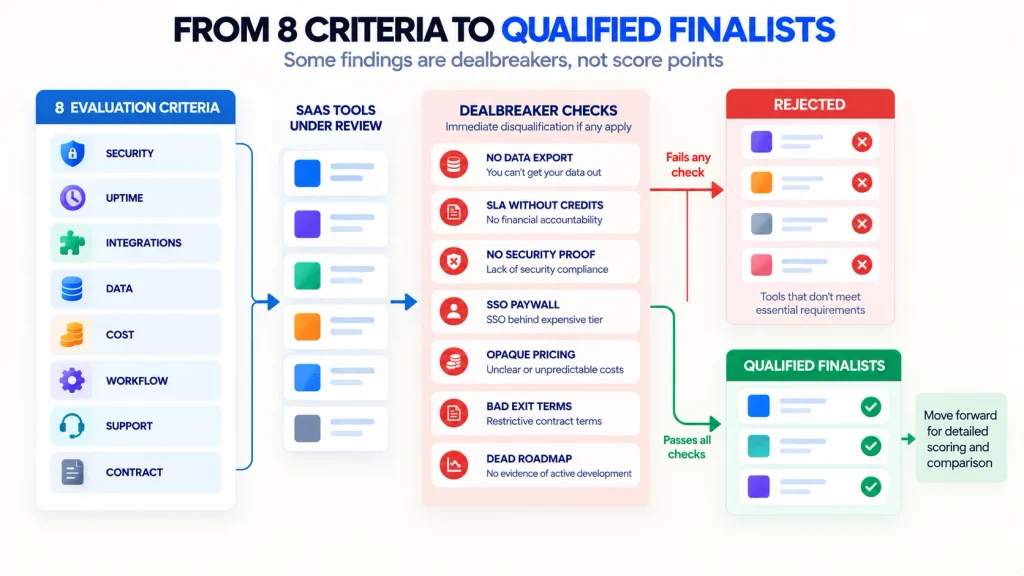
Some findings are not points to weigh, they are instant disqualifications. When a finalist hits one of these, drop it from the matrix no matter how strong the demo was. A SaaS tool selection checklist is as much about fast rejection as careful scoring.
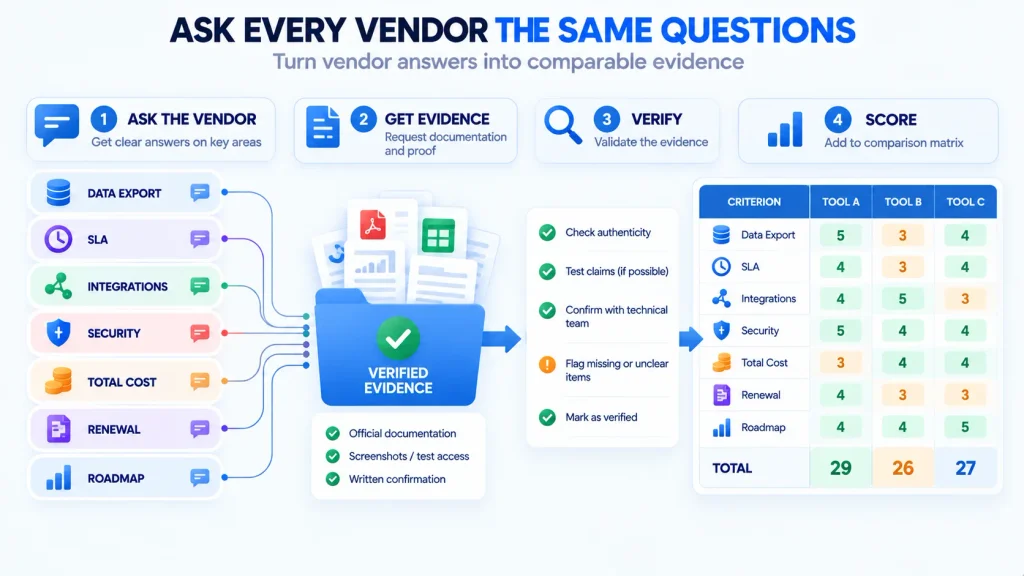
- No clean data export. If you cannot pull all of your data out in an open format on demand, the tool owns your business, not the other way around.
- An SLA with no credits. An uptime number with no financial consequence for missing it is marketing, not a commitment.
- No verifiable security. No SOC 2, no security documentation, and vague answers about encryption or access control mean the risk is unknowable.
- The SSO tax. Basic security like SSO locked behind the top enterprise tier is a red flag about how the vendor treats security.
- Opaque, quote-only pricing. If you cannot estimate your cost at scale, you cannot budget, and the number usually climbs once you are committed.
- Uncapped renewal with steep exit fees. Auto-renewal, unlimited price hikes, and a costly off-ramp together form a trap.
- A dead roadmap. No recent releases and slow, evasive answers suggest a tool that will stall while you depend on it.
Questions to ask every vendor
The last part of the SaaS tool selection checklist is a short question set. Send the same list to every finalist and compare the answers directly, because vague or evasive replies are data too. These questions map straight onto the matrix criteria, so the answers feed your scores.
- Can I export all of my data at any time, and in what formats?
- What is your uptime SLA, how is it measured, and do you pay credits when you miss it?
- Which of my existing tools do you integrate with natively, and can I test it in a trial?
- What security certifications do you hold, and can I see the report under NDA?
- What is my all-in cost at my expected scale in year two, including the tiers I will need?
- What are your renewal, price-increase, and termination terms?
- What shipped in the last two quarters, and what is on the roadmap for the next two?
The vendors that answer these clearly and quickly tend to be the ones worth buying from. The ones that dodge are telling you how support will feel after the sale.
Self-hosted vs SaaS: when owning the tool wins
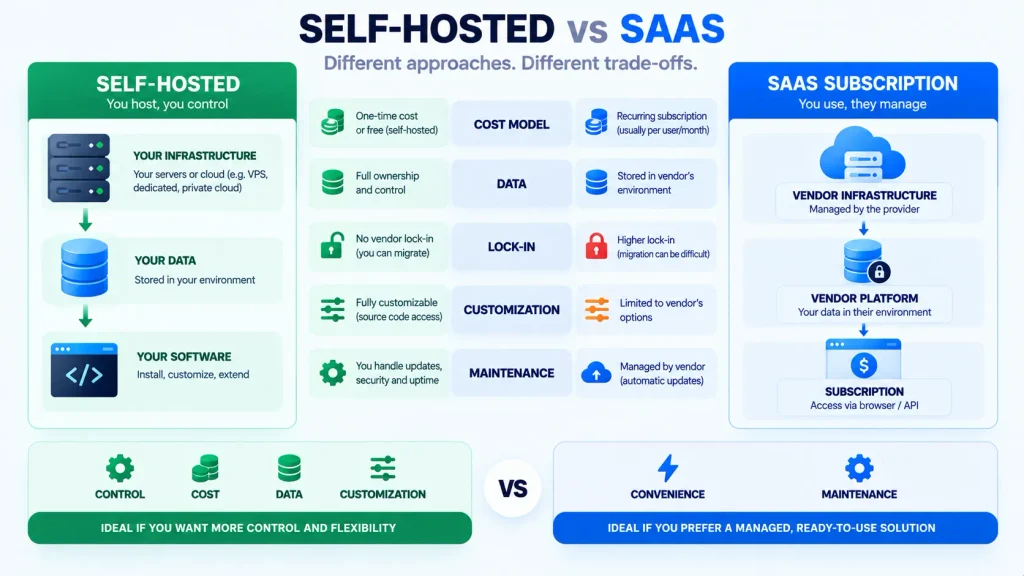
Being honest here matters, because the best answer to a SaaS tool selection checklist is sometimes not to rent a SaaS tool at all. The two models differ most on the things that hurt later.
| Factor | Self-hosted | SaaS subscription |
|---|---|---|
| Cost model | One-time or free, open source | Recurring per-seat, indefinitely |
| Data | On your server, you own it | On the vendor’s servers |
| Lock-in | None, nothing to leave | Grows with every month of history |
| Customization | Full source access | Limited to vendor settings |
| Maintenance | You run updates and hosting | Vendor handles everything |
Self-hosting is not automatically better. The honest rule is to weigh three things, and self-host only when one of them clearly bites:
- Cost at scale. When the per-seat bill grows faster than the effort of running your own server.
- Data control. When privacy, residency, or compliance means the data cannot sit on a vendor’s servers.
- Customization. When you need to change how the tool works, not just its settings.
If none of those bite, a well-scored SaaS tool is the simpler choice. When they do, put a self-hosted option in the matrix and let the weighted score decide, exactly as the example above did.
Real self-hosted alternatives worth scoring alongside the SaaS options include Helpnest for AI support, with the wider field compared in our self-hosted AI chatbot and open source customer support software roundups, and WooCommerce alternatives for self-hosted ecommerce. If the comparison points you toward building rather than buying, our custom SaaS development service can help.
Run a pilot before you sign
The matrix narrows your finalists to one, but the last score on the SaaS tool selection checklist should come from your own hands. Run a short pilot with a small team on the leading tool: import real data, connect one real integration, and give people the actual work they would do daily. A pilot measures adoption and workflow fit, which is the one thing a demo and a spec sheet cannot show you. If the pilot surfaces a problem, adjust the matrix and let the second-place tool have its turn.
Build your own SaaS tool selection scorecard
You do not need special software to run this. Recreate the weighted comparison matrix above in any spreadsheet: one row per criterion, a weight column that sums to 100, and a column for each finalist scored 1 to 5. Multiply score by weight, total each column, and the highest weighted total wins. Add a short list of the dealbreakers next to it, and paste the vendor questions so the answers feed straight into your scores. Reuse the same sheet for every evaluation, so each tool is judged the same way and the decision comes down to evidence rather than the best demo.
If you would rather have help choosing the right tool, or building one instead of buying, book a free call with our team.
Final thoughts
A SaaS tool selection checklist works because it compares, not just scores. Verify the critical tech specs first, since security, uptime, and integrations decide whether a tool is safe to build on at all. Then weight the criteria by what matters to you, score your finalists side by side, reject anything that hits a dealbreaker, and ask every vendor the same hard questions. Put a self-hosted option in the matrix, and finish with a pilot before you sign.
Selection is one step in a larger journey. Before you choose tools, our guide on how to build a SaaS in 2026 frames the build-versus-buy decision, and when you are ready to ship, the SaaS launch checklist scores your launch readiness with the same discipline this checklist brings to your tools.
SaaS Tool Selection Checklist FAQ
What is a SaaS tool selection checklist?
It is a structured way to compare and choose SaaS tools before you buy. This one verifies the critical tech specs, scores your finalists against each other in a weighted comparison matrix, lists the dealbreakers that disqualify a tool on sight, and gives you the questions to ask every vendor, so you decide on evidence rather than on the best demo.
What are the critical tech specs to check when selecting a SaaS tool?
Check three first: security and compliance (SOC 2, ISO 27001, SSO, encryption), uptime and SLA (a stated target like 99.9%, financial credits, and real status history), and integrations and API (native connectors, a documented REST API with webhooks, and SSO via SAML or OIDC). A tool that fails one of these is usually disqualified before the comparison starts.
Why use a weighted comparison matrix instead of a simple checklist?
Because not every criterion matters equally. Security and data ownership carry far more risk than a nice-to-have feature, so weighting them higher gives you a score that reflects real priorities. A flat checklist can rank a tool with great features and terrible data terms above a safer, more boring one, which a weighted matrix prevents.
What uptime SLA should a SaaS tool have?
For most business tools, look for 99.9% uptime, which allows roughly 8.8 hours of downtime a year. For mission-critical tools, push for 99.95% or higher. Just as important, confirm how uptime is measured and whether the SLA includes financial credits when the vendor misses, because a target with no credits is only a marketing number.
What are the biggest dealbreakers when choosing a SaaS tool?
The instant disqualifiers are no clean data export, an SLA with no credits, no verifiable security, basic SSO locked behind the top tier, opaque quote-only pricing, uncapped renewals with steep exit fees, and a dead product roadmap. When a finalist hits one of these, drop it regardless of how good the demo was.
Should I choose a self-hosted tool or a SaaS subscription?
Choose SaaS when you want zero maintenance and the recurring cost is not yet a concern. Choose self-hosted when per-seat cost, data control, or customization matter more than convenience, because owning the tool removes the recurring bill, the vendor data control, and the lock-in. Score at least one self-hosted option in your comparison matrix so the choice is made on evidence.