



Half of SaaS MVPs launch broken. Not because the code fails, but because billing was not wired, the privacy policy did not exist, monitoring was not set up, or no one was on call for the first 48 hours. The pattern is so consistent across agency and accelerator alumni networks that “launch readiness” has become its own discipline, separate from product development. The SaaS launch checklist below is built around that discipline.
This guide covers 12 critical items across four categories (technical, compliance, commercial, operational), the 12-Point Launch Readiness Score that scores readiness on a 24-point scale, the 48-hour soft launch protocol that surfaces problems before public launch, and the corrective action when the score falls below 18/24. The complete SaaS launch checklist runs as a downloadable template at the end of this article.
Key takeaways
- The SaaS launch checklist splits launch readiness into four categories, technical, compliance, commercial, and operational, that together decide whether a launch survives its first 30 days.
- It covers 12 critical items, three per category, each scored 0, 1, or 2 for a total out of 24.
- The 18/24 threshold is the launch gate: above it you can ship with a few known gaps, below it you delay and fix.
- A 48-hour soft launch to 10 to 50 invited users surfaces the problems the checklist cannot predict before public launch.
- When the score falls below 18, the fix is category-specific and time-bound, with a named owner and a hard deadline, not an open-ended delay.
Table of Contents
Why Most SaaS Launch Checklist Items Get Skipped
Most SaaS teams treat launch readiness as a one-day task. The team finishes the build, declares it done, and announces. What they skip is everything that happens after the customer signs up: the billing webhook that fails silently, the password reset flow that does not exist, the audit log that has no retention policy, the support email that goes to a personal Gmail no one checks on weekends.
For the broader build framework that places this launch decision in context, see how to build a SaaS in 2026.
The reason these items get skipped is psychology, not capability. Building features feels like progress; setting up Sentry alerts does not. Writing a privacy policy feels boring; shipping a new feature feels like real work. The SaaS launch checklist exists to force the team to do the unglamorous work that makes the launch survive contact with real customers.
Three patterns explain why teams under-invest in launch readiness:
- Most founders have not seen what happens at the 48-hour mark when a billing webhook misfires for the first paying customer.
- The cost of skipping each item feels small in isolation, but skipping ten items is the same as launching broken.
- The metrics that signal readiness (alerts wired, backups tested, dunning configured) do not show up in product demos or investor updates, so they get deprioritized.
The single most expensive launch mistake is the absence of a SaaS launch checklist that scores readiness honestly before the launch button gets pressed. The taxonomy of mistakes that cause this is covered in depth at common SaaS MVP mistakes.
The Four Categories of the SaaS Launch Checklist
The SaaS launch checklist organizes 12 items into four categories of three items each. Each category covers a different failure mode that wrecks early-stage launches.
- Category 1: Technical Readiness. Whether the application survives normal traffic and recovers from failure. Three items: monitoring and on-call rotation, backups and disaster recovery targets, security baseline against OWASP Top 10.
- Category 2: Compliance and Legal. Whether the customer can sign up without exposing the company to legal risk. Three items: privacy policy plus terms plus DPA, GDPR/HIPAA/SOC 2 posture check, cookie consent plus jurisdiction flags.
- Category 3: Commercial Readiness. Whether the customer can actually pay and the payment can actually be collected. Three items: billing infrastructure and tax compliance, pricing page plus trial logic plus dunning, analytics and conversion instrumentation.
- Category 4: Operational Readiness. Whether the team can support the customer after signup. Three items: support channel plus SLA plus playbook, customer onboarding and documentation, feedback loops and bug-triage process.
Each item in the SaaS launch checklist is scored 0 (missing), 1 (partial), or 2 (complete). The total runs from 0 to 24. The launch threshold is 18/24, which gives the team room to launch with two or three known partials but blocks launch when more than half of the items are not in place.
The reason for category-based grouping rather than a flat 12-item list: launch failures cluster by category. A team that aces Technical and Commercial but skips Compliance and Operational launches into legal exposure and customer support chaos. Spreading effort across categories prevents the single-category blind spot that kills most launches.
SaaS Launch Checklist Category 1: Technical Readiness
The technical readiness section of the SaaS launch checklist covers the three items that determine whether the application survives the launch week.
Technical Item 1: Monitoring, Alerts, and On-Call Rotation
Monitoring is not optional for SaaS at launch. The launch-week minimum:
- Error tracking: Sentry (free tier covers MVP-scale traffic).
- Uptime monitoring: Better Stack or Pingdom (under $20 per month).
- Performance monitoring: Datadog, Highlight, or Honeybadger.
- Alerting: every alert routes to a real human within five minutes of an incident.
- On-call rotation: two people sharing a 12-hour window each, with PagerDuty or OpsGenie routing alerts and escalating after five minutes if not acknowledged.
- Launch-week habit: check dashboards every two hours during business hours. The first 72 hours surface the issues that define customer trust for the first month.
Score: 0 if no monitoring, 1 if monitoring exists but no on-call rotation, 2 if both are configured and tested with a fake alert before launch.
Technical Item 2: Backups, Disaster Recovery, and RTO/RPO Targets
A backup that has never been restored is not a backup; it is a hope. The launch-week minimum:
- Automated daily backups of the primary database (managed cloud providers handle this by default).
- Point-in-time recovery enabled.
- A tested restore: at least one full restore run in a staging environment before launch.
- Documented RTO and RPO targets: RTO under 4 hours (back online within 4 hours of a catastrophic failure), RPO under 1 hour (no more than 1 hour of customer data lost in the worst case). These tighten as you grow; at launch, 4/1 is the floor.
- A rehearsed failure: simulate a complete database loss, restore, and verify customer data is intact.
Score: 0 if no backups, 1 if backups exist but never restored, 2 if backups are tested and RTO/RPO targets are documented. The AWS Well-Architected review checklist covers the backup and recovery patterns in depth.
Technical Item 3: Security Baseline (OWASP Top 10, Dependency Audit)
Skipping the security baseline is the single fastest path to a public security incident in the first 90 days. The minimum checks before launch:
- SQL injection prevention: parameterized queries everywhere, no string-concatenated SQL.
- XSS prevention: React and modern frameworks handle this by default, but custom HTML rendering needs review.
- Authentication and sessions: use a managed identity provider rather than custom auth.
- CSRF protection: token-based, enforced on every state-changing request.
- Security headers: Content-Security-Policy, X-Frame-Options, Strict-Transport-Security.
- Dependency audit: npm audit or equivalent, no critical vulnerabilities at launch.
The OWASP Top 10 is the canonical reference. Teams without a security engineer should run a static analysis tool (Snyk, GitHub Advanced Security, Semgrep) before launch as an outside check.
Score: 0 if no security review, 1 if dependency audit is clean but no application-level review, 2 if both are complete and documented.
SaaS Launch Checklist Category 2: Compliance and Legal
The compliance and legal section of the SaaS launch checklist covers the three items that determine whether the SaaS can collect customer signups without exposing the company to regulatory risk or customer-trust damage.
Compliance Item 1: Privacy Policy, Terms of Service, and Data Processing Agreement
The legal trio is the minimum legal documentation a SaaS needs at launch. Each serves a distinct purpose:
- Privacy policy: explains what data the SaaS collects and how it is used. Required by GDPR, CCPA, and most consumer protection regimes worldwide.
- Terms of service: define the contract with the user, including liability limits, dispute resolution, and acceptable use. Without ToS, you have no enforceable agreement at the first dispute.
- Data Processing Agreement (DPA): the processor-to-controller agreement that satisfies GDPR Article 28 when you handle personal data for a customer. B2B customers ask for this during procurement.
How to produce them: start from a reputable template (Termly, Iubenda, or law-firm templates), customize for your actual data practices, then have a qualified attorney review for the relevant jurisdictions. Templates without legal review are a starting point, not a finished product.
Score: 0 if any document is missing, 1 if templates exist but are not customized or reviewed, 2 if all three are customized, attorney-reviewed, and linked from the signup flow and footer.
Compliance Item 2: GDPR / HIPAA / SOC 2 Posture Check
Your compliance posture depends on your customer base. The launch-week minimum:
- GDPR architecture in place: data residency, deletion-on-request, and processing records. Functionally non-optional for any SaaS with European users, which is almost all SaaS.
- HIPAA architecture in place only if you process Protected Health Information at any point.
- SOC 2 deferred until enterprise contracts demand it (usually above roughly $50K ARR), but lay the foundation now: audit logs, encryption, and tenant isolation so it is cheap to add later.
The pragmatic rule: do not pursue formal certifications before launch unless contracts require them, but do put the architectural primitives in place.
Score: 0 if regulatory posture is unaddressed, 1 if architecture supports compliance but documentation is incomplete, 2 if both architecture and documentation are complete for your actual customer base.
Compliance Item 3: Cookie Consent, Age Gating, and Jurisdiction Flags
The smaller compliance items most teams skip, which quietly create regulatory exposure:
- Cookie consent banner: required in the EU and increasingly in US states. It must respect user choice and integrate with your analytics, so users who reject tracking are not tracked. Cookiebot, OneTrust, or Iubenda handle this for under $50 per month at launch scale.
- Age gating: an age gate at signup if your terms restrict use to adults, especially with new state-level child safety laws in 2024 to 2026.
- Jurisdiction flags: detect a user’s likely jurisdiction through IP geolocation or a declared country, and adjust features, terms, or data handling accordingly.
Score: 0 if these items are unaddressed, 1 if cookie consent is in place but age gating or jurisdiction flags are missing, 2 if all three are configured.
SaaS Launch Checklist Category 3: Commercial Readiness
The commercial readiness section of the SaaS launch checklist covers the three items that determine whether the SaaS can actually collect revenue from launch day onward.
Commercial Item 1: Billing Infrastructure and Tax Compliance
Billing is where most SaaS launch checklist failures hide. The launch-week minimum:
- Subscription billing through Stripe Billing, Paddle, or Chargebee, never custom-built.
- Webhooks tested end-to-end: subscription created, payment succeeded, payment failed, subscription canceled, plan changed. Trigger each event in test mode, confirm it is recorded correctly, and retry to confirm idempotency.
- Tax configured for your actual sales jurisdictions. Stripe Tax covers most US-and-EU cases at $1 per transaction or 0.5 percent of revenue; Paddle simplifies cross-border. Rolling tax manually is the fastest way to fail a first cross-border audit.
Score: 0 if billing is unconfigured or untested, 1 if billing works but tax is missing, 2 if billing is fully tested and tax is configured. The Stripe Atlas launch guide covers the launch-day billing patterns in operational detail.
Commercial Item 2: Pricing Page, Trial Logic, and Dunning Flows
The pricing page is the highest-stakes single page on a SaaS website at launch. The launch-week minimum:
- Clear pricing tiers: three-tier structures consistently outperform two-tier and four-tier ones, and the middle tier captures most paid conversions when feature gating is right. Benchmark conversion runs 2 to 4 percent for sales-led, 0.5 to 1.5 percent for product-led.
- Working trial logic: trial expiration that actually downgrades access, a visible billing prompt, and conversion that does not force re-entering payment details (which drops conversion 30 to 50 percent).
- Dunning configured: roughly 6 to 8 percent of recurring charges fail every month. Stripe Smart Retries plus a 4-email sequence (notification, second attempt, grace-period warning, cancellation notice) recovers 30 to 50 percent of failed payments.
Score: 0 if any commercial flow is broken, 1 if pricing and trial work but dunning is missing, 2 if all three are tested end-to-end before launch.
Commercial Item 3: Analytics, Attribution, and Conversion Instrumentation
The launch-week minimum for analytics:
- Product analytics: PostHog, Mixpanel, or Amplitude (free tier covers MVP-scale traffic).
- Attribution stored on the user record: save the original UTM parameters at signup, not just in session storage. Without this, you cannot answer “which channel produced our paying customers” three months later.
- Funnel events instrumented: hero CTA click, pricing page view, signup form view, signup completion, email verification, first meaningful action, and trial-to-paid conversion. Each should fire reliably with tenant_id and user_id attached.
Score: 0 if no analytics, 1 if analytics exist but attribution is incomplete, 2 if both analytics and attribution are wired with documented event names and properties.
SaaS Launch Checklist Category 4: Operational Readiness
The operational readiness section of the SaaS launch checklist covers the three items that determine whether the team can actually support customers after launch day.
Operational Item 1: Support Channel, SLAs, and Response Playbook
The support surface at launch needs three things in place:
- A single official support channel: email, in-app chat, or both, never personal Gmail. Route it into a help desk tool (Front, Help Scout, Plain) or a self-hosted open source customer support software tool you own. Adding a self-hosted AI chatbot such as Helpnest deflects routine questions from day one.
- Documented SLA targets you can actually meet: 4-hour first response for critical issues in business hours, 24-hour first response for routine issues, 72-hour resolution for non-blocking bugs.
- A response playbook: Critical means production is down or data is at risk, so page the on-call engineer and post status updates every 30 minutes. Urgent means a key feature is unusable, so respond within 4 hours and escalate within 24. Routine means questions and low-priority bugs, so respond within 24 hours and batch into the backlog.
Score: 0 if no support channel, 1 if a channel exists but no SLAs or playbook, 2 if all three are documented and the team has done a dry run.
Operational Item 2: Customer Onboarding and Documentation
The onboarding surface determines whether new customers reach activation. The launch-week minimum:
- An onboarding flow that walks the user to the first meaningful action: creating their first project, connecting their first integration, or inviting their first teammate.
- In-product tooltips for key features.
- A documentation site (or even a Notion page) with 10 to 20 articles covering setup, the most-used features, common errors, and billing FAQs. Help-desk tools like Intercom, Help Scout, and Plain include knowledge base features that double as documentation.
- An activation benchmark to watch: B2B SaaS at launch usually sees 40 to 60 percent of signups reach the first meaningful action. Below 40 percent, onboarding is broken.
Score: 0 if no onboarding flow or documentation, 1 if either exists, 2 if both are in place. The week-by-week buildup of these surfaces is covered at the SaaS MVP timeline.
Operational Item 3: Feedback Loops and Bug-Triage Process
The feedback loop catches problems before they become customer churn. The launch-week minimum:
- A feedback collection mechanism: in-product widget, post-onboarding survey, or an NPS prompt at the right moment.
- A bug-tracking system (Linear, GitHub Issues, Jira) connected to the support channel, so every item enters one queue and gets categorized as bug, feature request, question, or churn risk.
- A triage cadence: daily during week 1, every other day during weeks 2 to 4, weekly thereafter. The first 30 days surface 80 percent of the bugs that define customer experience for the first 6 months.
Score: 0 if no feedback mechanism, 1 if feedback is collected but not triaged, 2 if feedback flows into a tracked queue with a documented triage cadence.
The 12-Point Launch Readiness Score: Your SaaS Launch Checklist Framework
The 12-Point Launch Readiness Score is the framework that turns the SaaS launch checklist from a list into a decision tool. Twelve items, scored 0/1/2, totaled out of 24.
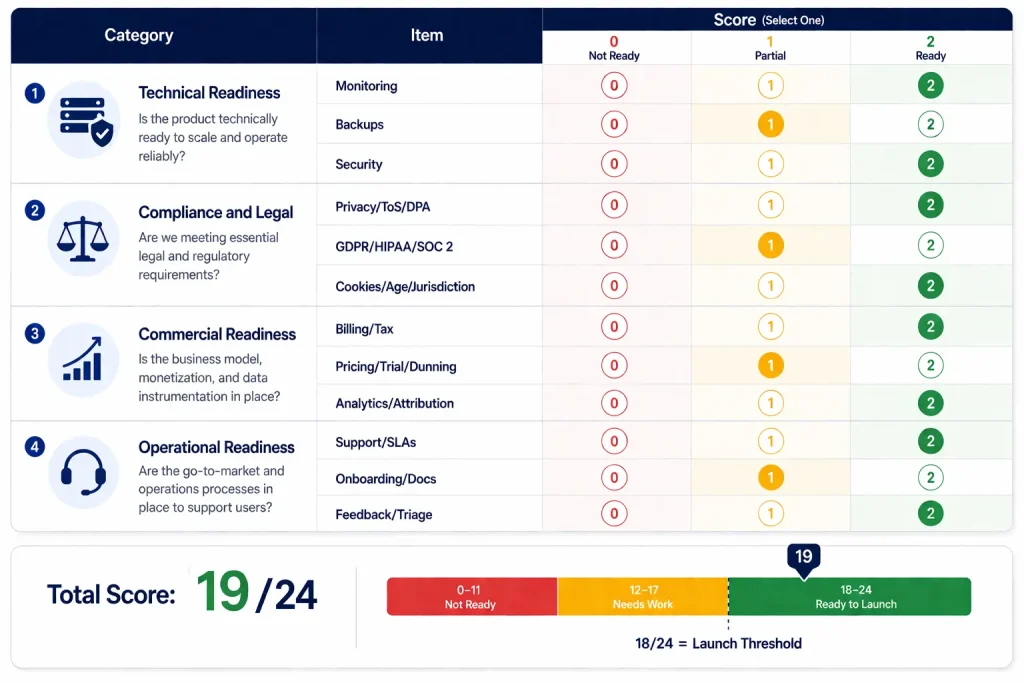
The scoring rules:
- 0 (missing). The item is unaddressed. No monitoring, no privacy policy, no dunning workflow. Each missing item is a launch failure mode.
- 1 (partial). The item exists but is incomplete. Monitoring is set up but no on-call rotation. Privacy policy exists but is not attorney-reviewed. Billing works but tax is not configured.
- 2 (complete). The item is in place, tested, and documented. Monitoring is wired with on-call. Privacy policy is reviewed and linked. Billing is fully tested with tax configured.
The 18/24 launch threshold is calibrated against observed launch outcomes: launches scoring below 18 produced customer-visible incidents in the first 30 days at roughly 3 times the rate of launches above 18. The threshold leaves room for two or three known partials but blocks launches with more than half of items unaddressed.
The team uses the Score in three ways: as a launch gate (do not press launch below 18), as a triage tool (direct effort at the lowest-scoring categories), and as a post-launch tracking tool (re-score after 30 days to catch items that drifted as the SaaS grew).
The downloadable Launch Readiness Score template is included at the end of this article, with worksheet rows for each of the 12 items, scoring guidance, and category-level rollups.
The 48-Hour Soft Launch Protocol After Your SaaS Launch Checklist
A soft launch is the 48-hour period before public launch where the SaaS is opened to a small, controlled group of users (typically 10 to 50 invited beta users or pre-sell customers). It surfaces problems the SaaS launch checklist could not predict, because real users find issues that internal testing misses.
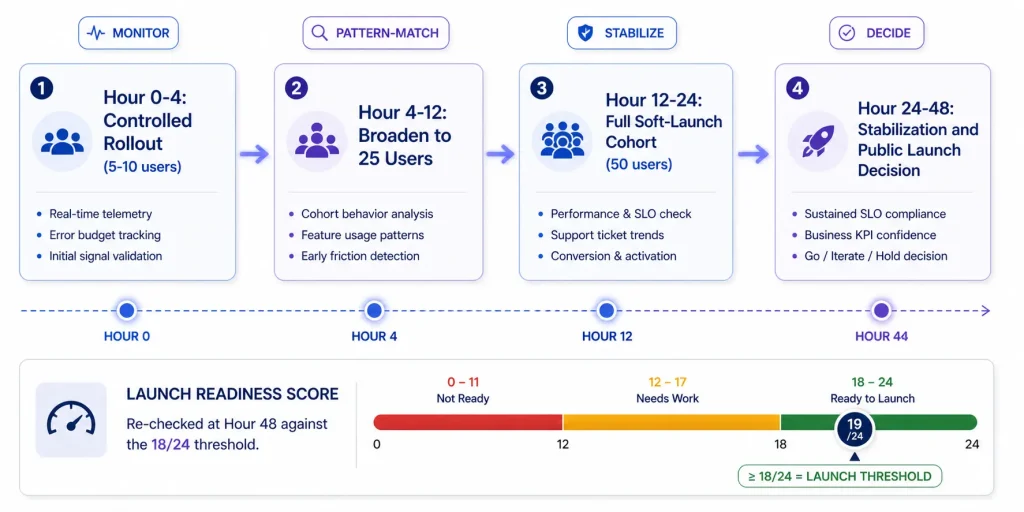
The 48-hour soft launch protocol:
- Hour 0 to 4 (controlled rollout). Open access to 5 to 10 users. Monitor error rates, billing webhooks, signup completion, and first-action completion. The on-call engineer is fully attentive. Log non-critical issues without necessarily fixing them in real time.
- Hour 4 to 12 (broaden to 25 users). Watch for patterns: the same error across multiple users (architectural bug, fix immediately), the same confusing onboarding step (UX bug, fix in batch), single-user one-offs (log and continue).
- Hour 12 to 24 (broaden to 50 users). Open to the full cohort. Have at least one support response cycle complete by hour 24, with response times measured against SLA.
- Hour 24 to 48 (stabilization). Fix the patterns surfaced in hours 0 to 24, document issues for the retrospective, and re-run the Score; it should be the same or higher than at hour 0.
- Hour 48 (decision). Public launch only if the soft launch produced no critical issues, billing webhooks fired correctly across at least 5 paying signups, support met SLA, and the Score remains above 18/24.
The discipline of the soft launch is its constrained scale. A 50-user cohort lets the team observe patterns without being overwhelmed. Founders who skip it and go straight to public launch handle the same issues at 10 to 100 times the volume, often poorly.
What to Do If Your SaaS Launch Checklist Score Falls Below 18/24
A score below 18/24 is a clear signal: delay the launch and address the gaps. The right response depends on which items are scoring low:
- If Technical readiness is the gap (below 4/6): delay 1 to 2 weeks to install monitoring, test backups, and run a security review. These are the cheapest gaps to fix because they are mostly wiring work.
- If Compliance is the gap: delay 2 to 4 weeks for attorney review and architecture work. These are the most expensive gaps to fix post-launch because they carry legal and regulatory risk.
- If Commercial is the gap: delay 1 to 3 weeks to wire billing, dunning, and analytics. These directly affect revenue, second only to compliance in importance.
- If Operational is the gap: delay 1 to 2 weeks to document support, onboarding, and feedback loops. These produce customer-trust damage but are usually solvable with process rather than engineering.
The corrective action that matters more than the delay: track the gap with a hard deadline and a named owner. “We will fix monitoring by next Friday” with a calendar invite, an owner, and a re-scoring meeting beats “we will fix monitoring soon” by the typical multi-week delay.
The honest counter-argument: some founders delay indefinitely, treating the checklist as a perfectionism enabler. The right framing is that 18/24 is the threshold to launch, not the score to optimize toward. A 19/24 with three known partials is a healthy launch; a 22/24 reached after 8 weeks of polish is over-investment that should have gone into customer acquisition. For the deeper post-launch question of when product-market fit is reached, see finding SaaS product-market fit.
Conclusion
The SaaS launch checklist organizes 12 critical items into 4 categories, scored against a 24-point Launch Readiness Score. The 18/24 threshold separates “launch now” from “delay and fix.” The 48-hour soft launch protocol surfaces issues at controlled scale before public launch makes them expensive. The corrective actions when the score is low are concrete and time-bound, not vague.
The dominant pattern across SaaS launches in 2026: teams that score and address the SaaS launch checklist disciplinedly produce launches that survive the first 30 days. Teams that skip it spend the next 90 days in firefighting, customer-trust damage, and rework. If you would rather have a team build and launch your platform for you, our custom SaaS development service can help.
Saas Pre-Launch Checklist FAQ
1. How long should pre-launch QA take?
For an MVP scoped through the saas pre-launch checklist, dedicated QA before launch runs 1 to 2 weeks. The first week covers technical and commercial readiness (monitoring, backups, billing, dunning end-to-end testing). The second week covers compliance and operational readiness (legal review, support playbooks, onboarding walkthrough). Adding a 48-hour soft launch on top of that brings total pre-launch hardening to 2.5 to 3 weeks. Skipping this period is the most common cause of broken launches.
2. Do I need a legal review before launch?
Yes for the legal trio (privacy policy, terms of service, DPA). Templates without legal review are a starting point, not a finished product. Cost for an attorney review: $1,500 to $5,000 for US-only operation, $3,000 to $10,000 for cross-border. The cost of skipping the review is significantly higher when the first dispute, breach, or B2B customer asks for a customized DPA.
3. Should I launch with annual or monthly billing?
Both, but monthly is the default and annual is the upsell. The pricing page should display monthly prices prominently with an annual toggle that shows a 10 to 20 percent discount. Annual billing improves cash flow and reduces churn, but launching monthly-first lets early customers test the saas without large commitment, which improves trial-to-paid conversion at the launch stage.
4. What is the minimum monitoring setup on day 1?
Sentry for error tracking, Better Stack or Pingdom for uptime, plus alerts that route to the on-call engineer within 5 minutes. Total cost: under $50 per month at MVP scale. Skipping any one of these means the team learns about issues from customers rather than from monitoring, which damages trust and slows incident response.
5. How do I handle a critical bug in the first 48 hours?
Roll back if the bug affects all users. Communicate proactively to affected customers within 30 minutes of detection (status page update plus email). Fix as quickly as possible, with a post-mortem within 7 days. Critical bugs in the first 48 hours are common; how the team handles them defines customer trust for the first 6 months.
6. Soft launch or public launch first?
Always soft launch first. The soft launch with 10 to 50 invited users surfaces problems at a manageable scale; the public launch surfaces the same problems at 10 to 100 times the volume. Skipping the soft launch saves a few days and costs weeks of post-launch firefighting. The discipline is non-negotiable for any team that has not launched 3+ saas products before.