

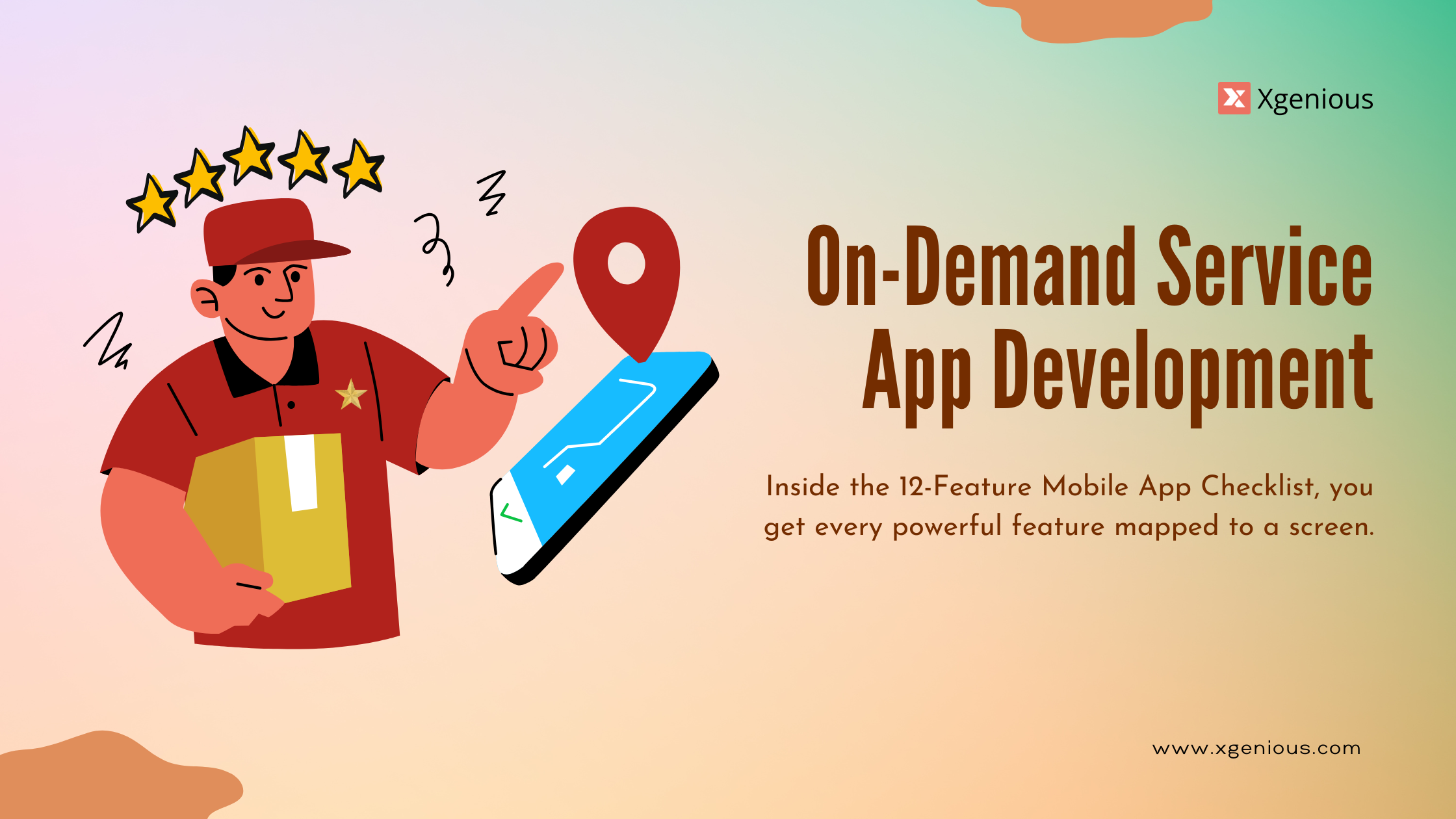


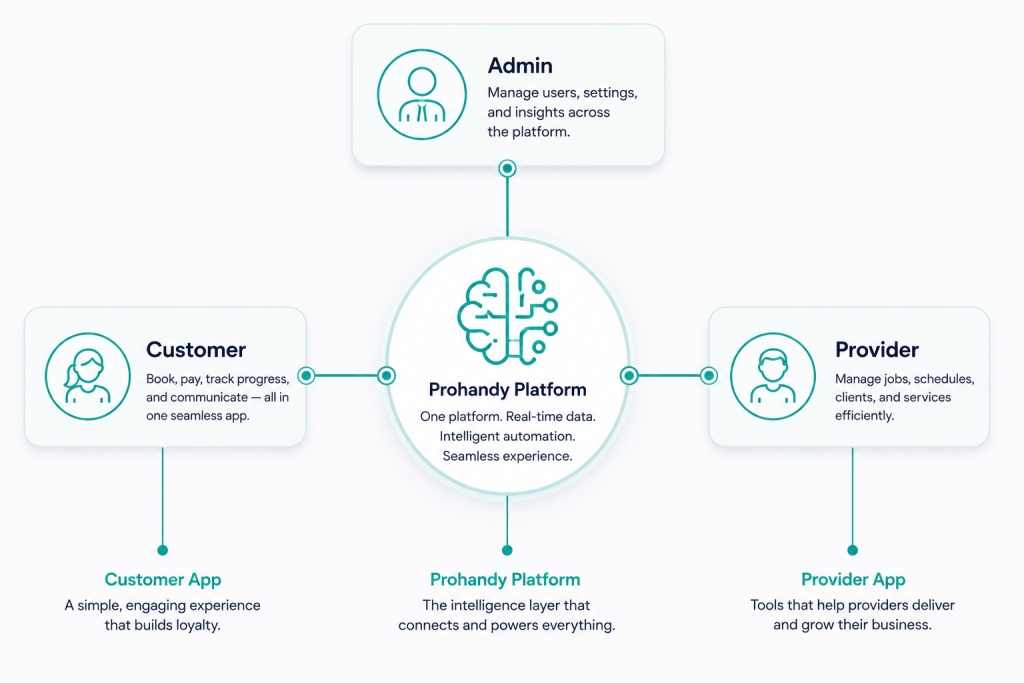
The single most expensive mistake I see in on-demand service app development is the founder who treats it as one app. They scope a “service app”, design six screens, and three months in discover they have actually committed to building three apps with three different release cycles, three different sets of users, and three different feature sets that have to stay in sync forever.
I have watched four founders do this in the last eighteen months. Two recovered. Two ran out of money. On-demand service app development is not one product. It is a customer app, a provider app, and an admin app working as a single coordinated system. Treat them as one and the build collapses under its own contradictions. Treat them as three and the scope, budget, and timeline come out roughly accurate from the start.
This piece is about the twelve features that have to be there for the three apps to function as a real platform. I call it the 12-Feature Mobile App Checklist, split across the three apps the way the build actually splits in practice. It is what we use at Xgenious when a founder asks us to scope a from-scratch on-demand build. If you are working on the wider marketplace structure, read this alongside our on-demand service marketplace development guide, which covers the platform and economics layer that these three apps sit on top of.
Why on-demand service app development means 3 apps not 1
The shortest way to explain the three-app problem is to look at who actually uses on-demand service app development in a real platform. The customer wants to book, pay, and track. The provider wants to receive jobs, navigate, and get paid. The admin wants to see everything, intervene when needed, and understand the business through data. Those are three completely different jobs to be done, and they cannot live inside a single interface without compromising all three.
The customer app is a consumer product. It competes with the polish of Uber, DoorDash, and Airbnb in the user’s expectations. It has to be fast, simple, and almost embarrassingly easy to use. The provider app is a productivity tool. It is the worker’s daily software for hours at a time, in real conditions like rain, basements, and bad signal. The admin app is a dashboard. It is used by operations, support, and finance, and looks completely different from the other two because the user is sitting at a desk solving problems.
Trying to merge any pair of these into one app produces a worse product. A customer app with operations features is cluttered and slow. A provider app with admin features is overwhelming. An admin dashboard squeezed onto a phone is useless during a busy support shift. On-demand service app development that respects the three-app structure ships products that each segment actually adopts. The mistake is almost always at the scoping stage, before any code is written.
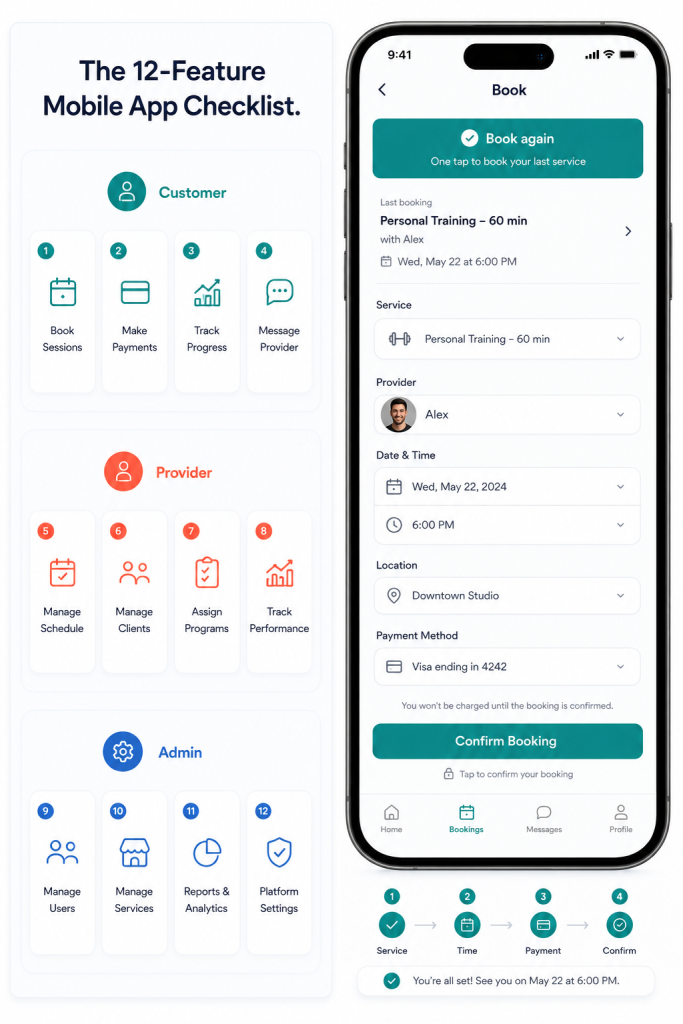
The 12-Feature Mobile App Checklist framework for on-demand service app development
The 12-Feature Mobile App Checklist has twelve features, split four per app. The split is not arbitrary. Each feature is the one that breaks retention or unit economics if it is missing. There are more features in a real on-demand platform than twelve. The checklist is the floor, not the ceiling.
Customer app features cover discovery, trust, payment, and convenience. Provider app features cover work flow, efficiency, proof, and earnings transparency. Admin app features cover real-time visibility, exception handling, multi-party coordination, and learning. Build all twelve at MVP and the platform can transact. Skip any one and you are patching the gap with manual work in the back office until you can engineer it later, which always costs more than building it the first time.
I order the features the same way I would prioritise a sprint plan. Customer features first because nothing else matters if buyers do not arrive. Provider features second because supply has to be ready to receive demand. Admin features third because you can survive a few weeks of manual operations while the customer and provider apps prove the model, but not longer.
Customer app feature 1: One-tap booking
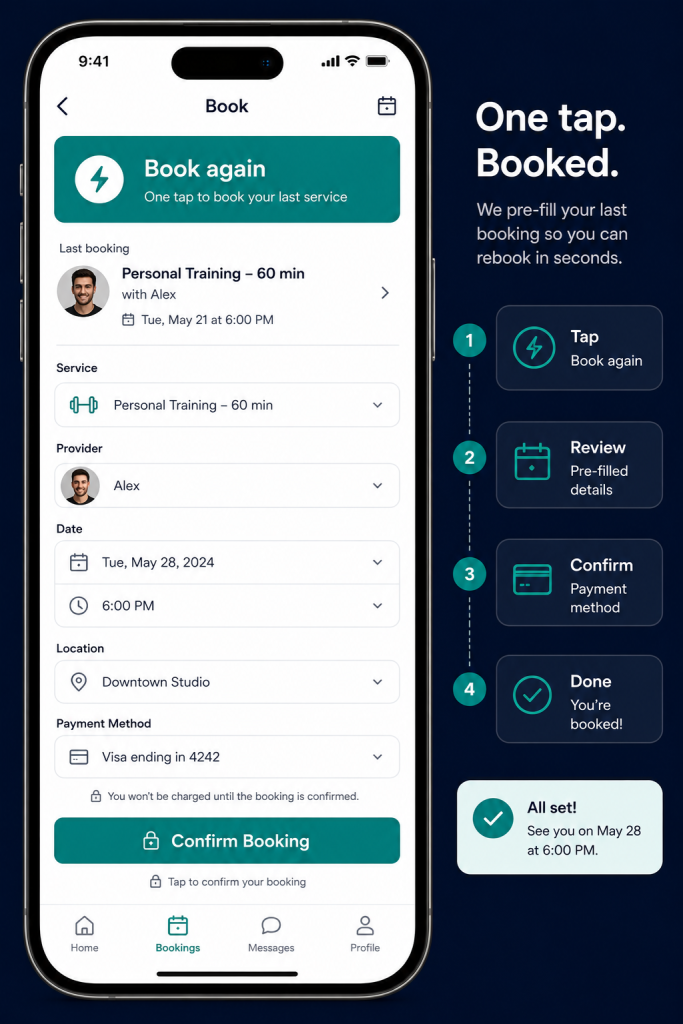
The single biggest conversion lever in on-demand service app development is how few taps it takes to book. Every extra screen between “I want this” and “this is booked” loses customers, and the loss is non-linear. A four-tap booking flow does not lose four times as many customers as a one-tap flow. It loses far more, because each tap is also a moment of doubt.
One-tap booking does not mean literally one tap. It means the shortest possible path from intent to confirmation, with the platform doing the work to remove decisions the user does not need to make. Saved address. Default payment method. Last service repeated by default. Time slot auto-suggested based on history.
What a real one-tap booking flow includes:
- Saved primary address with one-tap selection
- Default service type pre-selected from last booking
- Auto-suggested time slot based on availability and past behaviour
- Confirmation screen with clear total and provider preview
- An “edit” path that does not force the user to start over
The mistake is treating the booking flow as a settings form. It is a conversion funnel. Every screen has to earn its place.
Customer app feature 2: Real-time provider tracking
Once a booking is confirmed, the customer’s anxiety starts. Where is the provider? Are they coming? When? Real-time tracking inside the customer app is what removes that anxiety, and it is what turns a one-time booking into a returning customer. On-demand service app development without live tracking feels old, even when the rest of the product is good.
The Uber model trained the entire market for this. A live map, a moving icon, an updating ETA, and the worker’s name and photo. Customers in 2026 do not differentiate between a ride and a plumber. If your platform cannot show what they expect, the platform feels behind.
What tracking has to handle:
- Sub-minute location updates while the provider is en route
- Battery-aware updates so the provider’s phone does not die
- Clear ETA that updates as traffic and conditions change
- Provider name, photo, and rating on the tracking screen
- Quick contact options (chat, call) without leaving the screen
Tracking pairs tightly with feature 5 (provider job queue), because the provider has to accept and start a job for the tracking to begin.
Customer app feature 3: In-app chat and calls
Customers and providers need to talk. They almost always need to talk. The dog walker needs to ask about gate codes. The cleaner needs to confirm whether to enter through the back. The customer needs to add a note about the pet that hates strangers. If the platform does not give them a way to communicate inside the app, they do it over phone numbers and SMS, which kills the platform’s ability to see the conversation and protect both sides.
Chat and calls inside on-demand service app development are not a feature anyone gets excited about, and they are one of the biggest drivers of trust and dispute reduction in the platform. They also produce the audit trail that lets support actually resolve disputes later.
What in-app communication needs to support:
- Job-tagged chat threads so the conversation stays attached to the booking
- Masked calls (Twilio Proxy or similar) so neither party sees the other’s real number
- Image and voice note attachments because explaining a location is faster than typing it
- Read receipts and typing indicators so people know the other side is responsive
- Quick-reply templates for the most common provider responses
The trap here is over-engineering chat into a full social messaging product. It is a job-attached utility. Build it focused.
Customer app feature 4: Saved payment and auto-pay
The fewer decisions a customer makes at checkout, the more bookings they complete. Saved payment is the cheapest, most predictable lift in on-demand service app development. A customer who can rebook a cleaner with their saved card in one tap will rebook three times more often than one who has to re-enter card details every visit.
Auto-pay extends this to subscriptions and recurring services. A household that signs up for a weekly cleaning subscription with auto-pay is effectively pre-committed for the next twelve months. They will churn at a fraction of the rate of à-la-carte customers because the decision to skip a week is a more active choice than the decision to keep going.
What saved payment and auto-pay need to handle:
- PCI-compliant card storage (typically via Stripe, Adyen, or Braintree)
- Multiple cards per user with a default
- Apple Pay and Google Pay for one-tap on supported devices
- Recurring billing with clear pause and cancel paths
- Smart retry logic for failed cards because card failures are a major source of subscriber churn
Combined with feature 1, this is the conversion engine of the customer side of on-demand service app development. Without these two, the rest of the customer features do not get used often enough to matter.
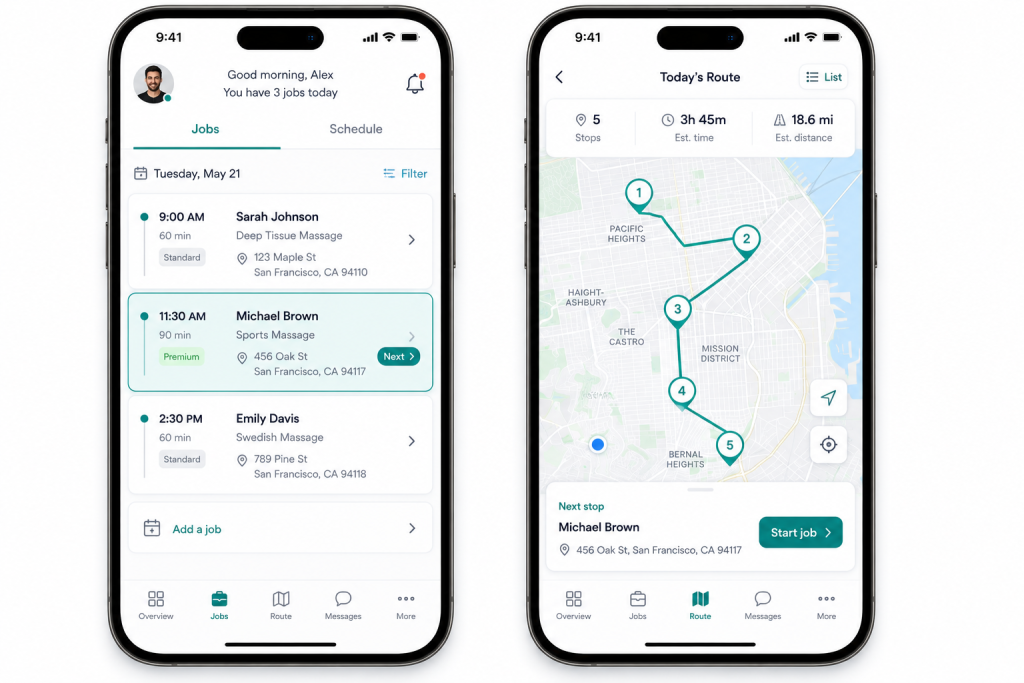
Provider app feature 5: Job queue and accept/decline
The provider app is the worker’s primary tool, and the first screen they see every shift is the job queue. A good job queue shows the work clearly, gives the provider enough information to make an accept or decline decision quickly, and respects their time. A bad one wastes the provider’s first thirty seconds of the day every day, which compounds into resentment fast.
Accept/decline is the moment where supply meets demand in real time. Build it well and providers feel in control of their schedule. Build it badly and providers feel pushed around by an algorithm, which is the single most common reason providers leave on-demand platforms.
What a healthy provider job queue does:
- Show the job address, type, estimated duration, and pay clearly
- Distance and ETA from the provider’s current location
- Customer rating and any flags (first-time customer, repeat customer, special instructions)
- Time-limited accept window so the system can route to the next provider if needed
- A decline reason capture so the platform can learn why jobs get rejected
The mistake is hiding the pay until after the job is accepted, which destroys provider trust. Show it up front. The platforms that do this have the loyalty.
Provider app feature 6: Daily route optimization
Providers do not just do one job a day. They do five, eight, sometimes a dozen, and the order they do them in is a non-trivial logistics problem. On-demand service app development that leaves route planning to the provider’s memory is leaving thousands of hours of paid labour on the table every month at scale.
Route optimization inside the provider app takes their accepted jobs for the day, plus traffic, plus any constraints (lunch break, vehicle return, customer time windows), and produces the order that gets them through the most work with the least driving. Done right, it lifts daily completed jobs per provider by 15 to 25 percent, which directly improves the provider’s earnings and the platform’s margin.
What route optimization needs:
- Multi-stop route planning that re-runs as new jobs are accepted
- Traffic-aware ETAs that update during the day
- Hard time windows for jobs that have to happen at specific times
- Provider-set constraints (max hours, no-drive zones, preferred areas)
- Integration with the customer-facing ETA so customers see consistent estimates
For deeper mechanics on the dispatcher-side of this, our mobile workforce management software guide covers the field operations audit that sits behind this feature.
Provider app feature 7: In-field photo and signature
Proof of work is what protects both the provider and the customer from disputes, and the platform from the legal mess that comes when a job is disputed without evidence. On-demand service app development without built-in photo and signature capture is shipping a dispute engine, not a service platform.
The provider app should require photos at the start and end of jobs where it matters, capture customer signatures on completion when needed, and attach all of it to the job record automatically. The worker should never have to think about uploading anything. The platform should never have to chase down evidence.
What in-field capture needs:
- Required before-and-after photos on jobs where proof matters
- Photos auto-attached to the job, not dumped in the phone gallery
- Customer signature capture for jobs that require sign-off
- Voice notes for context that would take too long to type
- Offline queue so the work continues when signal drops
This pairs with feature 11 (admin dispute resolution) because the moment a customer disputes a job, the photos and signatures are the platform’s primary defence.
Provider app feature 8: Earnings dashboard
The single biggest reason providers leave on-demand platforms is opaque pay. They cannot tell how much they earned this week. They cannot predict what they will earn next week. They cannot see why one job paid less than another. Opacity is the killer.
Earnings dashboards inside on-demand service app development have to make pay completely transparent. Real-time tally of today’s earnings, week-to-date numbers, payout history, and a clear breakdown of why each job paid what it did (base pay, surge, tip, deductions). Providers will accept lower average pay if the math is clear. They will leave higher-paying platforms that hide the calculation.
What earnings transparency needs:
- Real-time earnings display updated job by job
- Today, week, and month totals with the same calculation logic
- Per-job breakdown showing base, surge, tip, and any deductions
- Payout schedule and next payout date prominently displayed
- Tax summary view at year end (1099 or local equivalent)
This is one of the cheapest provider-side features to build and one of the most expensive to skip. On-demand service app development that gets earnings right earns provider retention almost for free.
Admin app feature 9: Live operations dashboard
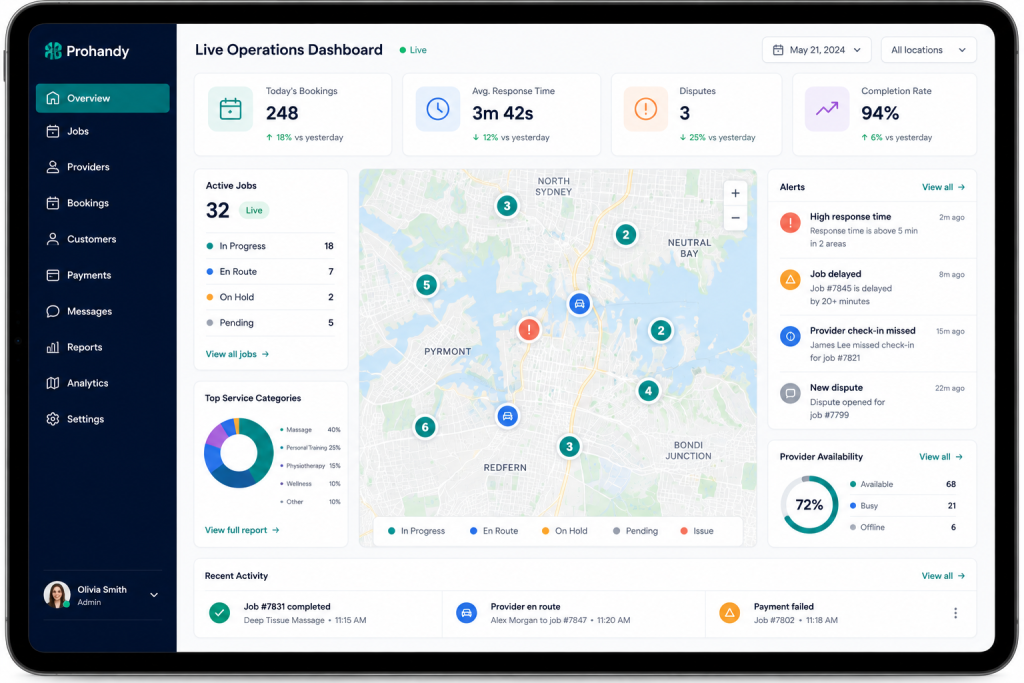
The admin app is what the operations team uses to run the platform in real time. The most important screen in it is the live operations dashboard, which shows every active job, every available provider, every customer waiting, every system alert. It is the cockpit. It is also the screen that decides whether the platform can scale.
A platform without a real live dashboard runs on phone calls and spreadsheets in the back office. That works at low volume. It collapses at growth. The threshold is usually around a hundred jobs per day per city, at which point the manual coordination falls behind reality and the customer experience degrades visibly.
What the live operations dashboard has to show:
- All active jobs on a map with their statuses colour-coded
- All available providers with their current locations and capacities
- Pending bookings waiting to be matched and how long they have been waiting
- System alerts (failed payments, declined jobs, customer escalations)
- Quick action paths so a coordinator can intervene without leaving the screen
This is the feature most under-scoped in on-demand service app development MVPs, because founders think they can run operations from spreadsheets early. They can, until they cannot, and the migration is harder than the initial build would have been.
Admin app feature 10: Dispute resolution workflow
Disputes happen. A customer claims the cleaner did not show. A provider claims the customer was abusive. A payment fails after the job is done. None of this is rare, and all of it has to be resolved fast and fairly or it eats the platform’s reputation.
A dispute resolution workflow inside the admin app gives support staff a structured path from the moment a dispute is opened to the moment it is closed, with full evidence on screen and clear decision options. It also captures the outcome so the platform can learn which providers or customers generate disproportionate disputes.
What dispute resolution needs:
- A single dispute view showing the job, the photos, the chat history, and the payment
- Clear decision options (refund full, refund partial, side with provider, escalate)
- Evidence requests that can be sent to either side without leaving the workflow
- SLA timers so support knows how old a dispute is
- Pattern flags for customers or providers with repeated disputes
Build this well and customer support scales without doubling headcount each quarter. Build it badly and every support hire spends their first month asking how to find the right information.
Admin app feature 11: Tenant and vendor management
If the platform supports multiple service categories or multiple vendor types, admin needs a clean way to manage them. Tenant management means adjusting policies, commissions, and rules per category. Vendor management means onboarding, suspending, and supporting individual providers or vendor accounts.
This is where on-demand service app development overlaps with multi-vendor marketplace patterns. The same logic that handles vendors in a multi-vendor goods marketplace handles providers in an on-demand service marketplace, with different fields and rules. Our multi-vendor marketplace development guide covers the vendor onboarding pipeline in more detail.
What vendor management has to support:
- Bulk and individual onboarding tools
- KYC document review and approval workflows
- Commission and payout rules per vendor or vendor tier
- Performance flags and automated suspension thresholds
- Communications history per vendor including all support interactions
The admin team becomes meaningfully more productive once this feature is mature. Vendor managers who used to spend two days a week on spreadsheets can spend that time recruiting better providers and improving the platform.
Admin app feature 12: Analytics and reporting
The final admin feature is the one that turns the platform into a learning system. Analytics in on-demand service app development cover three layers: marketplace health (liquidity, match rate, unit economics), operational health (response times, completion rates, dispute volume), and financial health (revenue, take rate, payout obligations).
Each layer has to be available to the right team in the right format. Operations want real-time tiles. Finance wants reconcilable monthly reports. Product wants cohort and funnel views. Trying to serve all three from one dashboard fails, so the analytics feature usually splits into role-specific views fed by the same underlying data model.
What analytics needs to handle:
- Real-time operational tiles for ops teams (active jobs, response times, alerts)
- Cohort retention and funnel analysis for product
- Monthly reconcilable financial reports for finance
- Per-vendor and per-customer drill-down for support
- Custom exports because someone always wants the data in a different shape
This is the lowest-priority feature at MVP and the highest-leverage one at scale. On-demand service app development that ships without analytics ships blind, but you can ship a few weeks blind without dying. You cannot ship blind for six months.
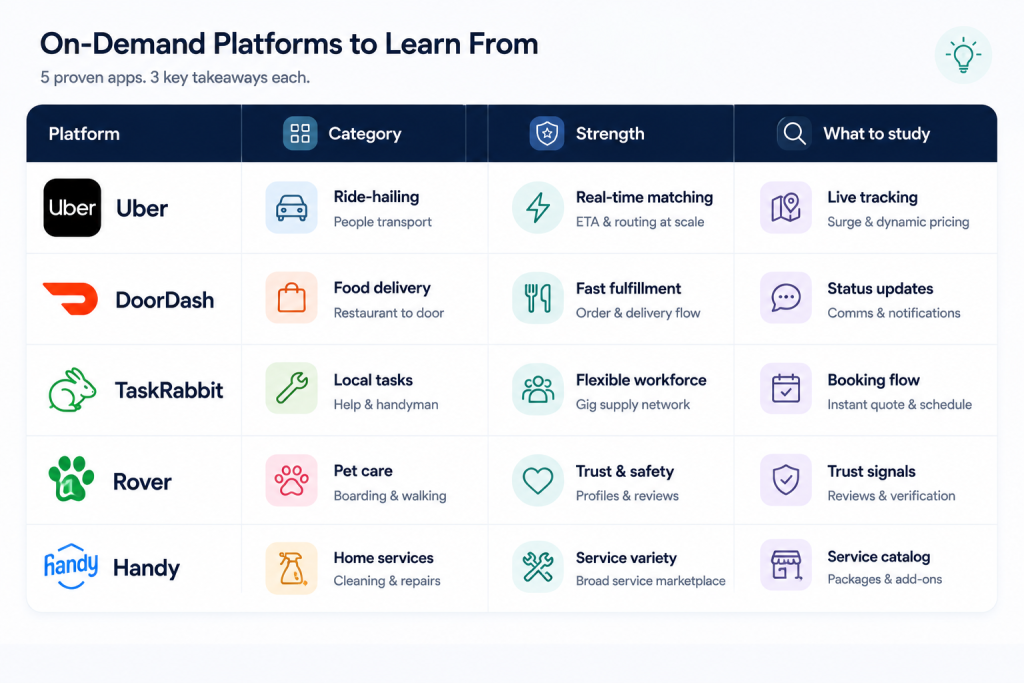
Five real on-demand app examples
Looking at real platforms shows the shape of mature on-demand service app development.
Uber is the canonical example. Three apps (rider, driver, internal ops), each with deeply refined versions of the twelve features above. Their public engineering writing is unusually transparent about how they evolved each surface. The customer app conversion patterns Uber pioneered are now category defaults.
DoorDash is the food delivery variant. Same three-app architecture, different category dynamics (perishable goods, restaurant-side complexity, courier batching). Strong reference for the routing and batching parts of the provider app.
TaskRabbit is the closest comparison for general home services. Tasker discovery, in-person service, hourly pricing, in-app chat as a primary surface. Useful reference for the customer-side trust patterns when the service is variable rather than standardised.
Rover focuses on pet care. Strong customer app, particularly the trust-building features (provider profiles, meet-and-greet flow, photo updates during service). Worth studying for any service category where the customer cares deeply about who is doing the work.
Handy is the home-services aggregator. Cleaner-focused, with strong recurring booking flows. Reference for the subscription side of on-demand service app development, where the goal is locked-in weekly or monthly bookings rather than one-offs.
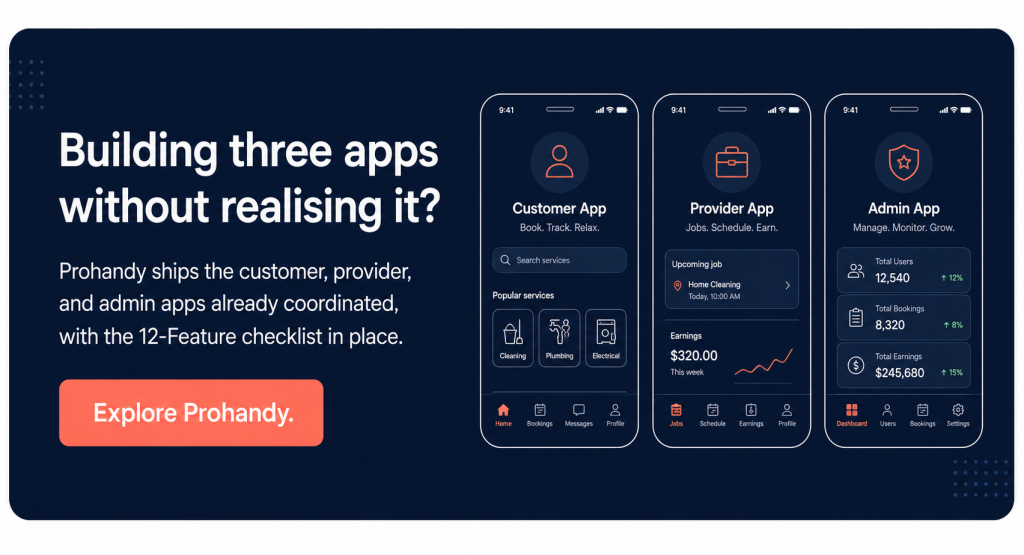
If your build is an on-demand platform with multi-vendor characteristics, Prohandy is the closest reference architecture and is built around the twelve features above with the three-app split already in place. It is what we use as the starting platform when a founder needs to ship faster than from scratch.
On-demand service app development cost and timeline
On-demand service app development is one of the more expensive software categories because the three-app structure multiplies the build effort. A realistic MVP with all twelve features, web-only versions of each app, runs $60,000 to $150,000. Native iOS and Android customer plus provider apps with a web admin lands closer to $150,000 to $400,000. Full native everything with deep customisation runs higher.
Rough cost ranges by build shape:
- White-label platform with light customisation: $25,000 to $60,000
- Custom MVP, web admin plus mobile customer and provider: $80,000 to $200,000
- Full native three-app build with all twelve features: $200,000 to $500,000
- Enterprise multi-city, multi-currency build: $500,000+
Timeline ranges:
- White-label launch: 4 to 8 weeks
- MVP custom build: 16 to 24 weeks
- Full native three-app build: 28 to 40 weeks
The biggest cost driver in on-demand service app development is the choice of mobile framework. React Native (react native docs) and Flutter (flutter docs) both allow a single codebase to ship to iOS and Android, which roughly halves the mobile build cost compared to fully native development. Native is justified for performance-critical apps, particularly the provider app if it has heavy GPS use, but the customer app can almost always ship cross-platform without quality loss.
The second-biggest driver is geographic and category footprint. A platform serving one city with one service category is meaningfully cheaper than one serving five cities with three categories from day one. Scope deliberately.
A final word
On-demand service app development is one of the more rewarding categories to ship because the product moves real-world coordination. People get services. Providers earn money. Cities become more efficient. The 12-Feature Mobile App Checklist (one-tap booking, real-time tracking, in-app communication, saved payment on the customer side; job queue, route optimization, in-field capture, earnings dashboard on the provider side; live operations, dispute resolution, vendor management, analytics on the admin side) is the floor for a platform that can actually scale.
At Xgenious we have built on-demand platforms across home services, beauty, repair, and trades, and the single pattern that decides success is whether the three-app split was respected at the scoping stage. The platforms that treated it as one app spent twelve weeks discovering they needed three. The platforms that started with three shipped on time. There is no faster way to lose six weeks of an on-demand service app development project than to scope the wrong number of apps.
If you want a fast path to a working platform, Prohandy has the three apps and the twelve features configured out of the box. Combined with the wider on-demand service marketplace development approach, it is what we use when a client needs to launch on-demand service app development infrastructure in weeks rather than quarters. Whatever route you take, start with the three apps. The three apps decide everything else.
Frequently asked questions about on-demand service app development
What is on-demand service app development, in one sentence?
On-demand service app development is the work of building the three coordinated apps (customer, provider, and admin) that let a platform connect service buyers with service providers in real time, with the booking, communication, payment, and operations infrastructure underneath.
How long does on-demand service app development take?
A focused MVP with the twelve features covered above usually takes 16 to 24 weeks. A full native three-app build runs 28 to 40 weeks. White-label configurations can launch in 4 to 8 weeks but trade flexibility for speed. The single biggest timeline driver is how much custom logic the platform needs beyond the standard pattern.
How much does on-demand service app development cost?
A white-label or configured solution sits around $25,000 to $60,000. A custom MVP with web admin and mobile customer and provider apps runs $80,000 to $200,000. A full native three-app build with all twelve features lands at $200,000 to $500,000. Enterprise multi-city builds run higher. Mobile framework choice (React Native or Flutter versus fully native) is the largest single cost lever.
Do I really need three separate apps?
Yes. The customer, provider, and admin users have fundamentally different jobs to do and expectations from a software interface. Trying to merge any pair produces a worse product for both. The three apps usually share a backend, design system, and authentication layer, so they are not three completely separate projects, but they are three distinct surface areas that have to be designed independently.
React Native, Flutter, or fully native?
Cross-platform (React Native or Flutter) for the customer app and usually for the admin web view, fully native if the provider app uses heavy GPS or background processing that benefits from native APIs. Most on-demand service app development projects use a hybrid model where the customer app is cross-platform and the provider app might be fully native. Pure native everywhere is overkill for most categories and roughly doubles the build cost.
How do I handle launching in multiple cities?
Launch in one city first. Get liquidity, fix the bugs, prove the unit economics. Then expand using the same playbook in city two, with playbook adjustments based on what you learned. On-demand service app development that tries to launch in multiple cities at once fails for the same reason multi-vendor marketplace development does: thin density everywhere produces a bad match rate everywhere. Win one place, then move.
What is the right team size to build this?
A focused team of six to ten people can ship a strong MVP in 16 to 24 weeks. That usually breaks down as two backend engineers, one mobile engineer per platform (or two cross-platform), one full-stack admin engineer, one product designer, one product manager, and one QA. Larger teams can ship faster up to a point, but coordination overhead means the marginal value of the tenth engineer is small. Smaller teams can ship the MVP but burn out before launch.