



The first time I sat down with a home-services founder whose business was bleeding money on operations, the problem wasn’t what he expected. Not the workers. Not the marketing. The mobile workforce management software he’d picked the year before. He had no idea where his teams were on a Tuesday afternoon. His dispatcher was on the phone all day asking. Two of his best plumbers had quit in the previous quarter, and when I asked why, both said the same thing: they were tired of logging the same job in three places.
That kind of story is depressingly common. Field operations look simple on a pitch deck and turn into chaos in real life. The mobile workforce management software you pick is either the thing keeping you sane or the thing slowly making it worse, and the mobile workforce management software market is wide enough that picking the wrong one is easy.
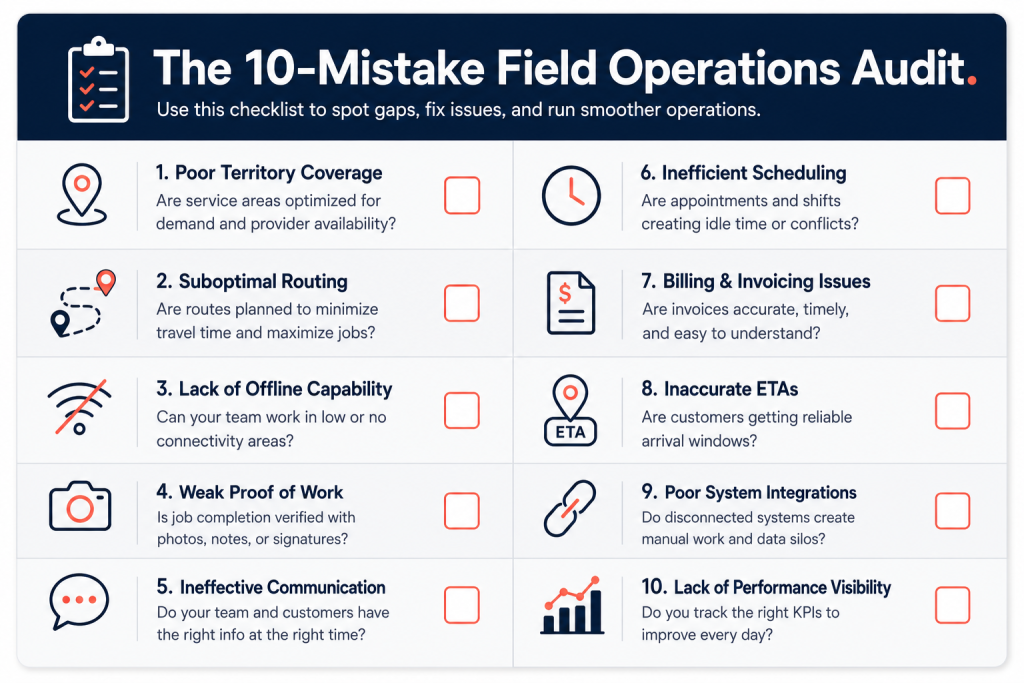
Out of the on-demand platforms we audit at Xgenious, more than half walk in convinced their growth problem is demand. It usually isn’t. It is that nobody can tell what is happening in the field on a Tuesday at 3pm, and the platform they bought to fix that is making it worse. This piece is about the ten mistakes that cause most of that pain. I call it the 10-Mistake Field Operations Audit, and it is the checklist I run when a marketplace, a cleaning platform, a service business, or any team with people working away from a desk is trying to figure out why their unit economics will not behave.
If you are building the wider on-demand platform around all of this, read this with our on-demand service marketplace development guide open in another tab.
Why mobile workforce management software decisions cost founders money
The whole reason mobile workforce management software exists is that the work happens somewhere other than the office, and the office cannot see it. A dispatcher in a building cannot watch a plumber’s van. A finance person cannot watch a cleaner finishing a deep clean. The platform is the bridge between what is actually happening on the ground and what the business knows about.
When that bridge works, the business runs on real information. Jobs get assigned to the closest available worker. Customers get accurate ETAs. Invoices go out the same day. Payroll matches reality. Workers stop ringing the office to ask basic questions, because the answer is in the app. When the bridge is broken, every one of those things turns into a phone call and a guess. A small operation might survive that. A growing one will not.
Bureau of Labor Statistics data on the home and personal services workforce shows just how many people in this category work mobile rather than in a fixed location, and that number is climbing. So is the cost of getting the coordination wrong. A wasted half-hour per worker per day, on a team of twenty, is ten hours of paid labour going nowhere. Roughly $500 a day in most markets. $10,000 a month. That is from one fixable problem. The ten below are the ones that add up to numbers like that.
Most of the operations leak we measure comes back to mobile workforce management software that was bought in a rush, configured by one person, and never reviewed against how the team actually works. Mobile workforce management software is one of the highest-leverage software decisions a service business makes, alongside the booking platform itself.
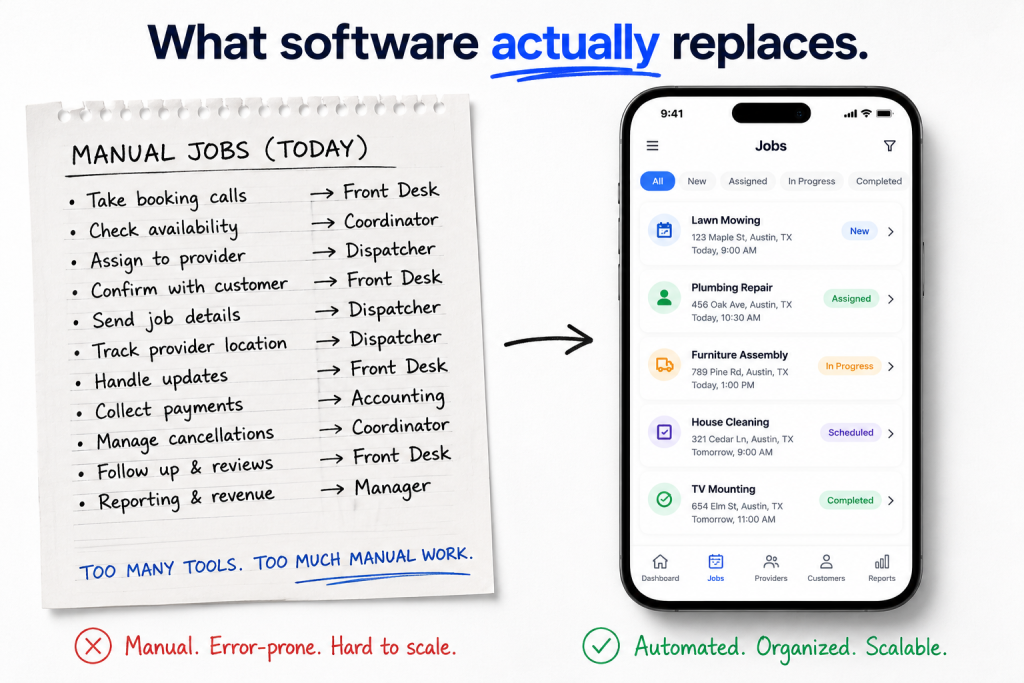
The 10-Mistake Field Operations Audit framework
The framework is not complicated. There are ten places where mobile workforce management software either does the work for you or quietly leaves it for someone in the office to do by hand. Run a team through all ten, mark which ones the platform handles well, and the gaps are the mistakes.
I order them roughly by how much pain each one causes. Real-time location and auto-routing sit at the top because they show up in every other mistake further down. ETA tracking and analytics sit lower, not because they do not matter, but because most operations cannot use them well until the basics underneath are working.
A quick word on what this list is not. It is not a feature comparison of the big platforms, although I will get to that near the end. It is a way of looking at your own operation before you go shopping, so when a vendor demo shows you a beautiful map screen, you can ask the next question: does this also handle mistake number seven, and how. Treat the audit as the spec, not the demo, when you shop for mobile workforce management software.
Mistake 1: No real-time location tracking
If the office does not know where the field workers are, every other decision is a guess. A dispatcher who cannot see live locations cannot route the closest worker to the next job. They cannot tell a customer when someone is arriving with any honesty. They cannot tell when a job is taking three times longer than it should. They are flying blind, on the phone, all day.
Real-time location tracking in mobile workforce management software solves a surprising number of problems at once. It feeds the auto-router. It powers customer ETA screens. It catches the worker who is sitting in a coffee shop for an hour between jobs, and it protects the worker who is genuinely stuck in traffic and being unfairly chased by the office.
Warning signs you have this mistake:
- Dispatchers calling workers to ask where they are
- Customers complaining about wrong arrival windows
- No way to verify a worker actually visited an address
- Location updates only every fifteen minutes or only on manual check-in
- Battery complaints from workers because the tracking is brute force rather than battery aware
You want sub-minute updates while a worker is on shift, with a battery-aware fallback so the app does not destroy a phone by lunchtime. The cheapest mobile workforce management software in the world is not cheap if it cannot tell you where your workers are.
Mistake 2: Manual job assignment instead of auto-routing
A dispatcher with a whiteboard, deciding which plumber gets which job by hand, is one of the most expensive things in any field-service business. It is slow. It is biased toward whoever the dispatcher trusts. It ignores live conditions. The plumber who got assigned the 11am job in the next town over may be sitting half a mile from a new request that is now going to someone forty minutes away because the whiteboard cannot see the map.
Auto-routing in mobile workforce management software takes location, skill set, job type, traffic, and shift constraints, and assigns the job to the worker who will actually finish it soonest. Done well, it lifts daily completed jobs per worker by 15 to 25 percent in most operations we have audited. Salesforce’s State of Service research tracks similar gains across field organisations using intelligent dispatch.
If your mobile workforce management software does not route automatically, it is forcing a human to do a math problem the computer should be doing.
Signs your dispatch is leaking money:
- A dispatcher spends more than two hours a day assigning jobs
- The same workers always get the same routes regardless of conditions
- Average travel time per job is more than 20 percent of paid hours
- New jobs sit in a queue while workers idle nearby
- Skill mismatches happen often (a generalist sent to a specialist job)
If your platform does not have auto-routing, the workaround is a fixed assignment rule like “closest available worker in the zone.” That is worse than software, but better than the whiteboard.
Mistake 3: No offline mode for field workers
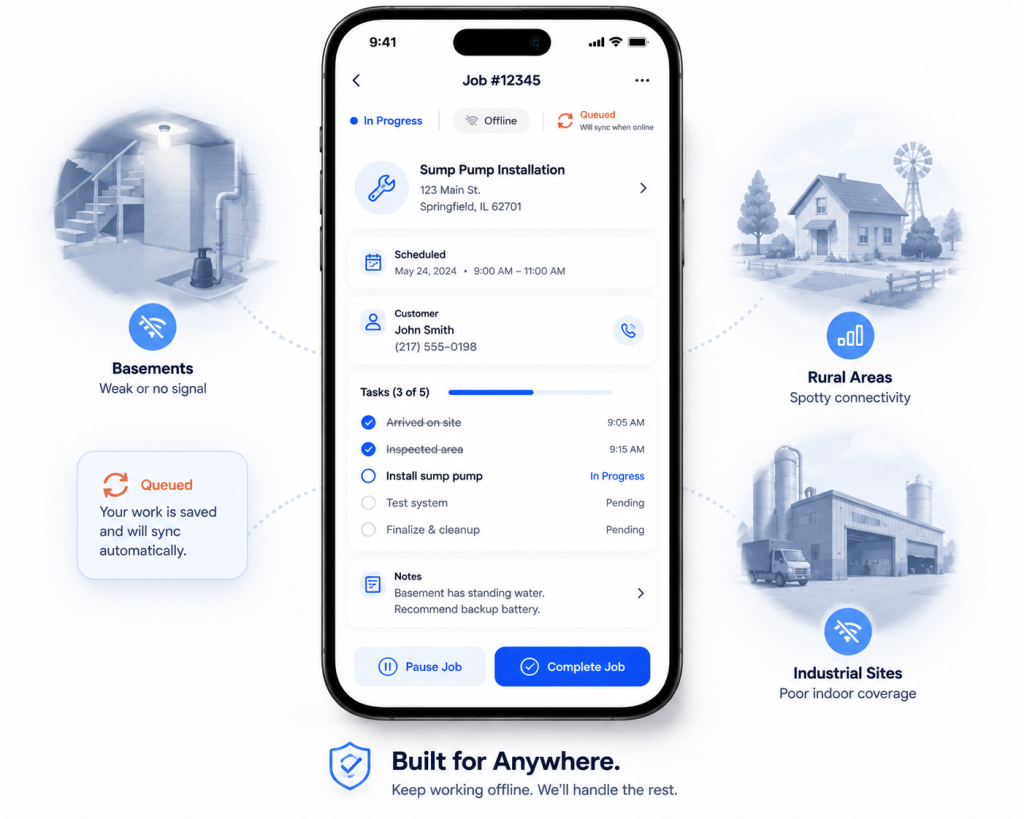
Field workers lose signal. They go into basements, into rural homes with no coverage, into industrial buildings where cell service dies at the front door. If the app stops working the moment connectivity drops, the worker either stops doing their job or works around the app. Once they work around it, the data quality is gone.
Offline mode in mobile workforce management software is not glamorous, but it is non-negotiable. The app should accept photo uploads, signatures, time entries, and notes while offline, queue them locally, and sync the moment a connection returns. The worker should never notice. The data should never be lost.
What proper offline support actually covers:
- Full job completion including photos and signatures
- Time entries and notes captured locally with timestamps preserved
- Automatic sync when signal returns, no user action required
- No data loss if the app is closed while offline
- Conflict handling when the same job is edited offline and online
Test it before you commit. Put a phone in airplane mode and try to complete a full job from start to finish. If the workflow breaks anywhere, your team will hit that same break a hundred times a week. Offline reliability separates serious mobile workforce management software from the marketing-led platforms.
Mistake 4: Missing photo and signature capture
Photos and signatures are the proof that a job happened the way the worker says it did. No photos and you have no defence against a customer complaint two weeks later. No signatures and you have no clean record that the work was accepted. In categories with insurance claims or warranty work, those records are also legal evidence.
The mistake is treating photo capture as a manual extra rather than a built-in step in the workflow. The platform should require a before photo and an after photo on jobs where it matters, attach them to the job record automatically, and refuse to mark the job complete until they are uploaded.
What good capture looks like in mobile workforce management software:
- Required before-and-after photos on jobs where proof matters
- On-photo annotations (circle a problem area, add a quick voice note)
- Customer signature pad inside the job itself, not a separate form
- Photos auto-attached to the job record, not dumped in a phone gallery
- Quick retake without abandoning the job step
Workers will not remember to take the photo. They will not, and you should stop being annoyed about it. The only thing that ever works is the app refusing to mark the job complete until the photo is there. Photo and signature capture is one of the cheapest features in mobile workforce management software and one of the most painful to lose a customer dispute without.
Mistake 5: Weak communication between office and field
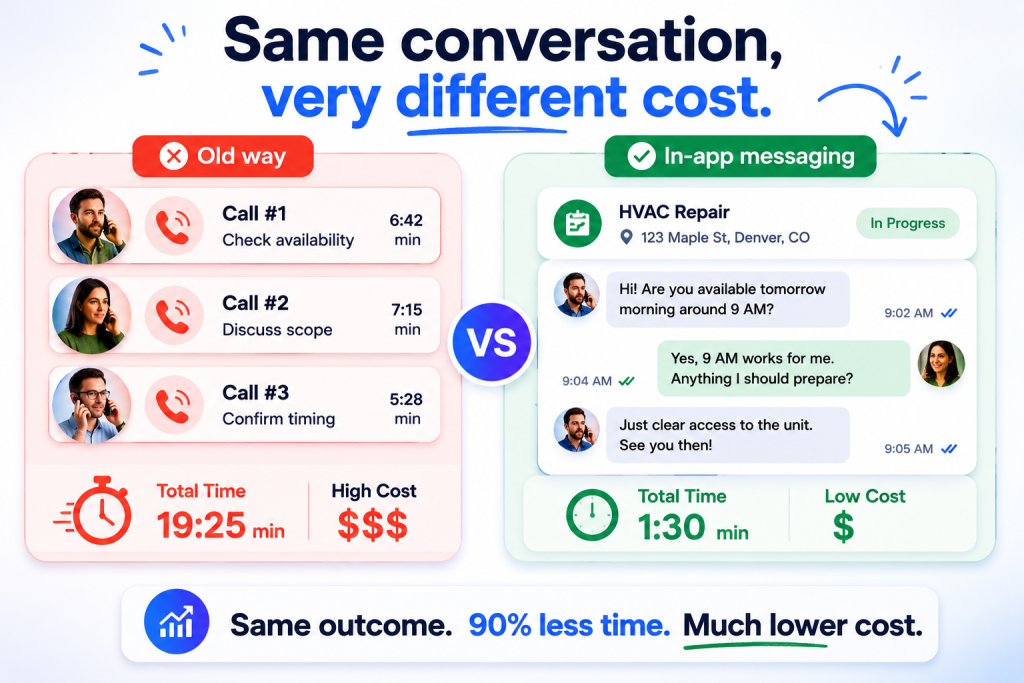
The phone call is the enemy. Every time a dispatcher calls a worker to ask where they are, or a worker calls the office to ask what to do about a change at the customer’s house, that is a minute or two of two people’s time, and the answer does not get recorded anywhere useful.
Good mobile workforce management software replaces those calls with in-app messages tied to the specific job. A note attached to job 4218 lives forever in that job’s history. A note delivered over the phone disappears the moment it is heard.
Signs your messaging design is failing:
- Workers still call the office for routine questions four weeks after rollout
- Important instructions live in personal text messages, not the platform
- Job-specific notes get attached to the wrong job or vanish entirely
- There is no audit trail for who said what about a particular customer
- New hires take weeks to learn where to find context for a job
If your dispatchers and workers have not stopped calling each other within four weeks, the tool is failing. Either retrain or change platforms. Our piece on building a handyman service app goes deeper into messaging design that gets used. The right mobile workforce management software makes the phone call feel like the slow option, not the default one.
Mistake 6: No time tracking or geo-fencing
If you cannot prove when a worker started and finished a job, you cannot pay them fairly, you cannot bill the customer accurately, and you cannot tell which workers are slow and which are efficient. You also cannot defend a payroll audit.
Geo-fencing solves most of this without making anyone feel watched. The worker arrives at the customer’s address, the app detects it and offers to clock them in. They finish, leave the address, the app offers to clock them out. The data is honest because the location is doing the work, not the worker’s memory.
Mobile workforce management software with proper geo-fencing pays for itself on payroll accuracy alone in the first three months.
What geo-fenced time tracking should do in mobile workforce management software:
- Detect arrival at the customer address and prompt clock-in
- Detect departure and prompt clock-out
- Catch obvious leaks like leaving site early but logging a full hour
- Allow corrections without punishing honest mistakes
- Feed payroll, invoicing, and routing from the same time data
Rigid time tracking that punishes honest errors will be sabotaged within a month. The platforms that get this right give workers an easy correction path.
Mistake 7: Manual invoicing after each job
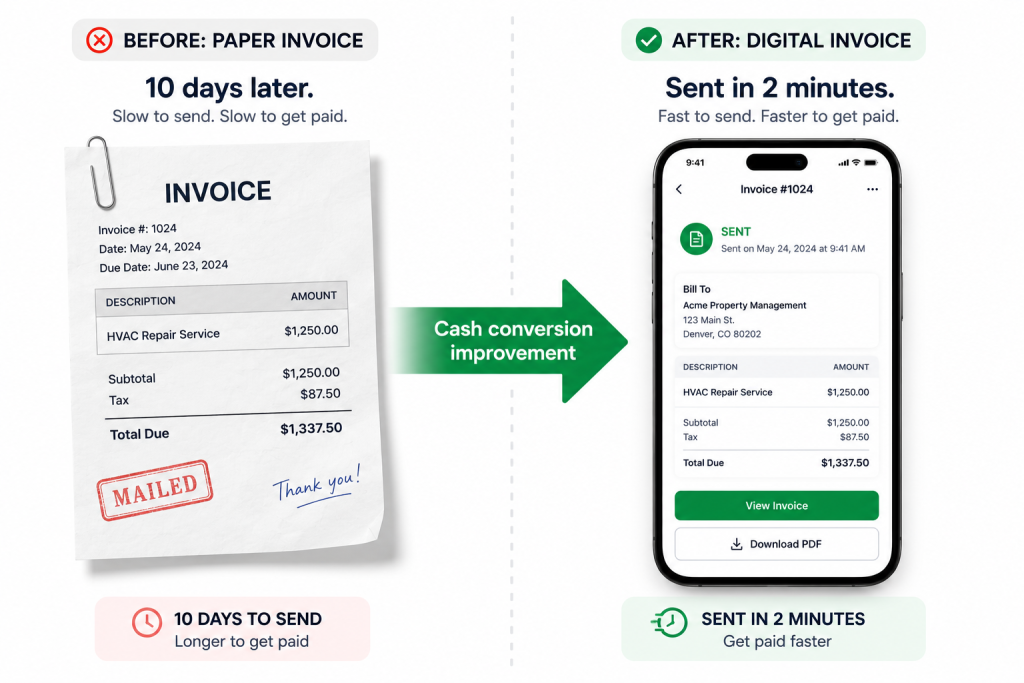
A worker finishes a job at 3pm. They drive to their next one. The invoice does not exist yet. Someone at the office types it up that evening, sends it the next morning, and the customer pays it a week later. By the time the cash arrives, the business has been carrying the cost of that job for ten days.
Auto-invoicing in mobile workforce management software closes this gap to minutes. The job is marked complete, the parts and labour are already attached, the invoice generates automatically, and it lands in the customer’s email or in the platform’s payment screen before the worker has left the driveway. Same-day payment becomes the norm.
Red flags in your invoicing flow:
- Invoices typed up in a separate system after the worker leaves
- Average time from job complete to invoice sent is more than 24 hours
- Parts and labour entered manually rather than pulled from the job record
- Customers paying a week or more after the work was done
- Back office staff spending whole afternoons on data entry
Real-time invoicing is one of the highest-ROI features in this whole list because the savings show up directly in cash conversion and bad-debt rates. Mobile workforce management software that cannot invoice from the job record is a workforce app bolted onto a separate billing problem.
Mistake 8: No customer-visible ETA tracking
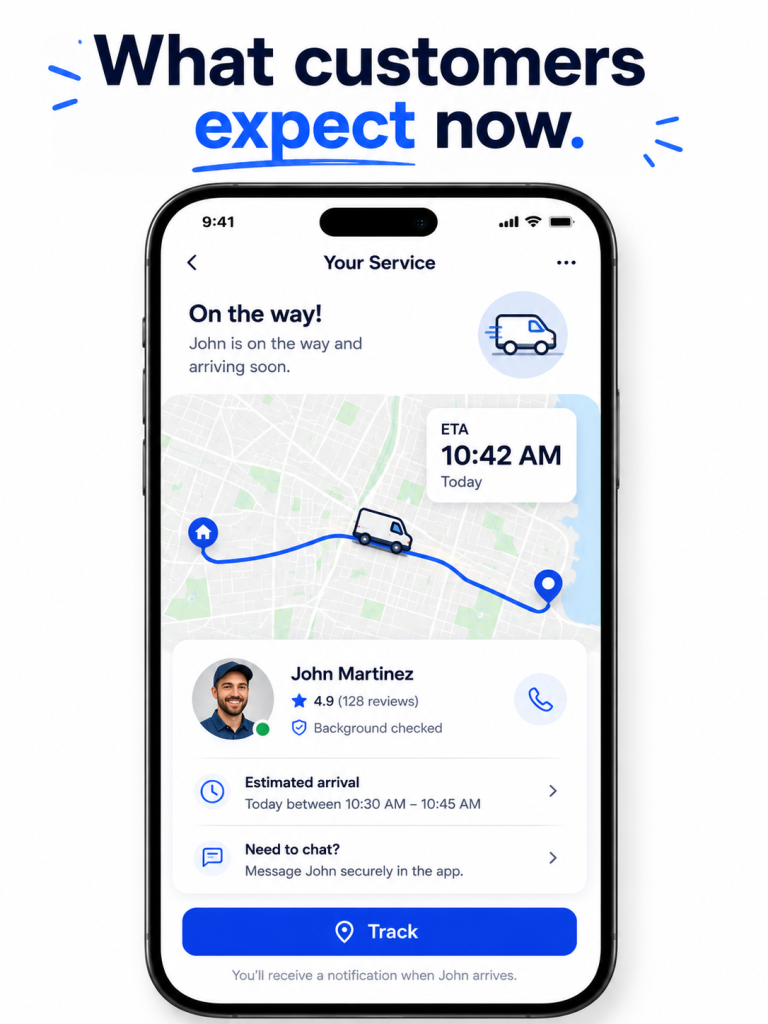
This one is half operations and half customer experience. A customer who has been told “between 9am and 1pm” and gets no further information will check the door every ten minutes from 8:50am onward and be furious by 12:30pm. A customer who can see a live ETA on a screen, with the worker’s name and photo, is a calm customer who will rate the job higher even if it ends up arriving slightly late.
The Uber model trained a generation of customers to expect this. They do not differentiate between a ride and a plumber. If a service platform cannot show a moving van on a map and an updating ETA, the platform feels old, even if everything else about it works.
What customers expect from a modern service ETA screen:
- A live map showing the worker’s location
- A name and photo of the person arriving
- An updating ETA that changes as conditions change
- A notification when the worker is on their way
- A simple way to message the worker without phone tag
ETA tracking inside mobile workforce management software earns its keep through customer ratings and repeat bookings, even before you count the operational savings. If you are running a marketplace, the business model literally relies on those repeat bookings. ETA visibility is the feature most often missing from mobile workforce management software bought before 2020 and the easiest to retrofit if you switch.
Mistake 9: Poor integration with payroll and accounting
The single biggest hidden cost in a field-services back office is double entry. Hours logged in the workforce app, then retyped into payroll. Invoices generated in the workforce app, then retyped into the accounting system. Tax codes maintained in two places. It looks like clerical work. It is six to twelve hours a week of skilled time, depending on team size, plus a constant supply of small errors that take hours more to fix.
Real integrations remove that work. Mobile workforce management software that pushes hours straight to QuickBooks, Xero, ADP, or Gusto, and pulls invoice statuses back, is not a cost saver of minutes. It is a cost saver of whole roles at scale.
Tests for a real integration, rather than a marketing claim:
- Bidirectional data flow, not just a CSV export
- Hours and invoices sync automatically without manual triggers
- Reconciliation is automatic and visible in both systems
- Tax codes and worker records stay in sync without intervention
- The vendor’s existing customers describe breakages as rare, not weekly
Ask the vendor to show you a live data flow during the demo, and ask their existing customers how often the integration breaks. If the answer is more than once a quarter, you will spend more time managing the integration than the manual entry it replaces. Integration depth is the single biggest predictor of whether mobile workforce management software actually saves back-office hours.
Mistake 10: No performance analytics by worker
Two cleaners on the same team can have wildly different revenue per hour, completion rates, and customer satisfaction. If your mobile workforce management software gives you team-level dashboards but no per-worker view, you cannot tell which is which. You cannot reward the strong performers fairly. You cannot coach the weak ones with specifics. You cannot fire the worst ones with confidence.
The right analytics are not complicated. The view a manager actually needs is short.
Metrics that drive real operational decisions:
- Jobs completed per shift, per worker
- Revenue per worker per day, blended across job types
- Average customer rating per worker, with the comments attached
- On-time arrival rate
- Rework rate (jobs that needed a callback to fix)
The mistake is using analytics only for celebration reports at the end of the month, rather than for the weekly one-on-ones that actually change behaviour. Worker-level data is useful only when it gets used. Build a fifteen-minute weekly review into the operations rhythm and watch the metrics move within a quarter. The point of analytics inside mobile workforce management software is to make the weekly one-on-one conversation specific, not to win awards for dashboard design.
Five real mobile workforce management software platforms worth comparing
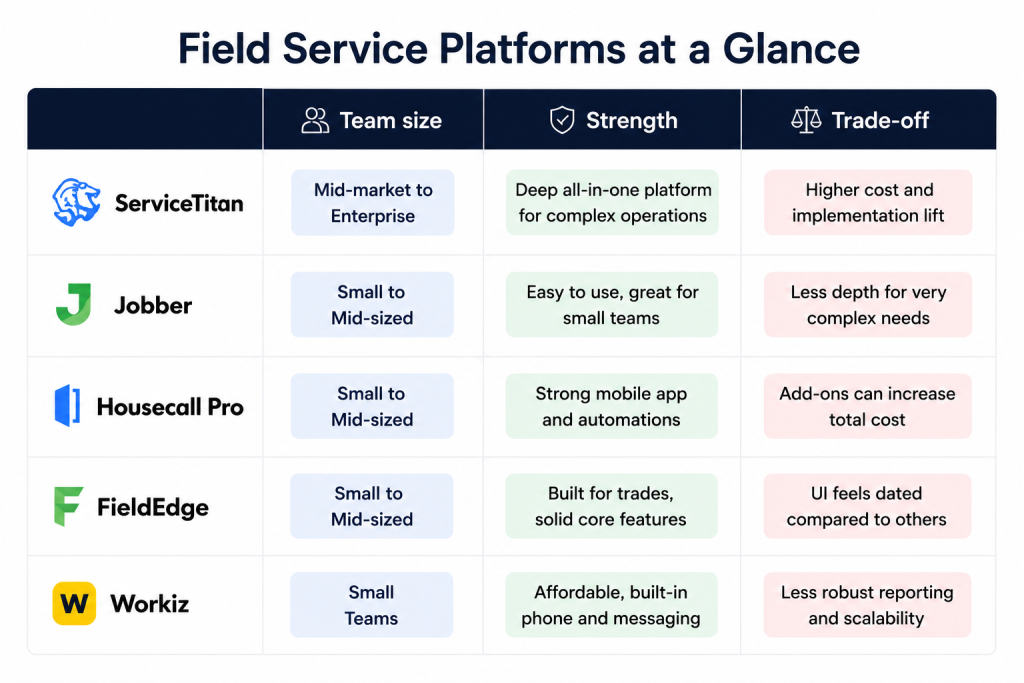
There is no single best mobile workforce management software for every operation, and a vendor that tells you otherwise is selling. Five platforms come up in almost every short list we run for clients, and each one suits a different shape of business.
ServiceTitan is the heavyweight, built for plumbing, HVAC, and electrical companies in the United States. The feature depth is genuine and so is the price, and it is the right choice for an operation with thirty or more technicians and a back office that can use the full toolset. Smaller teams find it overwhelming. ServiceTitan is the mobile workforce management software of choice if you have already proven the business model. ServiceTitan’s industry research is worth reading regardless of which platform you choose, because it sets the bar for what a fully digitised field operation actually looks like.
Jobber is the friendly mid-market option. It does the basics well and is fast to roll out. Plumbers, cleaners, lawn-care operators, and pool services with five to thirty workers tend to land here. The trade-off is that it does not go as deep on the heavy operational and financial workflows as ServiceTitan.
Housecall Pro is the consumer-facing choice. Strong customer communication, neat marketing automation, easy scheduling, and very good for service businesses where the customer experience is most of the brand. It is the closest thing to a “Shopify for home services.”
FieldEdge is the long-standing player for plumbing and HVAC, with a particular strength in tying job data to QuickBooks. It is unglamorous and reliable, which is sometimes exactly what an established service company wants.
Workiz is the scrappier alternative, popular with locksmiths, junk removal, garage-door services, and other categories where ServiceTitan is overkill but Jobber’s defaults do not fit. It is cheaper and more flexible, with a less polished interface. Workiz is the mobile workforce management software for operators who want fewer features and more flexibility.
If your business is a multi-vendor marketplace rather than a single-operator service company, none of the five quite fits, because they are built for one company managing its own workers, not a platform managing many independent providers. Our multi-vendor marketplace development guide covers what that custom build looks like.
A final word
The mobile workforce management software you pick will quietly decide a lot of things about your business, and the mobile workforce management software you outgrow will quietly punish you later. How many jobs each worker can complete in a day. How fast invoices turn into cash. Whether dispatchers are coordinating or just answering phones. Whether your best workers feel supported or annoyed enough to leave.
Run the 10-Mistake Field Operations Audit before you commit to a platform, and again every six months once you are running, because operations drift and the mistakes creep back in. Real-time tracking, auto-routing, offline mode, photo and signature capture, in-app messaging, geo-fenced time tracking, instant invoicing, customer ETA, payroll integration, and per-worker analytics. That is ten things to check. Most platforms get six or seven right. The two or three they miss are usually where the money is leaking, and they are different for every operation. That is why I keep coming back to the audit rather than to a vendor recommendation.
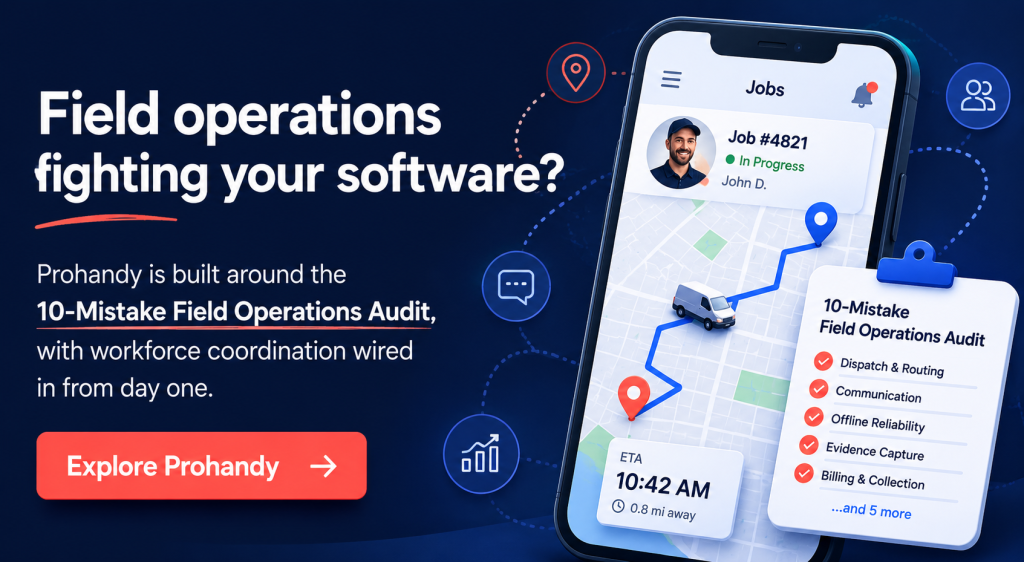
Prohandy is not off-the-shelf mobile workforce management software, and that is the point. If you are building a service marketplace rather than running a single-operator field business, the standard platforms will only get you so far. Our on-demand platform Prohandy is built around exactly these ten requirements, with workforce coordination, payouts, and customer experience already stitched together in a way the off-the-shelf vendors cannot match. Combined with the wider on-demand service marketplace development approach, it is what we use when a client needs mobile workforce management software that works from day one, rather than being patched together later.
Frequently asked questions about mobile workforce management software
What is mobile workforce management software, exactly?
Mobile workforce management software is the platform that lets an office coordinate workers who are out in the field rather than sitting at desks, and mobile workforce management software is what makes the same data usable across scheduling, payroll, and customer communication. It handles dispatch, real-time location, time tracking, invoicing, and messaging between the office and the field, all from a phone app for the worker and a dashboard for the dispatcher. The best examples also integrate with payroll, accounting, and customer-facing tools so the same data does not get typed in twice.
How much does mobile workforce management software cost?
Pricing ranges from around $30 per user per month at the entry level (Jobber, Workiz) up to several hundred dollars per user per month for full ServiceTitan deployments with additional modules. The right way to think about cost is not the licence fee but the labour saved. A platform that saves each worker thirty minutes a day pays for itself many times over even at the top of the range.
Do I need mobile workforce management software for a small team?
Mobile workforce management software is overkill if you have three or fewer workers and one dispatcher who knows everyone’s schedule by heart. Past five workers the spreadsheet starts to break. Past ten, refusing to use proper software is actively costing you money in missed jobs, late invoices, and worker frustration.
Can mobile workforce management software work offline?
Good ones, yes. The whole point is that field workers go into basements, rural homes, and industrial sites with no signal. The app should accept all the inputs the worker would make while connected (photos, signatures, notes, time entries) and sync them once a connection returns. Always test offline functionality during a vendor demo, because some platforms claim it without really delivering it.
How is mobile workforce management software different from a CRM?
A CRM tracks the relationship with the customer, while mobile workforce management software tracks the execution of the work for that customer. They overlap at the customer record but they are not the same thing. Most growing service businesses end up running both, with the two systems integrated. Trying to use a CRM as a workforce tool, or a workforce tool as a CRM, eventually breaks in awkward ways.
Should I build mobile workforce management software custom or buy off the shelf?
Buy if your operation looks like everyone else’s operation in your category, because the off-the-shelf platforms have already solved your problems. Build if your business model is genuinely different, like a multi-vendor marketplace where you coordinate independent providers rather than your own employees, or if you need workflows that none of the established platforms support. At Xgenious we have done both, and the right answer almost always reveals itself in the first hour of a serious requirements conversation.