



The first time I sat with a school principal whose budget had been cut for the third year running, the problem was not the curriculum. It was the $2,400 a year the school was paying for a school management system it used about thirty percent of. Most schools I have talked to are in the same place.
They bought a paid platform years ago, the contract auto-renews, and nobody has time to look at alternatives. Meanwhile, a smaller group of schools quietly moved to free school management software and put the saved budget into things that change daily life in the building, like classroom tablets and library books. Free school management software has caught up faster than the paid vendors will admit.
The paid platforms are good. They are also expensive, and most of what they do is now matched by free options. The catch is that not all free options are equal. Some are stripped-down lead magnets for upsells. Some are genuinely complete. This guide walks through what a modern free school management system covers in 2026, where it still trails paid platforms, the ten modules every school should audit, and the 10 best free and open source school management software platforms compared.
Key takeaways
- Free school management software in 2026 covers the 10 core modules most schools use, from student records to reporting.
- The real gaps versus paid platforms are narrow: state-mandated compliance reporting, multi-campus management, and guaranteed support SLAs.
- Run the 10-Module School Software Audit against your real usage before you renew any paid contract. Most schools use far fewer modules than they pay for.
- The strongest picks are Genius School Management and Fedena for polished, low-overhead options, and Gibbon, RosarioSIS, or OpenEduCat for schools with in-house IT.
- If your school is under about 5,000 students with no special compliance needs, staying on a free school management system is the financially rational call.
Table of Contents
Why most schools pay too much for a school management system
The math on school management software contracts is bad once you look at it honestly. A paid platform charges per student per year, typically $5 to $15. A school of 500 students pays $2,500 to $7,500 per year. A district of 5,000 students pays $25,000 to $75,000. That is real money, and most of it covers the same six tasks: student records, attendance, grades, fees, parent messages, and reports.
The pricing scales with the school, not with usage. A school of 800 students that opens only attendance and gradebook pays the same per student as a school using the full suite. The quieter cost is training overhead. Paid platforms tend to come with elaborate feature trees that need certified administrators, so small schools end up using ten percent of the platform and paying for the whole thing.
According to UNESCO’s research on ICT in education, the gap between what education technology promises and what schools use is one of the largest sources of wasted spending in the sector. A free school management system does not solve the gap on its own. What it does is remove the financial penalty for not using every feature, which is half the problem.
What free school management software covers in 2026
A decade ago, free school management software meant a half-built open source project with no parent portal, no online fees, and no real support. That is no longer true. The serious free options today cover almost everything a typical primary or secondary school needs, with the gaps concentrated in a few specific places.
What comes standard now.
The modules that work well across most free platforms include student records, attendance, timetables, exam and grade management, parent communication, teacher dashboards, library tracking, online classes, and basic reporting. None of these were universally available in free school management software five years ago. They are all table stakes today.
Where free school management software still trails paid platforms.
The biggest remaining gap is state-mandated compliance reporting. US districts that need specific submission formats often need a paid platform or a custom build. Multi-campus management with shared resources is the second gap. The smallest gap is vendor support contracts with response-time SLAs, which you can usually buy as add-ons but are rarely included by default. If your school does not have those needs, a free school management system covers your usage.
The 10-Module school management software audit
The audit is ten modules, each scored against your school’s real usage rather than a marketing checklist. They are in operational priority order, which is how the pain actually lands: the first three carry roughly half the daily usage in a typical school. Walking a free option through all ten takes about ninety minutes, less than most schools spend in a single procurement meeting.
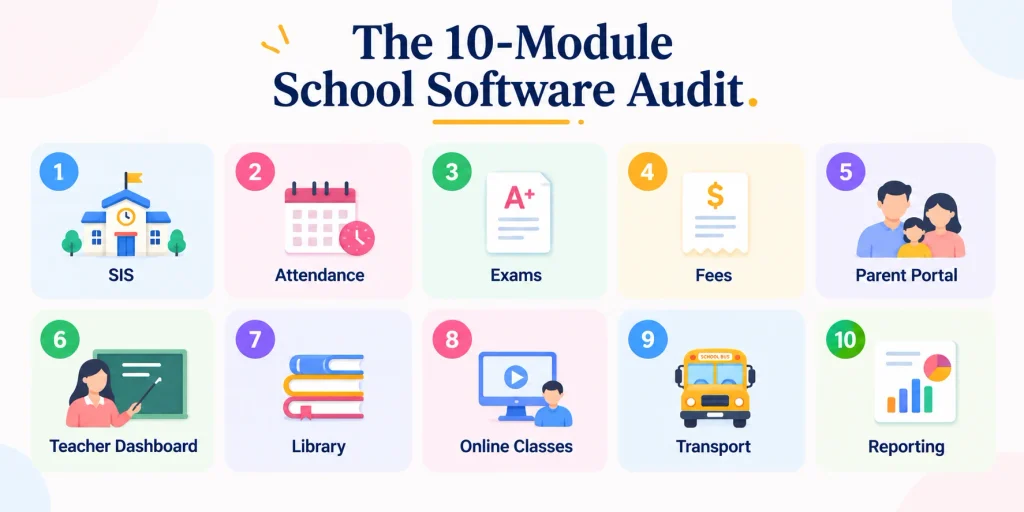
Module 1: Student information system. The most important module in any school management system. Everything else hangs off the student record: names, classes, parents, contact details, medical notes, photos, documents. Test full student profiles, CSV bulk import, year-end class promotion, document attachments, and an audit trail of who edited what.
Module 2: Attendance and timetable. Attendance runs every day, so marking it should take under a minute per class. Test mobile attendance, bulk mark-present with exceptions, late-versus-absent states, automatic absence notifications, and monthly reports. The timetable builder is the hardest module to get right; most free platforms offer a workable one that needs some manual adjustment.
Module 3: Exam and grade management. The good free options handle exam scheduling, grade entry, report card generation, and custom grade scales (percentage, GPA, letter, IB, A-level) as cleanly as paid platforms. The report card is where the school’s brand sits in parents’ hands, so software that lets you upload your own template matters.
Module 4: Fee and finance management. The basics (fee structure, term billing, receipts, arrears) are universal. The differentiators are online payment integration, reminder automation, and partial-payment handling. A school that collects fees online saves roughly twenty hours of admin work per week. This is where the gap between strong and weak free platforms is largest.
Module 5: Parent portal and communication. A parent who cannot easily see attendance, grades, fees, and homework calls the office instead. Test per-parent logins, real-time data, in-app messaging with teachers, SMS/email/push options, and multi-language support.
Module 6: Teacher dashboard. The daily workspace of the people who use the platform most. Strong dashboards group today’s classes, attendance to mark, homework to assign, grades to enter, and parent messages in one view. Buy software teachers hate and you end up with a half-used platform.
Module 7: Library and inventory management. A lower bar than the earlier modules. Test book catalogue, borrower records tied to the student information system, lending and return, fines, and stock reports. Some free platforms add general inventory (uniforms, lab equipment), which saves a separate tool.
Module 8: Online classes and homework. The hybrid-learning shift is permanent. The serious free options integrate with Zoom, Google Meet, and Microsoft Teams, and offer homework portals with attachments and submission tracking. A single click from the timetable that creates the meeting and invites enrolled students is the clean version.
Module 9: Transport and hostel. Optional for many schools, critical for those that have them. Test route management, vehicle and driver records, student-to-route assignment, GPS integration, room allocation, meal plans, and fees rolled into the finance module.
Module 10: Reporting and analytics. The module schools care about most around board meetings and accreditation. Test pre-built reports, a custom report builder, PDF/Excel/CSV export, principal dashboards, and comparison views. The most useful feature is saved report templates you can run again next year without reconfiguring.
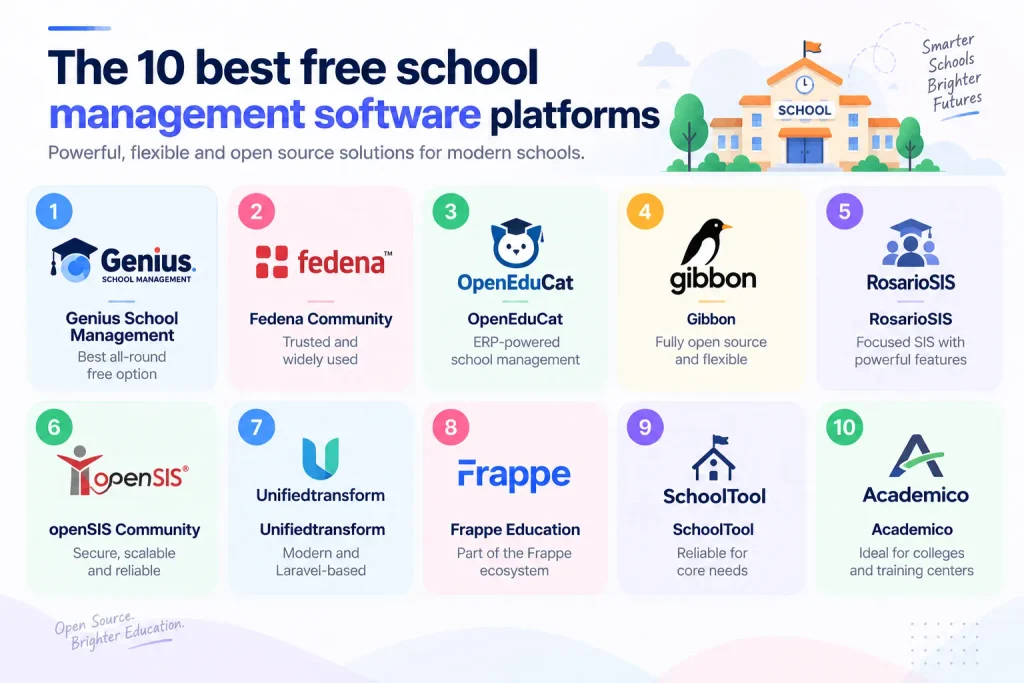
The 10 best free school management software platforms compared
| # | Platform | Type | Hosting | Best for |
|---|---|---|---|---|
| 1 | Genius School Management | Free, no per-student limit | Self-hosted or hosted | All-round pick, least setup overhead |
| 2 | Fedena Community | Open source (check license) | Self-hosted | Wide module coverage, big community |
| 3 | OpenEduCat | Open source (Odoo) | Self-hosted | Schools wanting ERP-style finance and HR too |
| 4 | Gibbon | Fully open source | Self-hosted | Free for commercial use, strong teaching tools |
| 5 | RosarioSIS | Open source | Self-hosted | A focused, well-maintained student information system |
| 6 | openSIS Community | Open source | Self-hosted | A scalable SIS with paid modules to grow into |
| 7 | Unifiedtransform | Open source (Laravel) | Self-hosted | Teams with PHP/Laravel skills who will customize |
| 8 | Frappe Education | Open source (Frappe/ERPNext) | Self-hosted | Schools wanting an open source school ERP + LMS |
| 9 | SchoolTool | Open source (older) | Self-hosted | Modest needs with strong technical staff |
| 10 | Academico | Open source | Self-hosted | Colleges and vocational or training centers |
These ten hold up well across the ten modules. The first is our own; the rest are independent open-source projects. Confirm current licensing on each project’s site before you commit, since some community editions change terms over time.
1. Genius School Management (best all-round free option)
Genius School Management is built around the audit framework above and free without per-student limits. Strong on the student information system, attendance, fees, parent portal, and reporting, with custom report card templates and online payments integrated. It suits schools from 50 to several thousand students, and because it is part of the Xgenious free suite, paid implementation help is available if you want it. Disclosure: this is our own product.
2. Fedena Community
The original open source school management platform, with wide module coverage and a strong community. Note the licensing carefully: the older community edition was open source, but the current product leans commercial and hosted, so check the version you download before committing.
3. OpenEduCat
Built on the Odoo ecosystem, strong for schools that also want ERP-style finance and HR in the same platform. The learning curve is steeper than purpose-built school software, and the parent-facing surface is weaker than the admin side.
4. Gibbon
A fully open source school management system from a respected non-profit community. Solid student information system, attendance, gradebook, teaching tools, and reporting. Less polished than the commercial free options but completely free in every sense, including commercial use.
5. RosarioSIS
An open source student information system that automates records, attendance, grading, scheduling, and fees, with strong Excel and CSV import/export and PDF reports. A good pick for schools that want a focused, well-maintained SIS with modular add-ons.
6. openSIS Community
A commercial-grade, secure, scalable open source student information system from OS4ED. Covers student records, attendance, grades, scheduling, and reporting, with paid modules and support available if you outgrow the community edition.
7. Unifiedtransform
A modern open source school management system built on Laravel, covering academics, exams, attendance, fees, and notices. Familiar and easy to extend for teams with PHP and Laravel skills, which is a real advantage if you plan to customize.
8. Frappe Education
The education module in the Frappe and ERPNext ecosystem, covering student admission, attendance, assessment, fees, and an LMS. Strong for schools that want an open source school ERP with the rest of the Frappe stack behind it.
9. SchoolTool
An older open source project, still functional for the basic modules but not maintained at the pace of the others. Suitable for schools with modest needs and strong technical staff.
10. Academico
An open source school management system aimed at colleges and training centers, covering enrollment, attendance, grades, and finance. A reasonable choice for post-secondary and vocational institutions that want a free, self-hosted option.
The honest summary: for most schools that want a polished free school management system without self-hosting overhead, Genius School Management is the strongest starting point. For schools with serious in-house IT, Gibbon, RosarioSIS, openSIS, and Unifiedtransform are credible self-hosted choices. The wider comparison of free and paid options sits in our best school management software guide, and the broader picture of the Genius suite is in our free business software for small business overview.
For broader trends in school software adoption, eSchool News and EdTech Magazine K-12 cover the category in depth.
Final words
Most schools could move to free school management software tomorrow and lose nothing they use. The blocker is not the software. It is the cost of switching, the muscle memory of the existing platform, and the risk of moving away from something that works, even when “works” means “we pay for it without thinking about it.”
Run the 10-Module School Software Audit on your current platform and on one or two free options. Most schools that do this end up surprised at how few modules they use, and at how cleanly the free school management software options cover those modules. If you want a polished, no-per-student-limit place to start, Genius School Management is free to download and run today. And if you would rather have a team set it up or customize it for your school, our custom software development service can help.
Frequently asked questions
Is free school management software really free, or are there hidden costs?
The fully free options (Gibbon, Fedena Community Edition, OpenEduCat Community, SchoolTool) are genuinely free but require self-hosting, which means server costs and someone who can maintain them. The hosted free options (Genius School Management, Fedena’s hosted free tier) are free without server costs but may have limits on student count, support response time, or specific module access. Read the fine print on each. The serious options are genuinely free for typical school usage.
Can free school management software handle a school of 1,000 students?
Yes, all five platforms above scale to 1,000 students without difficulty. The performance ceiling for most free school management software sits around 5,000 to 10,000 students per installation, and beyond that schools usually move to paid platforms or sharded deployments. If your school is under 5,000 students, scale is not a real concern.
What about data security with free school management software?
Hosted free platforms typically run on the same cloud infrastructure as paid platforms (AWS, Azure, Google Cloud) and use the same encryption standards. The security question is less about free versus paid and more about the vendor’s specific practices. Where is the data stored. Who can access it. What backups exist. What happens if you leave. Ask these questions of any platform, free or paid.
Will switching from paid to free school management software disrupt the school?
The switch takes between two and six weeks for a typical school, depending on data volume and how much custom configuration the paid platform had. The biggest cost is data migration, which strong free platforms support with import tools. Plan the switch for the term break to minimise disruption, and run both systems in parallel for one term so you can compare reporting outputs side by side.
How do free platforms make money?
Most free school management software vendors offer paid add-ons (premium support contracts, custom integrations, white-label apps) or a paid upgrade for schools that grow past a certain size. Open-source projects make money through services around their software (hosting, training, custom development). Genius School Management is free as part of the broader Xgenious product suite, with paid services available if you want hands-on implementation help.
What support comes with free school management software?
Community support (forums, documentation, user groups) is standard. Direct vendor support varies. The hosted commercial free options usually offer email support with same-week response times. Open-source projects rely on their communities for response times that vary from hours to weeks. If your school needs guaranteed response times, this is an area where paid platforms still have a real edge.
When should a school upgrade from free to paid school management software?
Three honest triggers. When the school grows past a few thousand students and starts hitting performance ceilings. When the school takes on regulated reporting requirements that the free options do not handle natively. When the school needs a vendor with formal SLAs that the free options cannot provide. If none of those apply, staying on free school management software is the financially rational call.