



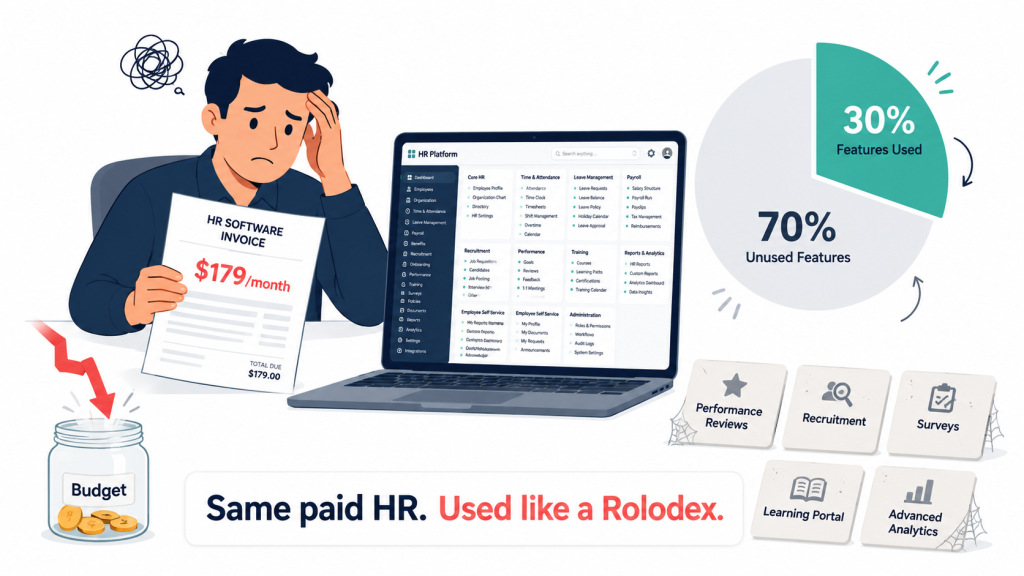
The HR manager at a 32-person company I talked to last summer was running her entire people operation through a $179-a-month platform she used for two things: storing employee records and running payroll. Everything else (leave requests, attendance, performance reviews, document storage) lived in Google Sheets or in her head. The annual bill for those two things was over $2,100. Free HR software for small business now exists that handles all eight functions she was paying for, plus the ones she had cobbled together in spreadsheets.
The migration would have taken her about a week. She did not know it existed. Most small business owners I talk to do not know free HR software for small business has caught up this far.
There is a strange gap in the HR software market. The big paid platforms (BambooHR, Gusto, Rippling) compete hard for companies with 50 to 500 employees. The truly small business (under 30 employees) is left with either expensive overkill or stripped-down free tiers that lock the useful features behind upgrades. In that gap, a quieter category has grown.
This piece walks through what free HR software for small business covers in 2026, the eight functions every small business should map onto a free option before committing, and where free still trails paid. I call the framework the 8-Function Lean HR Stack. It is what we use at Xgenious when an SMB owner asks us to evaluate their HR tooling.
If you want the broader picture of how the Genius free software suite fits together, our overview of free business software for small business covers that. This piece is about the HR side only.
Table of Contents
Why small businesses overspend on HR software they barely use
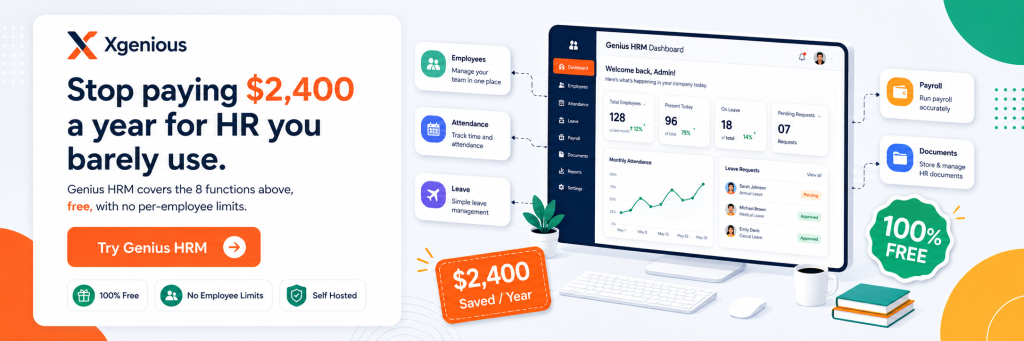
The math on HR software for small business is similar to the math on most enterprise tooling. A paid platform charges per employee per month, typically $6 to $15. A 25-person company pays $150 to $375 per month, or $1,800 to $4,500 per year. Most of that money covers six functions: employee records, payroll, leave, attendance, document storage, and basic reporting.
Bureau of Labor Statistics data on small business employment shows that the majority of US employers have fewer than 25 employees. None of those employers need the elaborate performance management, succession planning, or talent analytics that the larger HR platforms include. They are paying for features they will never open.
The quieter cost is integration overhead. Paid platforms usually require setup work that takes the founder or the office manager half a week to configure. Custom approval workflows, org chart wiring, payroll calibration. None of it is hard, but it adds up. A free HR software for small business option with sensible defaults out of the box can be live in an afternoon and produces the same payroll outcome at the end of the month.
According to Deloitte’s Global Human Capital Trends, most small businesses spend more on HR tooling than on HR training, which is upside down. The platform should be the cheap part. The people work should be where the budget goes. Free HR software for small business inverts the spending back to where it belongs.
What free HR software for small business cover?
Five years ago, “free HR software for small business” meant a basic employee directory and not much else. That is no longer the case. The serious free options now handle attendance tracking, leave management, performance reviews, basic recruiting, document storage, and compliance reporting.
What comes standard now
The functions that work well across free platforms include employee records, attendance, leave management, recruiting basics, document storage, reporting, and performance review structure. None of these were universally available in free HR software for small business in 2021. They are baseline today.
Where free still trails paid
The biggest gap is multi-jurisdiction payroll. If you run payroll across multiple US states or multiple countries, free options struggle with the tax tables and filing requirements, and you usually need a paid platform like Gusto, Rippling, or Justworks. The second gap is benefits administration with carrier integrations. Free HR software for small business can record that an employee has benefits, but the back-end carrier connections (Anthem, United Healthcare, Aetna) usually live in paid platforms or PEO services.
The smallest gap is dedicated support contracts with response-time SLAs. Most free options give you community support or email with same-week response times, which is fine for normal operations but not for emergencies. If your small business is single-state, single-country, and does not need carrier-integrated benefits admin, free HR software for small business covers your usage. If you do need those, the question becomes whether the paid version’s upcharge for them is worth what you currently pay for everything else.
The 8-Function Lean HR Stack framework
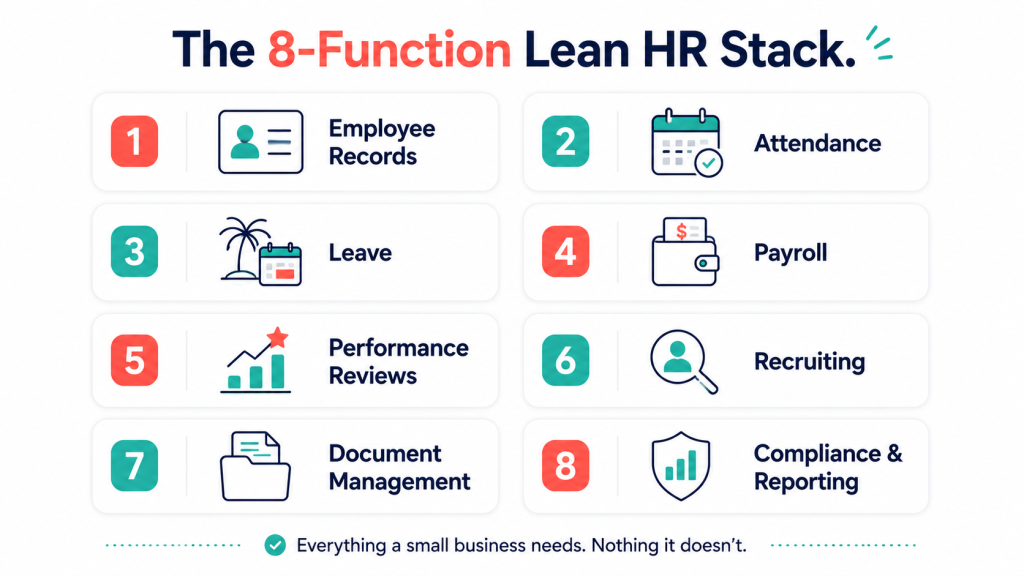
The 8-Function Lean HR Stack is exactly what it sounds like. Eight functions every small business uses, each scored against your team’s real usage rather than against a marketing checklist. I built the framework after auditing too many free HR software for small business options that looked impressive in the demo and fell apart on a Wednesday morning when the office manager tried to use them.
I order the functions by how much pain each one causes when it is missing or weak. Employee records, attendance, and leave are at the top because they show up daily. Performance reviews and recruiting are lower because most small businesses use them quarterly or annually. Document storage and compliance live at the bottom because they are background functions that matter most when something goes wrong.
Walking a free option through all eight takes about an hour. That is less time than most founders spend reading the marketing pages of three HR vendors. The audit exposes which functions your team uses, which is useful even if you stay on a paid platform, because you can stop paying for features you have not opened in a year.
The functions below are not in feature-count order. They are in operational priority order, which is how I score them in practice. The first three carry roughly seventy percent of daily HR usage in a typical small business. If those three are weak in a free platform, the remaining five do not matter.
Function 1: Employee records and profiles
The most important function in any free HR software for small business is the employee directory. Everything else hangs off it. Names, roles, start dates, contact details, emergency contacts, documents. If the directory is solid, the rest of the platform works. If the directory is weak, every other function inherits the weakness.
The employee record has to be the single source of truth for that person. Every other function (attendance, leave, payroll) should pull from it rather than store its own copy of the name and role. Free platforms that get this right feel calm. The ones that store employee data in three different places fall out of sync within a quarter.
What to test:
- Full employee profile with photo, role, manager, start date, and emergency contact
- Bulk import from CSV for the initial setup
- Custom fields for things specific to your business (badge number, vehicle, equipment)
- Document attachments (contracts, ID, certifications)
- Audit trail showing who edited what and when
A 25-person company spends more time inside the employee directory than any other module, by a margin. Score it strictly. The directory is also the function that hurts most when you migrate platforms, because every piece of historical data has to move with the people. Pick a free HR software for small business option whose directory you would still want to use in three years.
Function 2: Attendance tracking
Attendance is the second-most-used function after the directory. It runs every day and feeds payroll, leave, and reporting downstream. A slow or fiddly attendance tool is the single biggest cause of staff frustration with HR software in small businesses.
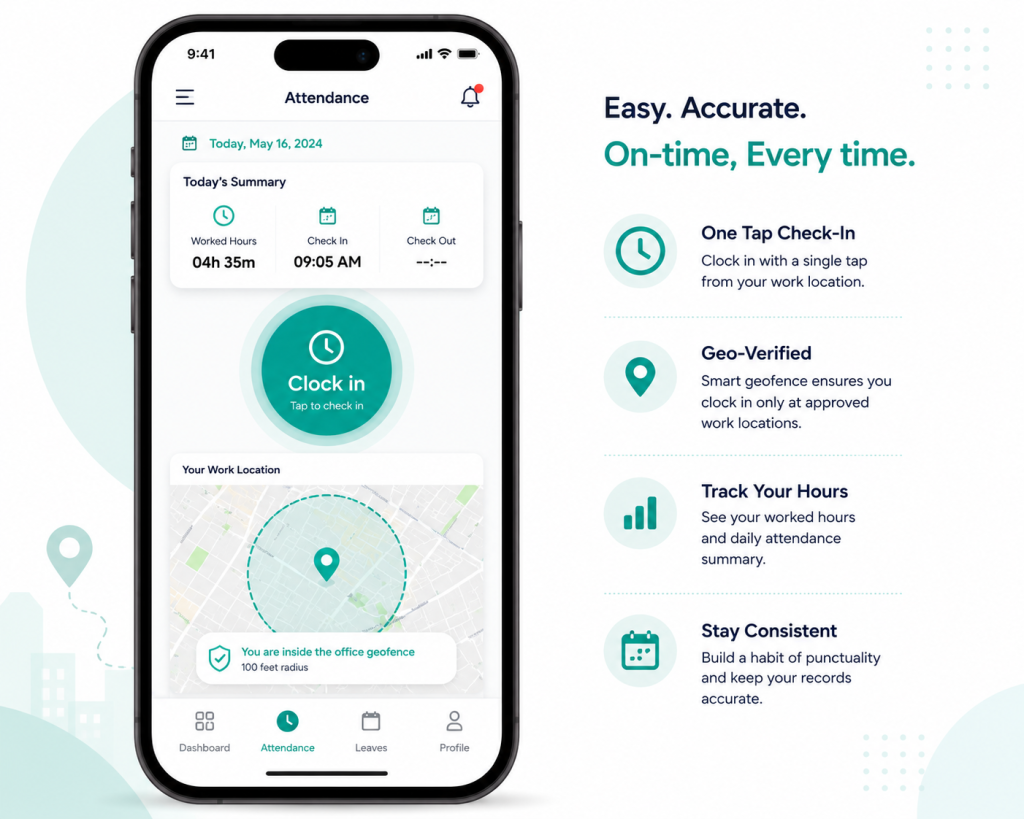
Marking attendance should take an employee under thirty seconds. The free HR software for small business options that get this right offer mobile check-in (most employees prefer this to a desktop login), geofenced clock-in for in-office teams, and automatic time-zone handling for remote teams. The ones that ask the employee to log in to a desktop web app and click through three screens lose adoption inside a month.
What to test:
- Mobile attendance from a phone
- Geofencing for in-office or site-based clock-in
- Time zone handling for remote employees
- Late versus absent versus excused as distinct states
- Monthly attendance reports per employee and per team
Attendance also has to feed payroll without manual reconciliation. The platforms that hand you an “hours by employee” report in CSV but do not push directly to payroll require someone to do the math every cycle. Free HR software for small business that integrates attendance and payroll cleanly saves the bookkeeper hours per month.
Function 3: Leave management
Leave management is where free HR software for small business proves itself or quietly drives the small business back to paid platforms. The basics (leave types, accrual rules, approval flows, calendar visibility) are universal. The serious differentiators are accrual policy flexibility, multi-level approval, and visibility into who is off when.
What to test:
- Multiple leave types (vacation, sick, personal, jury duty, parental)
- Accrual rules that match your policy (annual lump sum, monthly accrual, tenure-based)
- Approval flows with one or two reviewers
- Team calendar showing who is off when
- Email or Slack notifications for requests and approvals
The mistake here is treating leave as a single boolean. Real leave policy in even a small business has nuance: probationary employees might accrue differently, public holidays vary by location, and some teams need to see colleagues’ schedules to plan coverage. Free HR software for small business that supports these from the start saves the HR person from explaining the same edge case to the same manager every quarter.
Calendar visibility
A small business of 20 people benefits more from clear team calendars than from elaborate workflow tooling. The platforms that get leave right surface the calendar everywhere. Employees see it before requesting. Managers see it before approving. The whole team sees it when planning the next sprint or campaign.
Function 4: Payroll basics
Payroll is the function where the line between free and paid gets blurriest. Free HR software for small business can produce payroll calculations (gross to net, taxes, deductions, payslips) and export the data for payment. What free options rarely do is the actual tax filing and direct deposit. For that, most small businesses still use a paid payroll service like Gusto, ADP Run, or Patriot.
This is fine. Free HR software for small business that handles employee records, attendance, and leave, plus exports a clean payroll register, integrates with a $40-a-month dedicated payroll service. Combined cost is far below the $150 to $375 a month of a fully integrated HR-plus-payroll platform.
What to test:
- Gross-to-net calculation per employee
- Custom deductions and allowances
- Payslip generation in PDF
- Export formats that match common payroll services
- Year-end summaries for tax filing
Where free hits a wall on payroll
Multi-state US payroll, multi-country payroll, and W-2 / 1099 filing at scale are the three places free HR software for small business consistently falls short. If your business operates in one state and uses a separate payroll service, free works. If you operate across states with different tax tables, plan to use a paid payroll layer on top. Free HR software for small business with a clean integration to a payroll provider is the lowest-friction setup.
Function 5: Performance reviews
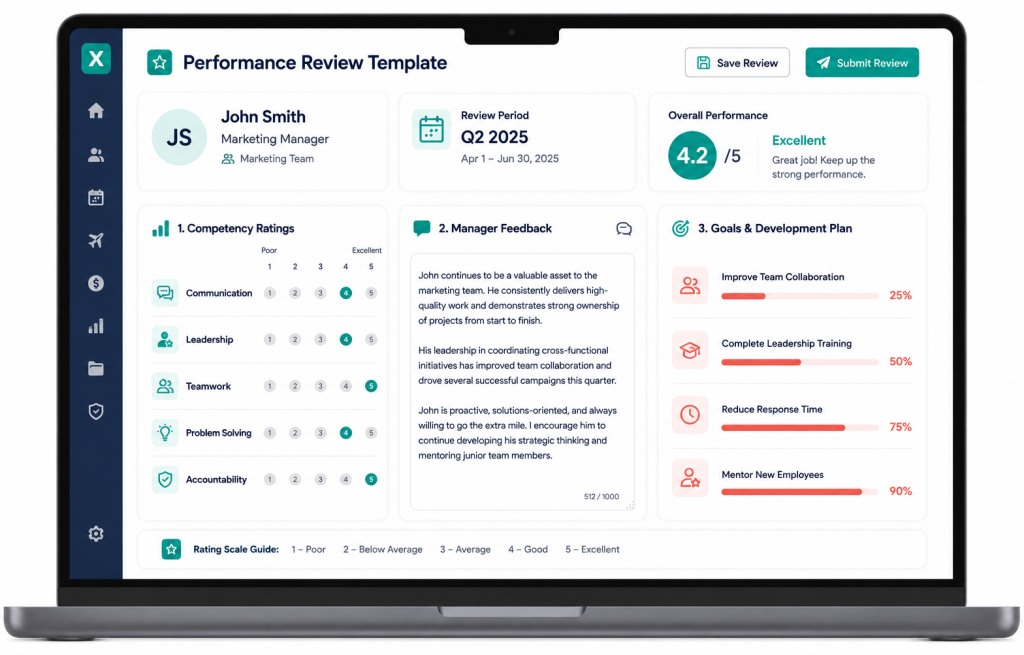
Performance reviews used to be the function that separated paid HR platforms from free ones. That gap has closed. Free HR software for small business now offers structured review templates, goal tracking, peer feedback, and review cycles, with the depth scaled appropriately for a small team.
What to test:
- Review templates that can be customised per role
- Goal tracking with progress check-ins
- Peer feedback as part of the review
- Self-review capture before the manager review
- Review cycle scheduling (annual, semi-annual, quarterly)
The mistake is over-engineering reviews in a small business. A 15-person company does not need 360-degree feedback with anonymised weighting. They need a structure that gets the manager and employee in the same room twice a year with a shared document. Free HR software for small business that delivers that without forcing the small business into enterprise rituals is the right kind of free.
The Society for Human Resource Management’s guidance on employee relations covers this nuance well, especially the part about not copying enterprise practices into small teams.
Function 6: Recruiting and onboarding
Recruiting is where free HR software for small business varies most. Some platforms offer a strong applicant tracking system with job posting integration. Others give you a single field to track candidates. The honest answer is that most small businesses do not hire often enough to justify a heavy ATS, but they do need somewhere to track the four candidates they are interviewing right now.
Onboarding is more universally important. Every new hire needs a structured first week: paperwork, equipment, accounts, introductions, training. Free HR software for small business that includes an onboarding workflow with a checklist saves the office manager from reinventing the process every time.
What to test:
- Job posting templates that can be shared on LinkedIn and Indeed
- Candidate pipeline with stages (applied, interview, offer, hired)
- Interview scheduling integration
- Offer letter templates
- Onboarding checklist that runs from offer accepted to end of week one
The honest take on free ATS
Free applicant tracking systems are sufficient for small businesses hiring under 12 people per year. Beyond that volume, a paid ATS (Greenhouse, Lever, Workable) becomes more cost-effective because the time saved per hire compounds. Free HR software for small business that includes a basic ATS works at the low-volume end. Plan to upgrade if you start hiring monthly.
Function 7: Document management
Document management is the function most small businesses underestimate and regret later. Employment contracts, NDAs, ID copies, certifications, signed policy acknowledgments. None of it is exciting day to day. All of it matters when there is a dispute, an audit, or a regulator visit.
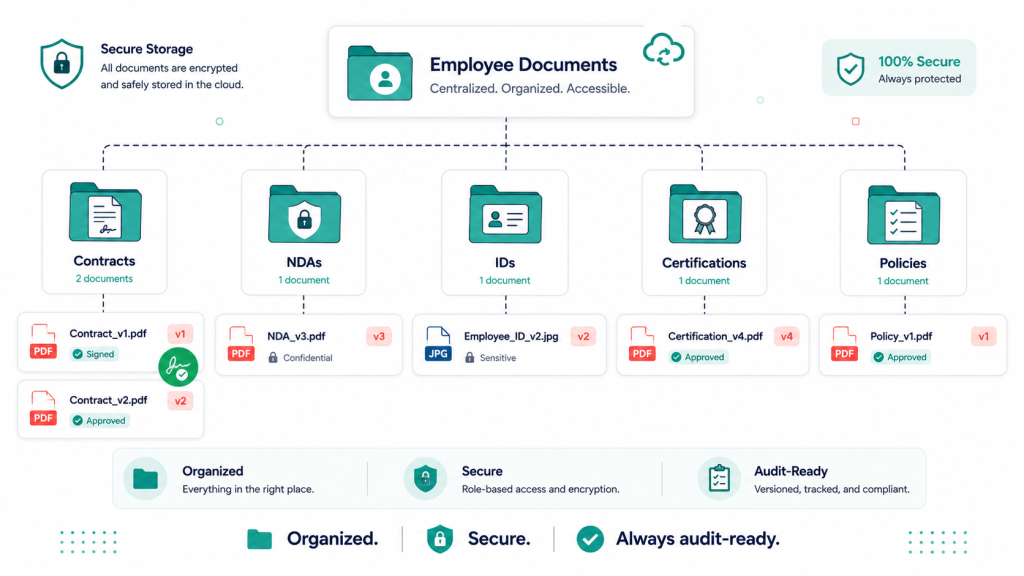
Free HR software for small business that includes secure document storage, e-signature, and versioning covers most of what a small business needs without a separate document tool. The platforms that store documents in a generic file dropdown without version control or signature workflows are not as useful, because the document trail is what matters legally.
What to test:
- Per-employee document folders with access controls
- E-signature for contracts and policies
- Versioning so you can see what was signed and when
- Bulk document distribution (annual policy acknowledgment)
- Expiry tracking for things that renew (visas, certifications, NDAs)
A small business with 20 employees probably has 200 to 400 documents in active circulation. Free HR software for small business that keeps these organised costs nothing and prevents the legal mess that comes from misplaced paperwork.
Function 8: Compliance and reporting
The final function is compliance and reporting, and it is the one small businesses care about most when a regulator shows up or a board meeting needs HR numbers. Good free HR software for small business produces employee count reports, headcount changes, diversity metrics (where legally required), and any regulator-specific reports your jurisdiction asks for.
What to test:
- Pre-built reports for the common HR questions (headcount, turnover, time to hire)
- Custom report builder for ad-hoc queries
- Export to PDF, Excel, and CSV
- Regulatory reports specific to your jurisdiction (EEO-1 in the US, similar in other countries)
- Comparison views (this quarter vs last quarter, this team vs company average)
The most useful reporting feature is not the fanciest dashboard. It is the ability to run the same report next quarter without reconfiguring it. Free HR software for small business that saves report templates well saves the HR person a meaningful chunk of administrative time every cycle.
Five real free HR software for small business platforms compared
Looking at real platforms turns the audit into a buying decision. These five hold up well across the eight functions.
Genius HRM
Our own offering at Xgenious, built around the lean HR stack and free without per-employee limits. Strong on employee records, attendance, leave, document management, and reporting. Payroll calculation supported with export to your payroll provider. Suitable for businesses from 5 to 200 employees. Full details on the Genius HRM product page.
Zoho People Free Tier
Part of the Zoho ecosystem. The free tier covers up to 5 employees, which makes it usable for very small teams and a starter for businesses that plan to grow into the paid Zoho People product. Strong if you already use other Zoho tools (CRM, Books, Mail).
OrangeHRM Open Source
A fully open-source HR platform with strong module coverage. Requires self-hosting and basic technical knowledge. The community edition covers most of the eight functions, with advanced modules (performance, recruiting) available in paid editions.
Bitrix24 Free Tier
A broader collaboration suite that includes HR features. The free tier supports up to 12 users and includes employee directory, time tracking, leave, and basic recruiting. Suitable for small teams that want HR alongside project management and chat in one tool.
HR.my
A purely free HR platform with no paid tier. Covers attendance, leave, payroll basics, and reporting. The interface is dated but the functionality is real. Suitable for businesses that want zero cost and accept lower polish in exchange.
The honest summary: for most small businesses that want polished free HR software for small business without self-hosting overhead, Genius HRM or Zoho People Free Tier are the strongest options. For technical teams comfortable self-hosting, OrangeHRM Open Source is a credible choice. Bitrix24 works if HR is one of several tools you want consolidated. The detailed comparison of all seven (free and paid) sits in our best HR software for small business guide.
[IMAGE 7, placement: directly under this section]
Common mistakes when picking free HR software for small business
A few mistakes show up repeatedly when small businesses choose free HR software for small business.
The first is treating “free” as the only criterion. A free platform that does not handle attendance properly costs the bookkeeper four hours per month in reconciliation. At a $30 per hour bookkeeper rate, that is $1,440 per year of hidden cost. The paid platform that would have done it cleanly might have been $1,200 per year. The free platform was the more expensive option once you counted the time.
The second mistake is over-buying features the small business will not use. A 15-person company does not need succession planning, 360-degree reviews, or talent analytics. Free HR software for small business that focuses on the lean eight functions beats free HR software that tries to replicate the BambooHR feature list. Less is more in this category.
The third is migration planning. Switching HR platforms (free or paid) means moving employee records, historical attendance, leave balances, and document history. The serious free options include import tools for this. The lighter ones do not. Plan migration before you commit. The cost of a bad migration is paid in employee trust, not just engineering hours.
The fourth is ignoring the support question. Free HR software for small business comes with varying levels of support. Some platforms offer email support with same-week response. Some rely on community forums where the answer comes in two weeks or never. If your small business does not have an HR-savvy founder who can troubleshoot, support response time matters more than feature depth.
The fifth is assuming all “free” platforms are equal. The vendors that built genuinely complete free tiers are betting on long-term relationships. The ones that built freemium funnels are betting on upgrade pressure. Both can work for a small business, but read the upgrade pages carefully to know which one you are dealing with.
Final word on free HR software for small business
Most small businesses could move to free HR software for small business tomorrow and lose nothing they use. The blocker is not the software. The blocker is the cost of switching and the assumption that paid means better, which is a habit from a time when the assumption was true. It is no longer true for the lean eight functions a small business runs on every week.
Run the 8-Function Lean HR Stack on your current platform and on one or two free options. Most small businesses that do this end up surprised at how few functions they use, and at how cleanly free HR software for small business now covers those functions. The decision to switch becomes obvious once the audit is done. The decision to stay also becomes more defensible, because you have evaluated rather than just renewed.
Frequently asked questions about free HR software for small businesses
Is free HR software for small business really free, or are there hidden costs?
The fully free options (OrangeHRM Community, HR.my, Bitrix24 free tier up to 12 users) are genuinely free, though they may have user count limits or require self-hosting. The hosted commercial free options (Genius HRM, Zoho People Free Tier) are free without server costs but may have user count limits or feature ceilings. The serious options are genuinely free for typical small business usage. The hidden costs to watch for are migration time when switching, integration costs with payroll, and support upgrade fees if you need guaranteed response times.
Can free HR software for small business handle payroll?
Free HR software for small business can produce payroll calculations and payslips. It cannot generally file payroll taxes on your behalf or run direct deposits in most jurisdictions. The clean pattern is to use free HR software for small business for employee records, attendance, leave, and payroll calculation, then use a dedicated payroll service like Gusto or Patriot ($40 to $80 per month) for the tax filing and payment side. Combined cost is still well below the $150 to $375 per month of integrated HR-plus-payroll platforms.
How many employees can free HR software for small business support?
Most free HR platforms scale to 50 to 200 employees without performance issues. Some have hard user limits (Zoho People free at 5, Bitrix24 free at 12). Genius HRM and OrangeHRM Open Source scale further. For most small businesses under 100 employees, free HR software for small business handles the load without difficulty. Beyond that headcount, paid platforms become more cost-effective because the support and advanced features start to pay back.
What about data security with free HR software for small business?
Hosted free platforms typically run on the same cloud infrastructure as paid platforms and use the same encryption standards. The security question is less about free versus paid and more about the vendor’s specific practices: where data is stored, who can access it, what backups exist, and what happens if you leave. Self-hosted free options put security entirely in your hands, which is a feature for technical teams and a risk for non-technical ones.
Should I use free HR software if I plan to grow past 50 employees?
Yes, with a migration plan. Free HR software for small business is well suited to the 5 to 50 phase, where the team does not yet need the depth of paid platforms. Migration becomes worth doing around 50 to 100 employees, when payroll complexity, benefits administration, and performance management start exceeding what free options handle cleanly. Plan the migration window in advance and pick a free option whose data exports cleanly.
How do free HR platforms make money?
Most free HR software for small business vendors offer paid add-ons (premium support, payroll integration, advanced modules) or paid upgrades for companies past a certain headcount. Open-source projects make money through services around their software. Genius HRM is free as part of the broader Xgenious product suite, with paid services available if you want hands-on implementation help.
What is the best free HR software for small business for fully remote teams?
The best fit for fully remote teams is one that handles time zone tracking, geofence-free attendance, and asynchronous leave approval cleanly. Genius HRM, Zoho People, and Bitrix24 all support this. Avoid free options that require geofenced check-in for attendance, because they assume an office.