



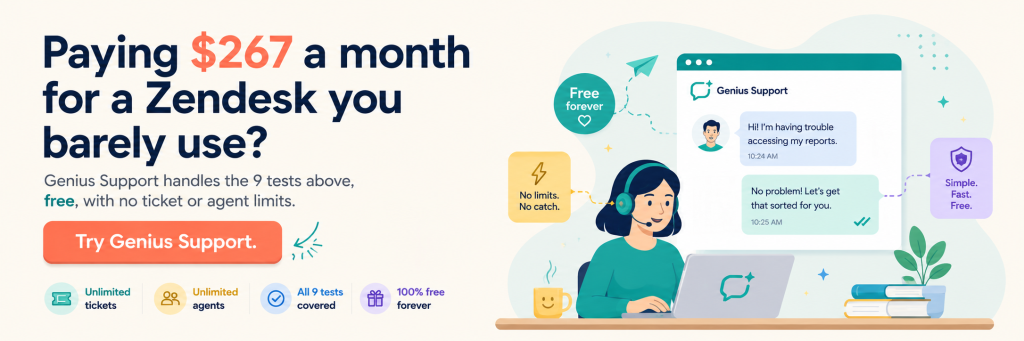
The support team at a 15-person saas company I advised last year was paying $89 per agent per month for Zendesk. They had three support agents. The bill was $267 per month, or about $3,200 a year. When I looked at their ticket volume, it was 47 tickets per week. Zendesk could have handled 10,000 tickets per week. They were paying enterprise software prices to run the equivalent of one busy email inbox. Free help desk software would have done exactly the same job at zero cost. They had never seriously evaluated free help desk software because nobody had time, and Zendesk auto-renewed every year.
This is the most common pattern in the help desk software market. The paid platforms are excellent at scale. They are massively overbuilt for the small support team. Most small businesses with under 200 tickets per week are paying for capacity they will never use, sometimes for years.
The honest story is that free help desk software has caught up enough that, for most small support volumes, the gap between free and paid is mostly in support contracts and edge-case integrations. The core ticketing workflow, multi-channel intake, automation, knowledge base, reporting. All present in the serious free options.
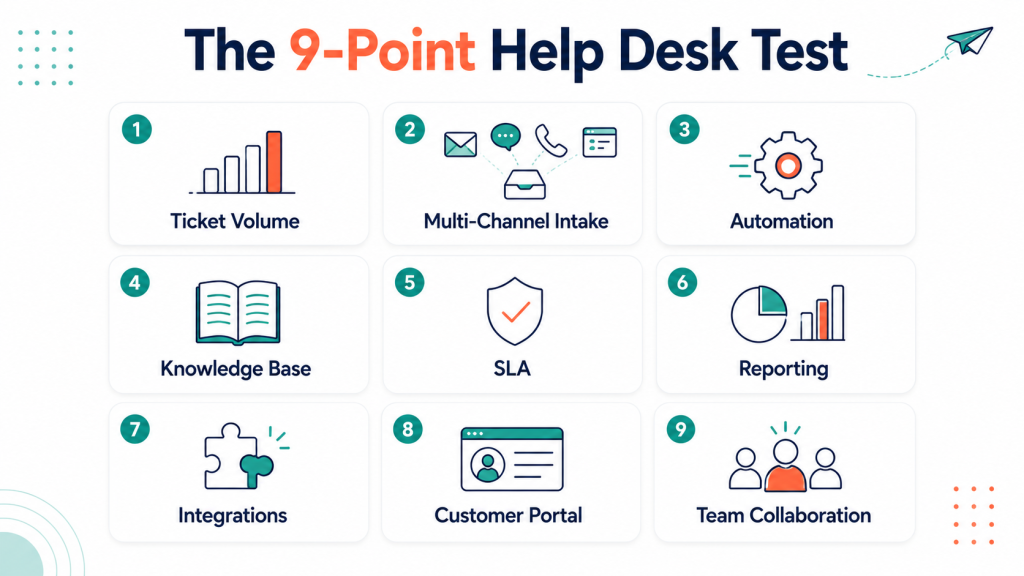
This piece walks through what free help desk software does at small support volumes, the nine tests every team should run before committing to any platform, and where free still falls short. I call the framework the 9-Point Help Desk Test. It is what we use at Xgenious when a small business asks us to evaluate their support tooling.
If you want the broader picture of how the Genius free software suite fits together, our overview of free business software for small business covers that. This piece is about the help desk side only.
Table of Contents
Why paid help desk software is overkill for most small teams
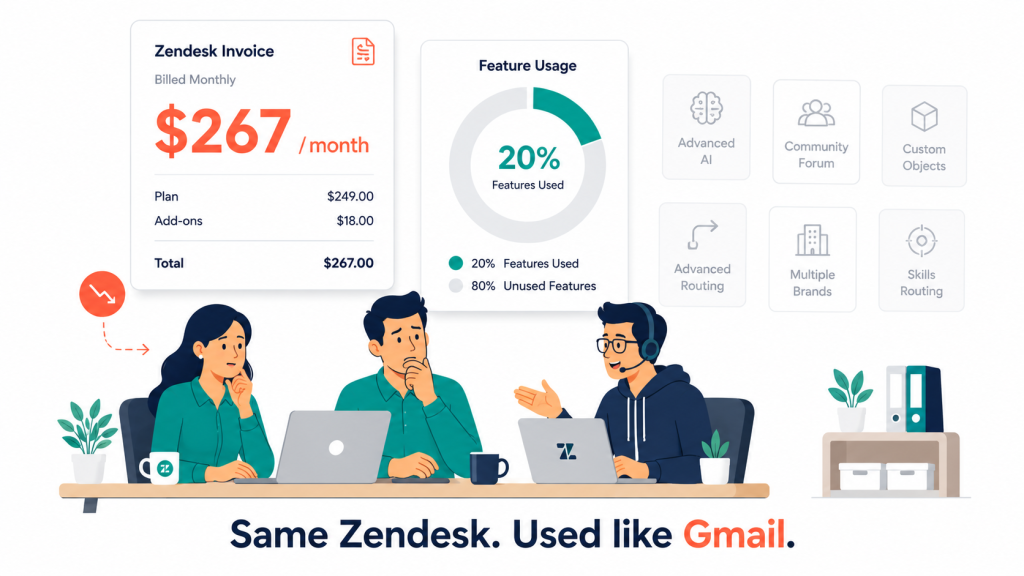
The math on paid help desk software is similar to other saas overpay patterns. Zendesk Suite Growth costs $89 per agent per month. Freshdesk Pro is $49 per agent. HubSpot Service Hub Professional is $90 per seat. A team of five agents pays $245 to $450 per month, or $2,940 to $5,400 per year, before any add-ons.
Most of that money goes toward features small teams do not touch. Custom SLA policies. Multi-brand portals. Round-robin agent routing with skills-based weighting. Advanced reporting with custom dashboards. AI-powered ticket suggestions. These are useful at scale. They are wasted on a team handling 100 tickets a week.
According to the Zendesk Customer Experience Trends Report, most small businesses use under 20 percent of the features in their help desk software. The other 80 percent is paid for and ignored. The same pattern runs through paid school software and paid HR software for small business.
The quieter cost is agent training overhead. Paid platforms come with elaborate configuration that needs onboarding time. A new agent on Zendesk takes about a week to feel productive. The same agent on a focused free help desk software can be answering tickets within an afternoon.
Free help desk software changes the math. The serious free options handle 100 to 500 tickets per week without difficulty, support multi-channel intake, include a knowledge base, and produce useful reporting. For most small teams, that is the entire job. The remaining 80 percent of paid features is the part that goes unused.
What free help desk software does at small support volumes
Five years ago, “free help desk software” meant a stripped tier from a paid vendor with a strict ticket cap and a permanent upgrade nag. That is still common, but a parallel category has grown. Genuinely complete free help desk software built for small support volumes from the start.
What comes standard now
The features that work well across serious free help desk software include generous ticket volume, email-to-ticket intake, basic automation and routing, a knowledge base, customer portal, agent collaboration, and reporting. None of these were universally available in free help desk software in 2021. They are baseline today.
Where free still trails paid
The biggest remaining gap is enterprise-grade SLA management with custom escalation paths. Paid platforms handle multi-tier SLAs with breach alerts and weighted priorities. Free options handle simple SLAs (first response in X hours, resolution in Y hours) but rarely the elaborate policies that enterprise B2B support needs. The second gap is deep integration depth. Paid platforms have hundreds of pre-built integrations. Free options have dozens, which covers the common cases but leaves edge cases as manual work. The smallest gap is guaranteed support response times. Paid help desk vendors include 24/7 support contracts at higher tiers. Free options rely on community support or email with same-week response, which is fine until something breaks at a bad moment.
If your small business handles under 500 tickets per week, has simple SLAs, and uses common tools, free help desk software covers your usage. If you need elaborate SLA policies, niche integrations, or guaranteed overnight support, the question becomes whether the paid upcharge is worth what you currently pay for everything else.
The 9-Point Help Desk Test framework for free help desk software
The 9-Point Help Desk Test is nine tests, each scored against your team’s real support volume rather than against a marketing checklist. I built the framework after watching support teams pick free help desk software based on demo videos and discover the limits two weeks later when a real Tuesday morning hit.
I order the tests by how much pain each one causes when it is missing or weak. Ticket volume and multi-channel intake are at the top because they decide whether the platform can handle your business at all. Automation, knowledge base, and SLAs are next because they affect daily efficiency. Reporting, integrations, customer portal, and collaboration are lower because they are operational polish that scales with team size.
Walking a free option through all nine tests takes about ninety minutes. That is less time than most teams spend in a single procurement meeting. The audit exposes which tests your team passes today and which it does not, which is useful even if you stay on a paid platform, because you can stop paying for capabilities you never invoke.
The tests below are not in feature-count order. They are in operational priority order. The first three carry roughly two-thirds of the daily support workflow. If those three are weak in a free help desk software option, the remaining six do not matter.
Test 1: Ticket volume limits
The first test is the one that decides everything else. How many tickets does the free help desk software let you handle per month? Some free tiers have hard caps (200 tickets, 500 tickets, 1,000 tickets per month). Others are effectively unlimited. The cap is the boundary between “this works for our business” and “we will hit the upgrade page in three months.”
What to test:
- Total ticket cap per month, if any
- Per-agent ticket caps
- Whether closed tickets count toward the cap
- What happens when the cap is hit (block new tickets, queue them, force upgrade)
- Historical ticket retention (some platforms delete tickets after 30 or 90 days)
A small business handling 100 tickets per week (roughly 400 to 450 per month) fits inside most free tiers. A business handling 300 per week (1,200 to 1,400 per month) hits caps in many free options and needs to pick carefully. Genuinely unlimited free help desk software is rarer than vendors imply, so read the fine print.
The honest test is to estimate your peak monthly ticket volume, add 30 percent for growth and spikes, and look for free help desk software that handles that comfortably without cap pressure.
Test 2: Multi-channel intake
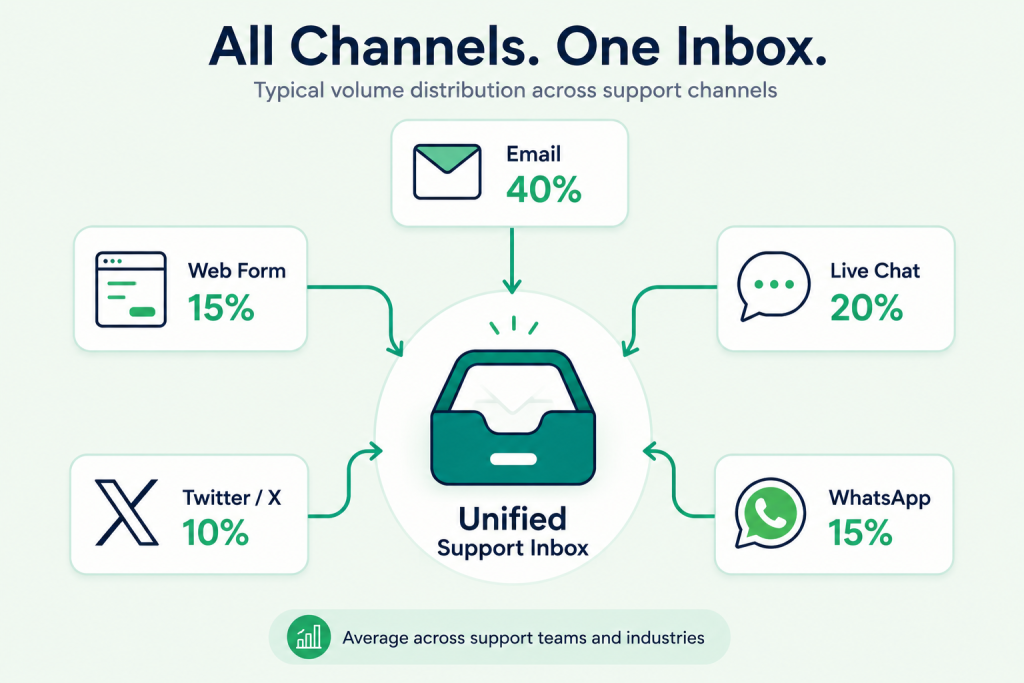
Modern support is not just email. Customers reach out through email, web forms, live chat, social media, and increasingly WhatsApp or SMS. Free help desk software that only accepts email tickets is missing where customers actually are.
What to test:
- Email-to-ticket with custom support domains ([email protected])
- Web form embedded on your site
- Live chat widget for real-time conversation
- Social media intake (Twitter mentions, Facebook messages)
- WhatsApp or SMS for businesses where customers prefer those channels
The serious free help desk software options handle the first three (email, web form, chat) at minimum. Social media and messaging usually live in paid tiers, though some free options include basic Twitter or Facebook intake.
What channels matter most
In our reviews of small support teams, email and web form together account for 70 percent of ticket volume. Live chat handles another 20 percent for businesses with real-time customer expectations. The remaining 10 percent is social and messaging. If your free help desk software covers email, web form, and chat well, you are covering most of your customer base.
Test 3: Automation and routing
Automation is what separates a help desk that scales from one that drowns when ticket volume rises. The basics are auto-assignment by category, auto-response to acknowledge receipt, status changes based on rules, and SLA timer starts. The serious differentiators are conditional rules, time-based triggers, and skill-based routing.
What to test:
- Auto-assignment by ticket category, channel, or customer
- Auto-responder for new tickets with branded copy
- Tag-based routing (VIP customer, urgent issue, refund request)
- Time-based escalation (unanswered after 4 hours, escalate to manager)
- Macros for common agent responses
Free help desk software with strong automation feels less like a queue and more like a system that handles half the work before an agent looks at it. The weak ones require manual triage on every ticket, which adds up to hours per day at any real volume.
Where free options usually stop
Skills-based routing (assigning tickets based on agent expertise) and machine learning suggestions are the two automation features that usually live behind paid tiers. Free help desk software handles rules-based routing well. It rarely handles intelligent routing. Acceptable trade-off for most small teams.
Test 4: Knowledge base
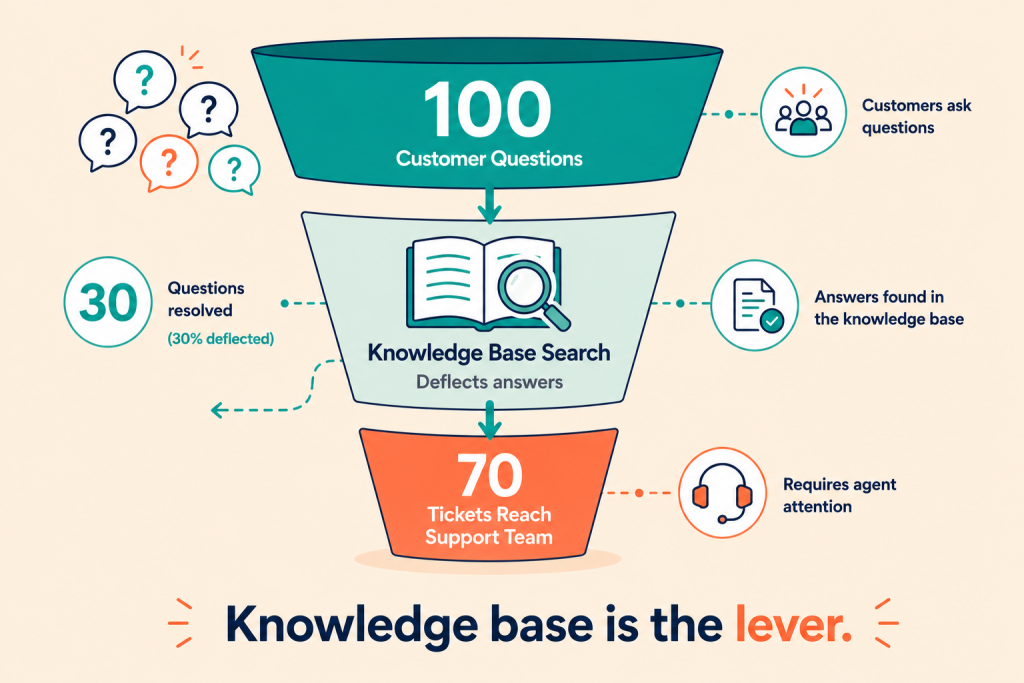
A knowledge base is the single highest-leverage feature in free help desk software because it reduces ticket volume at the source. A good knowledge base article answers a customer’s question without them ever opening a ticket. Multiply that by 100 customers a week and the support team has materially less to do.
What to test:
- Article creation and editing with rich text
- Categories and tagging for navigation
- Search that returns relevant results
- Public visibility settings (public, internal, customer-only)
- Article analytics (which articles get viewed, which deflect tickets)
Free help desk software that includes a public knowledge base is doing the small business a favor. Free options that hide the knowledge base behind paid upgrades miss the point. The knowledge base is the lever that makes the rest of the help desk smaller.
Knowledge base style
The articles that deflect tickets best are short, specific, and skimmable. Avoid the temptation to write comprehensive guides. Customers searching the knowledge base want the answer in 30 seconds, not the encyclopedia entry.
Test 5: SLA and priority management
SLA management is where free help desk software either keeps up with paid or hits its first real wall. The basics (set a first-response target, set a resolution target, see when they are about to be missed) are common in serious free options. The complexity comes when you need different SLAs for different customer tiers, ticket types, or times of day.
What to test:
- First-response and resolution SLAs per ticket type or priority
- Different SLAs for different customer tiers (free, paid, VIP)
- Breach warnings before SLAs miss
- SLA reporting showing met versus missed rates
- Business hours configuration (SLAs pause overnight and weekends)
Most small support teams operate with simple SLAs (respond within 4 hours, resolve within 24 hours). For that pattern, free help desk software is sufficient. If your business operates with multi-tier SLAs tied to contract levels (B2B saas with paid support tiers), you are likely to hit the limits of free options and need paid help desk software for the SLA depth.
Test 6: Reporting and analytics
Reporting is what tells you whether the support team is winning. Tickets handled, average response time, resolution time, CSAT scores, ticket volume trends, repeat issues. Without these numbers, support is running blind.
What to test:
- Per-agent productivity (tickets handled, average response time)
- Customer satisfaction scoring (CSAT) with survey integration
- Volume trends (this week vs last week, this month vs last)
- Resolution rate (first contact, escalated, reopened)
- Repeat issue tracking (which problems keep coming back)
Free help desk software with strong reporting helps the support manager catch problems before they spiral. Free options with weak reporting force the manager to pull spreadsheets and pivot tables every Friday afternoon.
The honest take on free analytics
Free help desk software analytics covers the basics well. What it usually does not include is custom dashboard builders or BI-tool integration (Tableau, Looker, Power BI). For small teams, this is fine. The basics are enough to run the operation. For larger operations that need custom slicing, paid platforms are usually worth the upcharge.
Test 7: Integrations
Integration depth is where free help desk software varies most. Some platforms come with hundreds of native integrations. Others come with a handful and Zapier. Both can work. The question is whether the integrations you actually need are in the box.
The common needed integrations:
- CRM (HubSpot, Salesforce, Pipedrive, or Genius CRM for the free side)
- Email (Gmail, Outlook for ticket-source visibility)
- Slack or Microsoft Teams for agent notifications
- Ecommerce platform (Shopify, WooCommerce for order context)
- Live chat widget for the marketing site
- Knowledge base search inside the chat widget
Free help desk software with native integrations to these tools saves the team from constantly switching contexts. Free options that rely on Zapier for everything work but introduce delays and break occasionally.
What about API access
API access is the integration safety net. Even if the free platform does not natively integrate with your tool, an open API means you can build the integration yourself or hire someone to. Most serious free help desk software includes API access on the free tier, though some throttle the request rate.
Test 8: Customer portal
A customer portal is where ticketing meets self-service. Customers log in, see their open tickets, search the knowledge base, and submit new tickets through a branded surface that looks like part of your business rather than a generic help desk.
What to test:
- Branded portal with your colors, logo, and domain
- Customer ticket history visible to them
- Self-service ticket submission with custom fields
- Knowledge base search inside the portal
- Optional community forum where customers help each other
Free help desk software with a real customer portal feels professional in a way that ticket-only systems do not. The platforms that get this right let small businesses present a support experience that looks like a paid platform without the cost.
Some free options skip the portal entirely or paywall the branding customisation. Those are usable but visibly free. Acceptable trade-off if budget matters more than brand consistency.
Test 9: Team collaboration
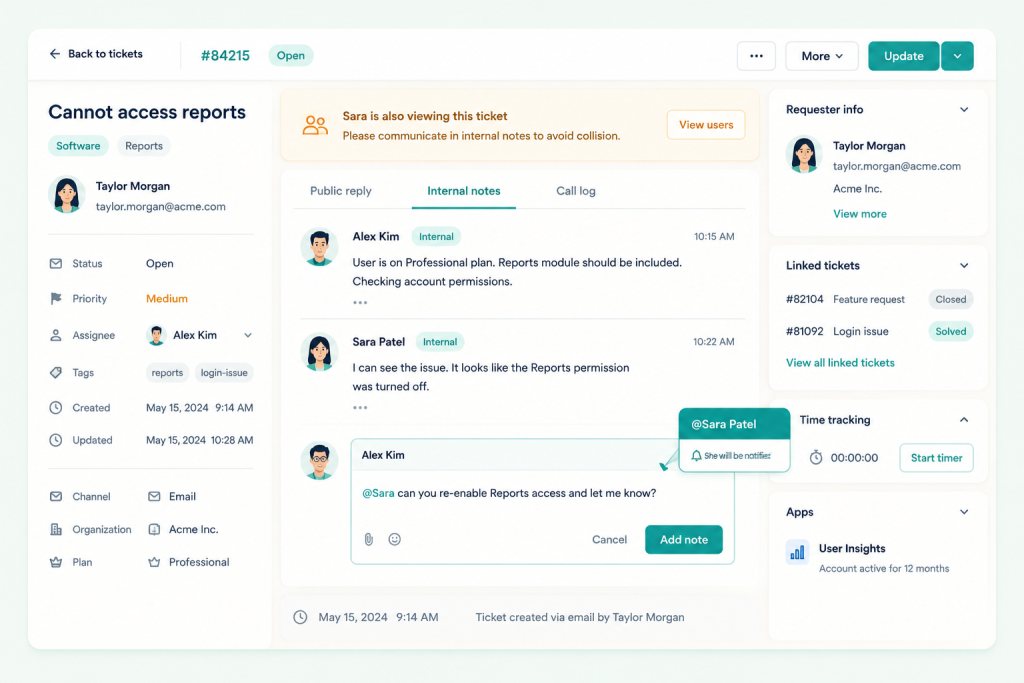
The final test is whether agents can work together inside the platform. A help desk where agents have to email each other about tickets is barely a help desk. The minimum is internal notes on tickets, ticket assignment between agents, and escalation paths.
What to test:
- Internal notes visible to agents but not to customers
- Ticket reassignment with handoff context
- @mentions to pull a teammate into a conversation
- Collision detection (warn when two agents are working on the same ticket)
- Shared inboxes for team-wide categories
Free help desk software with strong collaboration features works well for support teams of three to ten agents. Larger teams start to need more elaborate workflow tooling that usually lives in paid platforms. For most small support teams, the collaboration features in serious free help desk software are sufficient.
Where free hits a wall on collaboration
Shift management, agent scheduling, and workload balancing are the three collaboration features that usually live in paid tiers. If your support team runs 24/7 with shifts, plan to use a paid platform or a separate scheduling tool layered on top.
The 9 free help desk software tools compared
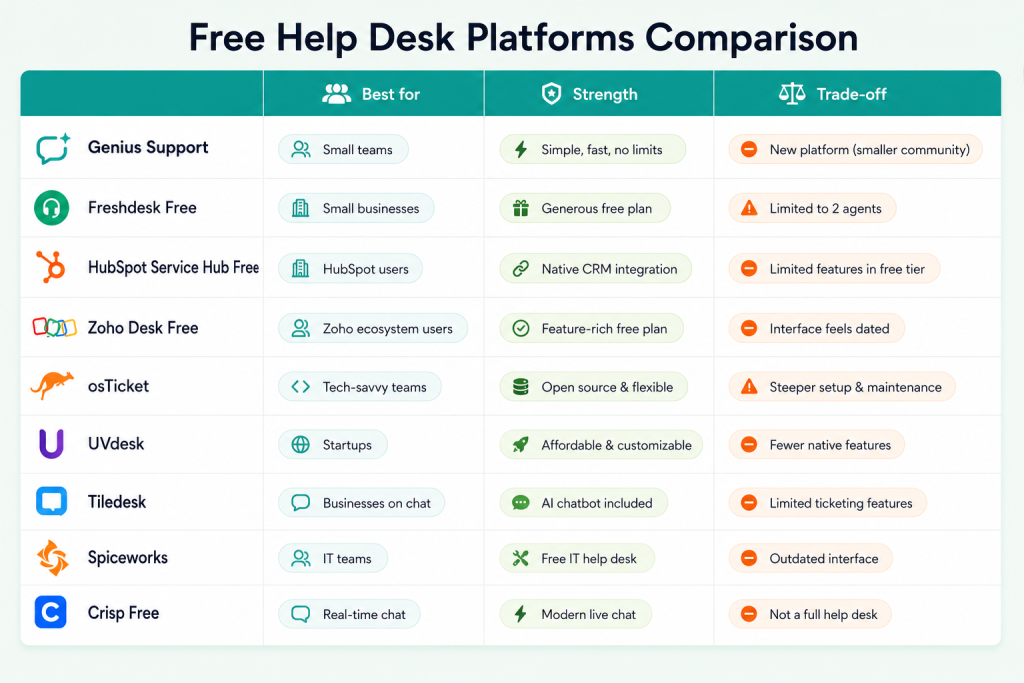
Looking at real platforms turns the test from theory into a buying decision. These are the nine that hold up across the framework.
1. Genius Support
Our own offering at Xgenious, built around the 9-Point Help Desk Test and free without ticket limits. Strong on multi-channel intake, automation, knowledge base, and reporting. Customer portal with branding included. Suitable for support teams from 1 to 50 agents. Full details on the Genius Support product page.
2. Freshdesk Free Tier
The free tier of Freshworks’ help desk. Limited to email intake, basic automation, and a small ticket cap, but solid for very small teams. Good upgrade path to paid Freshdesk if you scale.
3. HubSpot Service Hub Free
Part of HubSpot’s free CRM. Includes ticketing, a knowledge base, and live chat. Strong if you already use HubSpot for marketing or sales because the CRM data is shared. The free tier is generous compared to most.
4. Zoho Desk Free
Three-agent free tier with email, social, and form intake. Knowledge base included. Solid choice for teams already using Zoho’s broader ecosystem.
5. osTicket
Open-source ticketing system, free to self-host. Reliable, well-documented, and used by thousands of small support teams worldwide. Trade-off is self-hosting overhead.
6. UVdesk
Open-source help desk built for ecommerce support specifically. Strong integrations with WooCommerce, Shopify, eBay, and Amazon. Free self-hosted edition with paid SaaS option.
7. Tiledesk
Open-source live chat and ticketing combined. Strong for businesses that want chat-first support. WhatsApp integration available.
8. Spiceworks
Free cloud help desk supported by ads in the platform. Suitable for IT support teams. Lower polish than the commercial options but completely free with no ticket caps.
9. Crisp Free Tier
Modern chat-first help desk with a free tier for very small teams. Two-agent limit on the free tier but the chat experience is polished.
The honest summary: for small support teams that want polished free help desk software without self-hosting overhead, Genius Support, HubSpot Service Hub Free, or Zoho Desk Free are the strongest options. For technical teams comfortable self-hosting, osTicket and UVdesk are credible. Spiceworks is the budget option if ads in the platform are acceptable.
For broader market context, the HubSpot State of Service research and Gartner’s customer service insights both track how the category is evolving.
Common mistakes when picking free help desk software
A few mistakes show up repeatedly when small businesses pick free help desk software.
Mistakes One
The first is underestimating peak volume. The platform that handles 100 tickets a week comfortably might collapse at 250 tickets during a launch week. Free help desk software with low ticket caps creates a forced upgrade exactly when you can least afford the workflow disruption. Pick a free option whose ceiling is well above your projected peak.
Mistakes Two
The second mistake is choosing free help desk software based on the chat widget design rather than the underlying ticketing system. The chat widget is what customers see for 30 seconds. The ticketing system is what agents see all day. Optimise for the agent experience, because that decides retention.
Mistakes Three
The third is ignoring the knowledge base as a feature. A platform with a strong knowledge base reduces ticket volume by 20 to 40 percent over six months as customers self-serve. A platform without one keeps ticket volume artificially high. The math compounds.
Mistakes Four
The fourth is buying a free help desk that does not integrate with your CRM. The conversation history with a customer should pull in their order data, their account tier, and their interaction history. Without that, agents are asking customers for context they should already have. Free help desk software with native CRM integration (or strong API access) is worth picking even if the rest of the platform is slightly weaker.
Mistakes Five
The fifth is assuming all free tiers are equal. The vendors that built genuinely complete free help desk software are betting on long-term relationships. The ones that built freemium funnels with aggressive ticket caps and feature paywalls are betting on upgrade pressure. Both work for some teams, but read the upgrade page carefully before committing.
Final word on free help desk software
Most small businesses could move to free help desk software tomorrow and lose nothing they use. The blocker is not the software. The blocker is the auto-renewal contract and the assumption that paid means better. That assumption was true ten years ago. It is no longer true for the small support volumes a typical small business handles.
Run the 9-Point Help Desk Test on your current platform and on one or two free options. Most teams that do this end up surprised at how few tests they actively use, and at how cleanly free help desk software now covers those tests. The decision to switch becomes obvious once the audit is done. The decision to stay also becomes more defensible, because you have evaluated rather than just renewed.
If your support team is leaning toward switching, Genius Support covers the nine tests out of the box and is free without ticket or agent limits. Combined with the broader free business software suite for small business, it is the package we recommend when a small business wants modern free help desk software without the maintenance burden of self-hosting. Whatever route you take, run the audit first. The audit is what separates a real decision from another auto-renewal.
Frequently asked questions about free help desk software
Is free help desk software really free, or are there hidden costs?
The fully free options (osTicket, UVdesk Community, Tiledesk, Spiceworks) are genuinely free but require self-hosting or accept ads in the platform. The hosted commercial free options (Genius Support, HubSpot Service Hub Free, Zoho Desk Free, Freshdesk Free, Crisp Free) are free without server costs but may have agent count limits or ticket caps. The serious options are genuinely free for typical small support usage. Hidden costs to watch for are migration time when switching, integration costs with non-supported tools, and support upgrade fees if you need guaranteed response times.
How many tickets can free help desk software handle per month?
Most serious free help desk software options handle 500 to several thousand tickets per month without performance issues. Some have hard caps (Freshdesk Free at around 1,000 tickets per month) and some are effectively unlimited (Genius Support, osTicket, HubSpot Service Hub Free). For most small businesses under 500 tickets per week, free options handle the load without difficulty. Beyond that volume, paid platforms become more cost-effective because the advanced automation and routing start to pay back.
What about data security with free help desk software?
Hosted free platforms typically run on the same cloud infrastructure as paid platforms and use the same encryption standards. The security question is less about free versus paid and more about the vendor’s specific practices: where data is stored, who can access it, what backups exist, and what happens if you leave. Self-hosted free options put security entirely in your hands, which is a feature for technical teams and a risk for non-technical ones.
Can free help desk software handle live chat?
Yes. The serious free help desk software options include live chat as a core feature, not an add-on. HubSpot Service Hub Free, Crisp Free, Genius Support, and Tiledesk all include real-time chat with knowledge base integration. Some put advanced chat features (chatbots, multi-language, chat routing rules) behind paid tiers, but basic chat is standard.
Should I use free help desk software if I plan to scale to 50 agents?
Yes, with a migration plan. Free help desk software fits well in the 1 to 20 agent range. Migration to paid becomes worth doing around 20 to 50 agents, when the advanced automation, custom reporting, and dedicated support contracts start to pay back. Pick a free option with clean data export and an upgrade path to paid if you already know which paid platform you would move to.
How do free help desk platforms make money?
Most free help desk software vendors offer paid add-ons (premium support, advanced automation, AI features) or paid upgrades for teams past a certain agent count. Open-source projects make money through services around their software (hosting, integration, customisation). Genius Support is free as part of the broader Xgenious product suite, with paid services available if you want hands-on implementation help.
What is the best free help desk software for a fully remote support team?
For fully remote support teams, the best fit is one that handles asynchronous handoff, time zone visibility, and clear collaboration features. Genius Support, HubSpot Service Hub Free, and Zoho Desk Free all support this. Avoid free options designed for in-office teams with strict shift-based assumptions, because they assume agents overlap geographically.