




The first sign that a “best school management software” list is fake is that the article’s #1 pick is also the advertiser. Most listicles on this topic are sponsored content with three sentences of generic praise per platform and a referral link at the end of each section. I have read about thirty of them over the last two years while helping schools evaluate platforms. The pattern is identical. The best school management software for the reader’s actual situation is buried at position seven or omitted entirely.
This piece is different in one way. I have no incentive to push you toward any specific platform, because we make our money on custom builds, not affiliate commissions. The best school management software for your school depends on your size, budget, regulatory environment, and how much your staff really uses the platform. Twelve platforms below, each scored against an honest 8-point framework, with our own platform (Genius School Management) placed at position 2 because that is where it ranks for the school size it serves best.
Pick 1 is PowerSchool, because PowerSchool is the most-used school management software in the world. That does not mean it is the best for your school. Position in this list is not a ranking of overall greatness. It is a starting point for matching the platform to the school. I explain my scoring criteria up front so you can disagree with the rankings if your priorities differ from mine.
If you want the broader free-software view that includes a deeper look at Genius School Management specifically, our free school management software guide covers that. This piece is the wider 12-platform comparison, paid and free both.
Table of Contents
Why most “best school management software” lists are useless
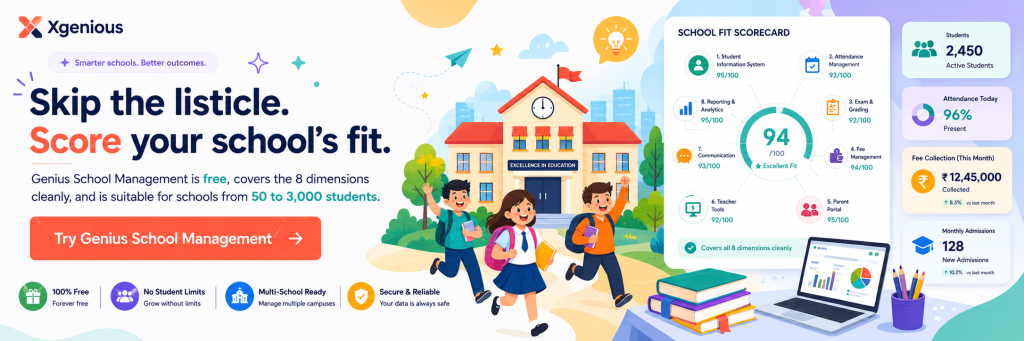
The school management software comparison space online is one of the most polluted areas of saas content. Vendors pay listicle sites for placement. Review aggregators bury negative feedback. Sponsored “expert picks” rotate based on whoever has the biggest current ad spend. The schools I have worked with say they could not tell which platforms were being recommended versus which were being paid for, and they are right, because most lists do not disclose either.
The three problems with most “best school management software” lists:
- The author has never run a school. The recommendations are written by content marketers based on vendor marketing pages, not by anyone who has used the platform daily for a year.
- Affiliate commissions distort the order. The platform offering the highest referral fee ends up at position 1, regardless of fit.
- The criteria are vague. “Easy to use” and “great features” without a structured scorecard means the recommendations cannot be compared apples to apples.
Honest comparison of best school management software requires three things the typical listicle skips. A defined scorecard so you can see the criteria. Honest placement of platforms where they actually fit (which means putting some platforms low if they do not match most schools). And clear “best for” tags so the reader can self-select rather than being pushed toward whatever paid the most.
I do not promise this piece is perfect. I do promise the scorecard is real and the placements reflect the criteria. If you disagree with a placement, the scorecard tells you why I ranked it where I did, and you can adjust based on your own priorities.
12 Best School Management Software
| Platform | Best for | Strength |
|---|---|---|
| Genius School Management | Small to mid schools (50 to 3,000 students) wanting free without per-student limits | Complete 10-module coverage at zero license cost |
| Alma | US independent and charter schools wanting modern UX | Clean interface and fast 2 to 4 week implementation |
| MySchool | International schools using IB, Cambridge, or American curriculum | International-school-specific features and multi-language report cards |
| PowerSchool | Large US public school districts with IT staff | Deepest state-reporting and integration ecosystem |
| Fedena | Emerging-market schools with technical staff | Wide module coverage on open-source license |
| Gradelink | Small US Catholic and other religious private schools | Religious-school-specific features at low per-student price |
| Classter | International schools and multi-institution groups | K-12 plus higher-ed flexibility in one platform |
| FACTS / RenWeb | US private and parochial schools | Integrated tuition management and financial aid |
| Skyward | US public districts in Midwest strongholds | Integrated municipal-style accounting |
| OpenEduCat | Schools already using Odoo for other business functions | ERP integration via the Odoo ecosystem |
| Edsby | Schools in Canada, Australia, UK prioritising parent engagement | Social-learning interface and strong parent portal |
| SchoolTime | Small private schools in emerging markets | Simple, affordable, fast to deploy |
The 8-Point Scorecard for the best school management software
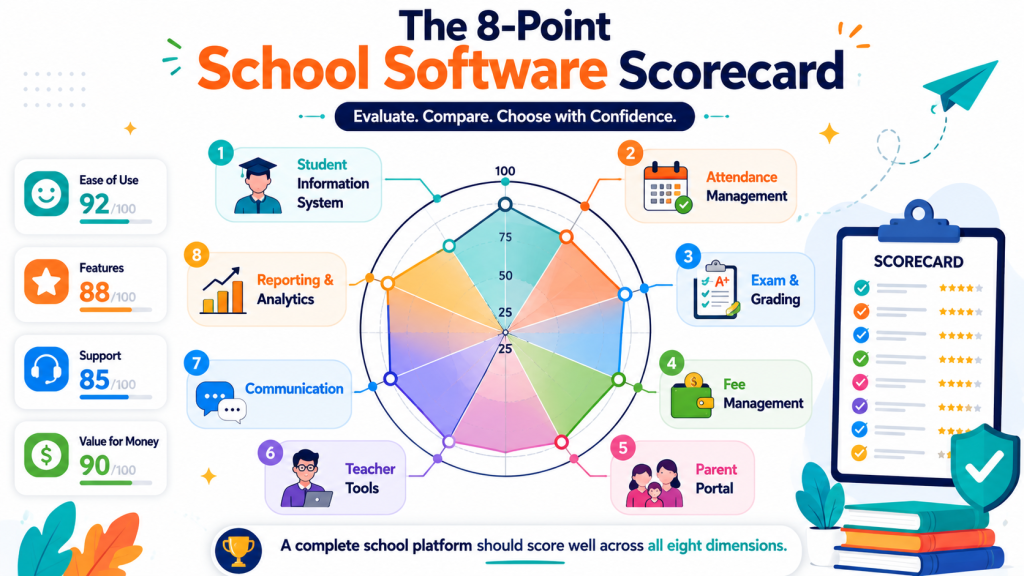
The 8-Point School Software Scorecard rates each platform on eight dimensions that decide whether the best school management software for a typical school actually delivers in practice. I order the dimensions by how much they affect daily satisfaction.
The eight points:
- Core SIS quality (how clean the student information system is)
- Attendance and timetable usability (how fast teachers can mark attendance, how well the timetable builder works)
- Fee management and online payments (whether the platform handles the financial side cleanly)
- Parent portal experience (what parents see and how often they use it)
- Teacher dashboard (what teachers see when they log in)
- Reporting and analytics (whether the school can answer board-meeting questions without spreadsheets)
- Total cost (license cost plus implementation plus training)
- Implementation difficulty (how long until the school is live and stable)
Each platform below is scored 1 to 5 on each dimension, with total scores out of 40. I include the score in each pick so you can see how I rated it. The schools I have advised weight cost and implementation difficulty more heavily than the marketing pages suggest, because those two factors decide whether the platform gets used or shelved.
A 5 on cost does not mean “expensive.” It means “best value for what you get.” A 5 on implementation means “fast to roll out without a consultant.” A 5 on core SIS means “the data model holds up over years.”
The best school management software for your school is the one that scores highest on the dimensions you care most about. Use the scorecard as a starting point, then adjust the weights based on what your school needs.
Pick 1: PowerSchool
PowerSchool is the most-used student information system in the United States and the de facto standard for large public school districts. Around 45 million students worldwide are managed in PowerSchool. The platform is mature, feature-rich, and integrates with almost every K-12 ecosystem tool that exists.
The strengths are scale and integration depth. PowerSchool’s SIS, attendance, gradebook, and state-reporting modules are deep, with the configuration flexibility that large districts need for compliance. Their parent portal is widely adopted because most parents have used it at one school or another.
The trade-offs are price and complexity. PowerSchool is built for districts with IT staff and budget to match. Per-student pricing typically runs $7 to $15 per year, and implementation usually requires a paid consultant. Smaller schools find the platform overwhelming and end up using a fraction of the features.
Scorecard: SIS 5, Attendance 4, Fees 3, Parent portal 5, Teacher dashboard 4, Reporting 5, Cost 2, Implementation 2. Total: 30/40.
Best for: large public school districts with IT staff, multi-school deployments, and state-reporting requirements. PowerSchool is the best school management software for the high-volume regulated-district segment. Not a fit for small private schools or budget-constrained operations.
Pick 2: Genius School Management
Genius School Management is our offering at Xgenious, included here because it ranks at position 2 for the school size it serves best. I have scored it honestly using the same scorecard as the other picks.
The strengths are price and module completeness for small to mid schools. Genius School Management is free without per-student limits, includes all ten modules from the standard school software audit, supports custom report card templates, and integrates with major payment gateways for online fee collection. Implementation typically takes one to two weeks for a school with clean data.
The trade-offs are state-specific compliance reporting (US districts with complex state submission requirements should still consider PowerSchool or Skyward) and the absence of vendor-provided 24/7 support contracts. Email support with same-week response is standard.
Scorecard: SIS 4, Attendance 4, Fees 4, Parent portal 4, Teacher dashboard 4, Reporting 4, Cost 5, Implementation 5. Total: 34/40.
Best for: small to mid-sized schools (50 to 3,000 students) that want the best school management software available without per-student pricing. Full details on the Genius School Management product page.
Pick 3: Skyward
Skyward is PowerSchool’s most credible direct competitor in the US K-12 district market. The platform is most popular in the Midwest and serves large public districts with similar feature depth to PowerSchool. Around 10 million students are managed in Skyward worldwide.
The strengths are clean state-reporting for the states Skyward targets, strong finance and payroll integration (Skyward includes municipal-style accounting tools that PowerSchool does not), and a slightly more conservative interface that some district administrators prefer.
The trade-offs are limited market presence outside the US, smaller integration ecosystem than PowerSchool, and per-student pricing similar to PowerSchool ($6 to $14 per year). Implementation is comparable to PowerSchool in complexity.
Scorecard: SIS 4, Attendance 4, Fees 4, Parent portal 4, Teacher dashboard 3, Reporting 5, Cost 2, Implementation 2. Total: 28/40.
Best for: US public school districts in Skyward’s regional strongholds (Wisconsin, Texas, parts of the Midwest) and districts that need integrated municipal accounting.
Pick 4: Fedena
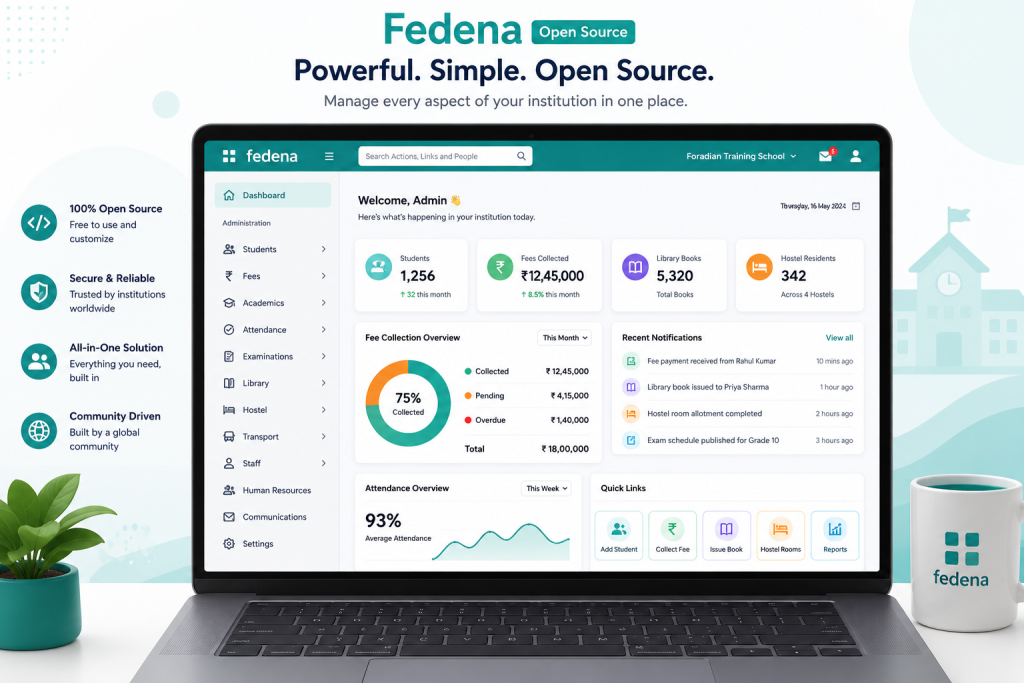
Fedena is the original major open-source school management platform. The community edition is genuinely free and self-hosted. A paid hosted version (Fedena Pro) is available through partners. The platform has been in active development since 2008 and is used by thousands of schools across Asia, Africa, and the Middle East.
The strengths are module coverage and customisation flexibility. Fedena handles SIS, attendance, gradebook, fees, transport, hostel, library, and online classes out of the box. Plugins extend the platform further. The open-source nature means schools can modify the platform if they have technical staff.
The trade-offs are the self-hosting overhead (you need a server and someone to maintain it) and the dated interface in the community edition. The Pro version has a more modern UI but adds cost.
Scorecard: SIS 4, Attendance 4, Fees 4, Parent portal 3, Teacher dashboard 3, Reporting 4, Cost 5 (community), Implementation 3. Total: 30/40.
Best for: schools in emerging markets that want the best school management software at zero license cost and have access to technical staff for self-hosting.
Pick 5: Edsby
Edsby is a Canadian-built school management platform that positions itself as a learning-management-plus-SIS hybrid. The platform is widely used in Canada, Australia, and parts of the UK. Strong parent engagement features and a learning-platform feel that goes beyond pure administration.
The strengths are the social-learning interface (teachers post assignments, students respond, parents see the activity stream) and strong calendar and event handling. The platform is built for schools that want to engage parents continuously rather than just send report cards twice a year.
The trade-offs are price (per-student pricing in the $8 to $12 range) and the fact that some traditional SIS features are less developed than competitors. The platform is stronger on the learning side than the administrative side.
Scorecard: SIS 3, Attendance 4, Fees 3, Parent portal 5, Teacher dashboard 4, Reporting 3, Cost 2, Implementation 3. Total: 27/40.
Best for: schools in Canada, Australia, or the UK that prioritise parent engagement and learning-platform features alongside core SIS.
Pick 6: Gradelink
Gradelink is a school management platform popular with small private schools, especially Catholic schools in the US. The platform is built for the specific needs of religious schools (tuition management, donor management, sacrament tracking) and has a long history in that segment.
The strengths are the private-school-specific features and the relatively low price for a paid platform ($1 to $3 per student per year for smaller schools). Customer support has a strong reputation in the segment. Implementation is straightforward for the schools it targets.
The trade-offs are limited fit outside the private-school segment, less depth on advanced features compared to PowerSchool or Skyward, and an interface that some find dated.
Scorecard: SIS 4, Attendance 4, Fees 4, Parent portal 4, Teacher dashboard 3, Reporting 3, Cost 4, Implementation 4. Total: 30/40.
Best for: small to mid private schools, especially Catholic or other religious schools in the US that want the best school management software built around tuition and donor workflows.
Pick 7: Alma
Alma is one of the more modern entrants in the K-12 SIS space. The platform was built from scratch in the last decade with a cleaner interface than the legacy options. Most popular with US independent schools and progressive public charter schools.
The strengths are the user interface (significantly better than PowerSchool’s or Skyward’s) and the implementation speed (most schools are live in two to four weeks rather than the months that legacy platforms require). Strong on competency-based grading for schools that have moved away from traditional letter grades.
The trade-offs are smaller market presence (newer platform), less depth on state-reporting for districts that need every state-specific form, and per-student pricing around $7 to $11 per year.
Scorecard: SIS 4, Attendance 5, Fees 4, Parent portal 4, Teacher dashboard 5, Reporting 4, Cost 3, Implementation 4. Total: 33/40.
Best for: US independent schools and charter schools that want the best school management software with a modern interface, fast implementation, and competency-based grading support.
Pick 8: Classter
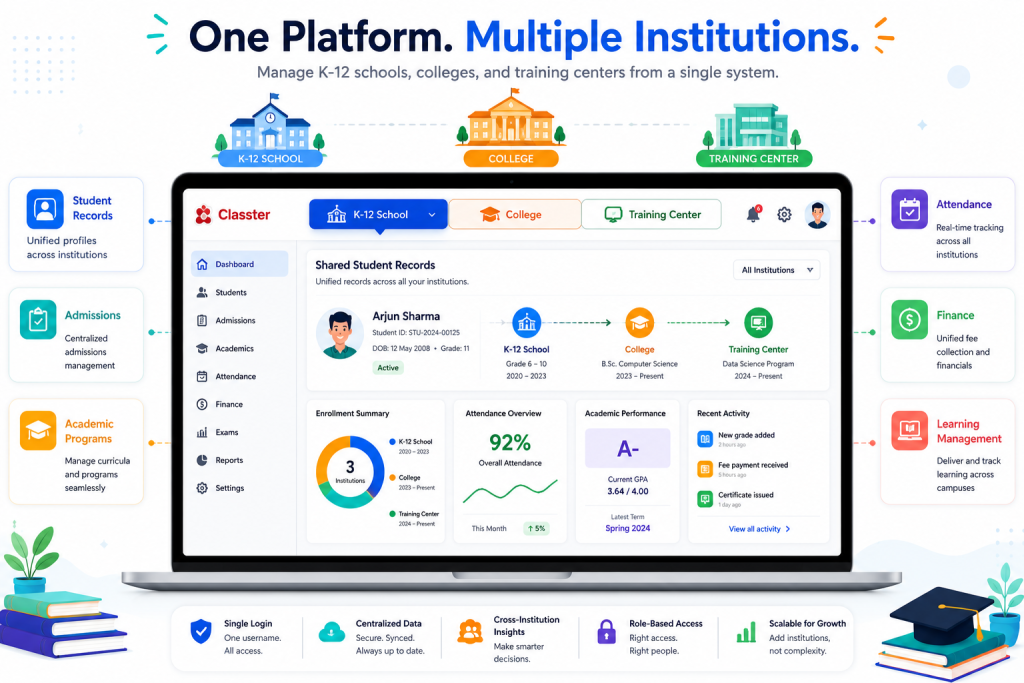
Classter is a European-built school management platform with strong presence in international schools and higher education. The platform targets K-12, higher ed, and vocational training from a single codebase, which makes it unusually flexible.
The strengths are multi-institution support (a single Classter installation can manage K-12, a college, and a training center together), strong multi-language support, and a feature set that scales from primary schools to universities. Useful for school groups that operate multiple institutions.
The trade-offs are the configuration complexity that comes with the flexibility (Classter takes longer to set up than purpose-built K-12 platforms) and pricing that is higher than the smaller-school options ($5 to $10 per student).
Scorecard: SIS 4, Attendance 4, Fees 4, Parent portal 4, Teacher dashboard 3, Reporting 4, Cost 3, Implementation 3. Total: 29/40.
Best for: international schools, multi-institution school groups, and education organisations that need K-12 plus higher ed in one platform.
Pick 9: SchoolTime
SchoolTime is a long-standing school management platform aimed at small to mid private schools globally. The platform is straightforward and covers the standard modules without trying to be enterprise-grade. Used by schools across Asia, the Middle East, and Africa.
The strengths are simplicity and price (significantly cheaper than the major platforms) and a relatively short implementation cycle. Suitable for schools that want a functional platform without complexity.
The trade-offs are limited innovation pace (the platform has not changed dramatically in recent years), a basic interface, and weaker support for online payments and parent portal features compared to newer entrants.
Scorecard: SIS 3, Attendance 4, Fees 3, Parent portal 3, Teacher dashboard 3, Reporting 3, Cost 4, Implementation 4. Total: 27/40.
Best for: small private schools in emerging markets that need a straightforward functional platform at a low price and do not need leading-edge features.
Pick 10: MySchool
MySchool is a school management platform built for international K-12 schools, particularly those following IB, Cambridge, or American curriculum models. The platform targets the international school market specifically and has features tuned to those needs.
The strengths are international-school-specific features (IB-style grade scales, multi-language report cards, parent portals localised for non-native English speakers) and good module coverage for the segment. Used by international schools across Asia, Europe, and the Middle East.
The trade-offs are limited fit for public school districts (the platform is not built for state-reporting), pricing in the $6 to $10 per student range, and a focus on international schools that means the marketing and support feel less relevant for domestic schools.
Scorecard: SIS 4, Attendance 4, Fees 4, Parent portal 4, Teacher dashboard 4, Reporting 4, Cost 3, Implementation 4. Total: 31/40.
Best for: international schools following IB, Cambridge, or American curriculum models that want the best school management software for diverse student populations and parent communities.
Pick 11: FACTS / RenWeb
FACTS (formerly RenWeb) is the dominant school management platform for private and parochial schools in the US, especially Catholic schools. The company also handles tuition management and financial aid processing, which makes it sticky for the segment.
The strengths are the integration between school management and tuition management (a parent can pay tuition, view grades, and message teachers in one portal), strong private-school-specific features, and a long track record in the segment. Customer support is generally well regarded.
The trade-offs are price (private-school pricing is usually higher than public-school equivalents because the customer base can absorb it), interface that has not been modernised at the pace of newer entrants, and limited fit outside the US private school segment.
Scorecard: SIS 4, Attendance 4, Fees 5, Parent portal 4, Teacher dashboard 3, Reporting 4, Cost 2, Implementation 3. Total: 29/40.
Best for: US private and parochial schools that want integrated school management plus tuition and financial aid in one vendor.
Pick 12: OpenEduCat
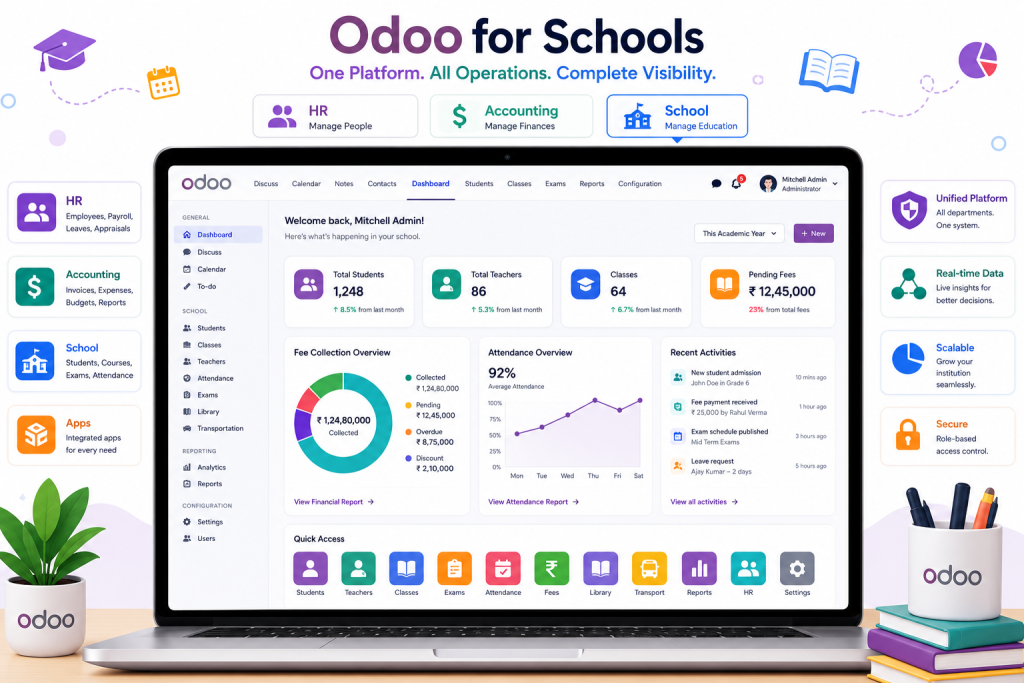
OpenEduCat is an open-source school management platform built on the Odoo ERP framework. The platform is unusual in that it inherits Odoo’s ERP capabilities, which means it can handle school management alongside HR, accounting, and inventory in one system.
The strengths are the ERP integration (useful for schools that want to consolidate tools), the Odoo ecosystem (which gives access to thousands of additional modules), and the open-source license (the community edition is free to self-host).
The trade-offs are the steeper learning curve (Odoo is a complex platform and schools without technical staff find it harder than purpose-built K-12 platforms), weaker parent-facing surface than the focused options, and the operational overhead of self-hosting.
Scorecard: SIS 4, Attendance 3, Fees 4, Parent portal 3, Teacher dashboard 3, Reporting 4, Cost 5 (community), Implementation 2. Total: 28/40.
Best for: schools that already use Odoo for other functions, technical teams comfortable with the framework, and educational organisations that want one platform for school plus business operations.
How to choose the best school management software for your school size
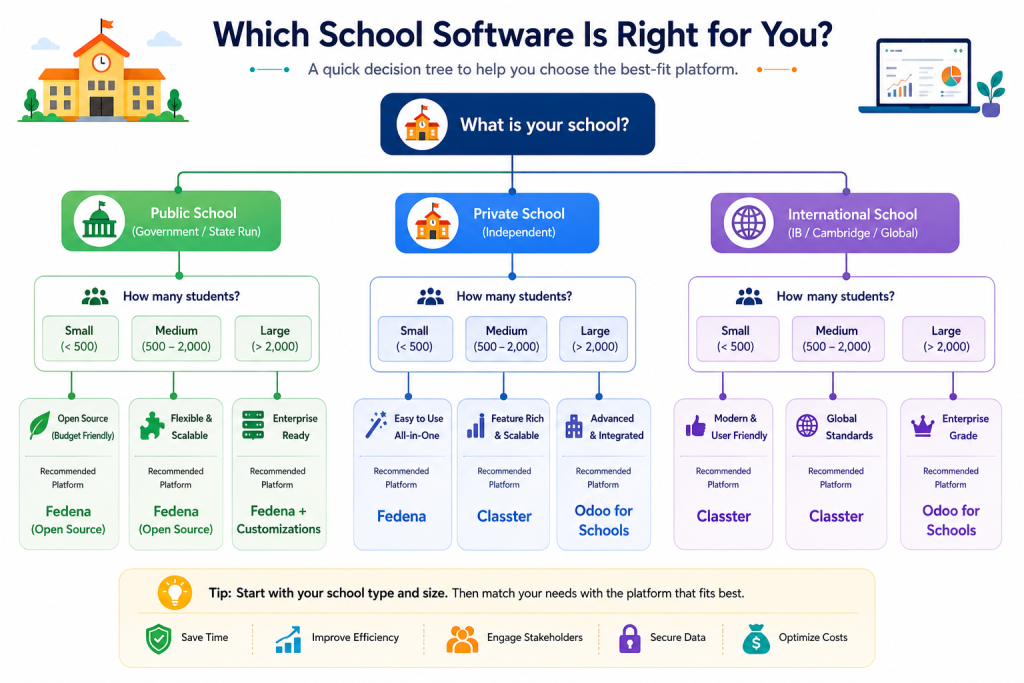
The 12 picks cluster into six buyer profiles that map cleanly to school size and type.
- For large public school districts (5,000+ students, multiple campuses, US state-reporting): PowerSchool and Skyward are the only serious choices. Pick PowerSchool unless your state has Skyward strongholds. Budget $5 to $15 per student per year and plan for a multi-month implementation with paid consultants. The best school management software for this segment is the one with the deepest state-specific reporting.
- For mid-sized public schools or progressive charter schools (500 to 5,000 students, modern interface preferences): Alma is the strongest fit among the paid options. Edsby works for schools that prioritise parent engagement. Genius School Management works if budget is constrained and you can accept the trade-off of less state-specific reporting depth.
- For small private schools (50 to 1,500 students, Catholic or other religious): FACTS / RenWeb dominates the US Catholic segment. Gradelink is the more affordable alternative. Genius School Management is the strongest free option. Pick based on whether tuition management integration matters more than cost.
- For international schools (IB, Cambridge, American curriculum): MySchool and Classter are the segment leaders. MySchool is more focused on international K-12. Classter is broader and works for multi-institution groups.
- For schools in emerging markets with limited budget: Fedena Community, Genius School Management, and SchoolTime are the most practical options. Fedena and Genius offer the most polished free experiences. SchoolTime is the simplest paid option. The best school management software for this segment depends on whether you have technical staff for self-hosting.
- For schools with technical staff that want maximum customisation: Fedena Open Source and OpenEduCat are the strongest choices. Both require self-hosting and ongoing maintenance.
- The best school management software for your school is not the highest-scored platform on the list. It is the platform that fits your size, budget, and priorities the closest. Use the scorecard above to map your priorities, then narrow to two or three options for a real evaluation. A 90-minute demo is worth more than a four-hour comparison spreadsheet.
For broader market research, G2’s school management software category and Capterra’s school management software listings both have user reviews that supplement vendor marketing. UNESCO’s research on ICT in education covers the wider context.
Final word
The best school management software for your school is the one that scores highest on the dimensions you care most about, fits your budget, and your staff actually uses. The 12 platforms above cover the main shapes of buyer in the K-12 market: large public districts, mid-sized progressive schools, private and religious schools, international schools, emerging-market schools, and technical-team-driven open-source builds.
Use the 8-Point Scorecard to map your priorities first, then narrow to two or three options for real evaluation. Most schools spend more time reading comparison articles than evaluating platforms, which is backwards. A 90-minute demo with your real data tells you more than 30 hours of marketing pages.
If your school fits the small-to-mid segment with budget constraints, Genius School Management is our offering at Xgenious and the option I would pick if I were running a school of 200 to 2,000 students today. Free without per-student limits, modern interface, and covers the eight scorecard dimensions cleanly. If you want the deeper feature audit on the free side, our free school management software guide goes into detail. For the broader free business software view, the free business software for small business guide covers the wider Genius suite. Whatever route you take, run the scorecard first. The scorecard separates real decisions from auto-renewals.
Frequently asked questions about the best school management software
What is the best school management software overall?
There is no single best school management software for every school, which is why this article scored 12 platforms against an 8-point framework rather than picking one. PowerSchool is the most-used in large US public districts. Genius School Management is the strongest free option for small to mid schools. Alma is the best modern interface for mid-sized public and charter schools. FACTS / RenWeb dominates US Catholic schools. The best school management software for you depends on your school size, type, and budget.
What is the cheapest school management software?
The cheapest school management software is the free options: Genius School Management (hosted, no per-student limit), Fedena Community Edition (self-hosted, free license), and OpenEduCat Community Edition (self-hosted, free license). Among paid options, SchoolTime and Gradelink offer the lowest per-student pricing for the segments they serve. Total cost includes more than license fees, so factor in implementation and training when comparing.
How long does school management software implementation take?
Implementation time varies by platform complexity and school readiness. Modern hosted platforms like Genius School Management or Alma can be live in one to four weeks for a school with clean data. Legacy enterprise platforms like PowerSchool or Skyward typically take two to six months for a full district rollout, especially if multiple campuses and state-reporting are involved. Plan migration during the summer break for minimum disruption.
Should I pick free or paid school management software?
If your school size and needs fit a free option, pick free. Free school management software has caught up enough that for small to mid schools with standard requirements, the paid options offer little additional value. If you need deep state-specific reporting, multi-campus management, or vendor-provided 24/7 support, paid platforms still have an edge. Many schools start with a free option to validate the use case and migrate to paid only if specific needs emerge. The best school management software for a small school is often the free one.
What are the most important features in school management software?
The dimensions that decide daily satisfaction with school management software are the student information system (data quality), attendance and timetable usability (used daily), fee management with online payments (saves administrative hours), and the parent portal (where parents form their opinion of the school’s technology). Reporting and teacher dashboards matter too, but those four are the ones that drive day-to-day adoption.
Can school management software integrate with Google Classroom or Microsoft Teams?
Most modern school management platforms integrate with Google Workspace for Education and Microsoft 365 Education at some level. Common integrations include single sign-on, calendar sync, and assignment handoff. The depth of integration varies. PowerSchool, Skyward, Alma, Genius School Management, and Edsby all have decent integrations. Always confirm the specific integration depth with a vendor demo, because “integrates with Google” can mean anything from full SSO and assignment sync to a one-time data export.
How do I migrate from one school management software to another?
Migration is the most common reason schools delay switching. The serious platforms (free or paid) include import tools that handle CSV imports of student records, attendance history, and grade history. The migration usually takes two to six weeks depending on data volume and configuration complexity. Plan the migration during summer break, run both systems in parallel for at least one term, and budget time to retrain staff on the new platform.