



Small businesses face numerous challenges in today’s world. One of the biggest challenges is managing their IT infrastructure while keeping their costs under control.
That’s where software as a service (SaaS) comes in. SaaS is a software delivery model in which the software is hosted on the cloud and accessed via the internet.
It’s a popular solution for businesses in the cloud market and alternative to traditional software installation systems. SaaS has the ability to throw out old software on-premise software models.
SaaS offers small businesses numerous benefits, such as reduced costs, increased flexibility, and improved scalability.
In this article we will explore the benefits of using SaaS for small businesses in more detail, outlining how it can help them overcome their IT challenges and achieve their business objectives more effectively.
Quick Answer
- SaaS (software as a service) delivers software over the internet on a subscription, so there is nothing to install or maintain on your own servers.
- The seven core benefits of using SaaS: cost savings, ease of use, scalability, improved security, data backup and recovery, compatibility with easy updates, and time savings.
- SaaS shifts maintenance, security, and updates to the provider, which suits small teams with limited IT resources.
- You pay only for what you need and can scale plans up or down, avoiding large hardware investments.
- SaaS differs from PaaS: SaaS gives you ready-to-use software, while PaaS gives developers a platform to build their own applications.
Table of Contents
What is SaaS?
The term “saas” is used to describe software as a service. SaaS is a way of delivering software applications over the internet, often on a subscription basis.
SaaS applications are also known as web-based software, on-demand software, and hosted software. SaaS works as an alternative to the usual offline software.
The SaaS software development cycle includes design, development, testing, launching, and maintenance. A SaaS development company develops different types of applications like
- HR management software
- Accounting software
Static reports show that the cloud computing services or SaaS market is estimated to be worth approximately 146 billion and about to reach 195 billion US dollars by 2023. The overall SaaS market is continuously growing.
Benefits of Using SAAS for Small Businesses
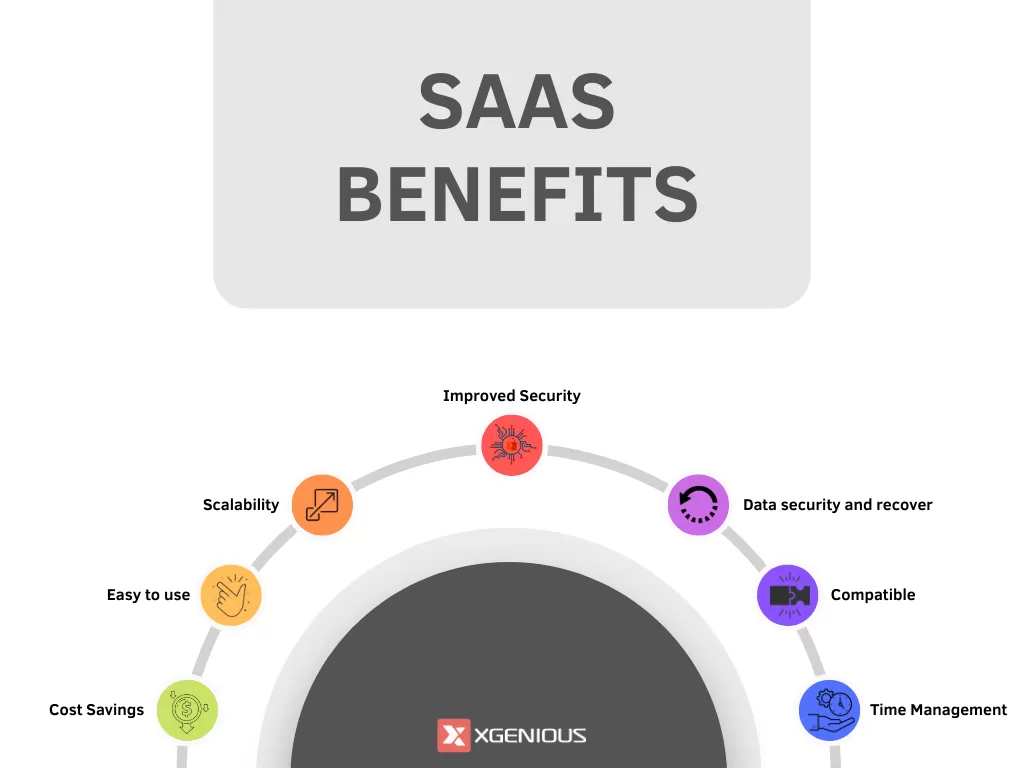
Cost Savings
One of the key benefits of SaaS software is cost savings. With SaaS software, businesses do not have to invest in expensive infrastructure and hardware, as the software is hosted on the provider’s servers.
Additionally, businesses only pay for the services they need and can easily scale up or down as their needs change. This can result in significant cost savings over time.
However, it’s also important to note that while SaaS software can offer cost savings, in some cases custom software development cost may be more cost-effective in the long run, depending on the specific needs of the business.
Easy to Use
SaaS solutions are flexible and easy to use. As SaaS is a cloud-based solution, it can be accessed through the internet with mobile devices. The SaaS solutions are easy to adapt. Anyone can use this software with basic knowledge. Its functions are easy to understand.
Scalability
One of the highlighted advantages of saas is its high scalability. SaaS software providers offer many subscription plans, you can change subscriptions from one to another when needed. You don’t need to buy an additional server. Besides, you will have the flexibility to scale your saas up or down on your needs.
Alternative to traditional software users can access data anywhere in the world. They can access their data and work on it without any trouble.
Improved Security
SaaS providers are provided by IT that secures data. Data is backed up by the provider and hosted on the cloud. Its security is high than traditional software.
Data Security and Recover
In case you lost your data or somehow deleted you can recover your data. SaaS ensures data security and recovery. Unlike any other software except a high budget, no software provides data backup. SaaS supports automated data backups without user involvement and ensures data integrity.
Compatible
SaaS technology is more easily compatible than any other solution. Software updates are time-consuming and costly. But in the saas solutions, updated versions are easily adaptable. Users easily log in to their system in the latest version. It’s the responsibility of the SaaS service providers to manage updates.
Time Management
With traditional software, businesses need to install and configure the software on each individual computer or server. This can be a time-consuming process, especially for businesses with limited IT resources.
With SaaS, however, the software is hosted on the cloud and can be accessed via a web browser. This means that small businesses can save time by avoiding the need to install and configure the software on individual machines.
Is Your Business Ready For SaaS?
Small businesses can benefit greatly from using Software as a Service (SaaS) solutions to streamline their operations and improve efficiency.
However, before adopting a SaaS solution, it’s important to know whether your business is ready for it.
To determine this, start by identifying your business needs and evaluating whether a SaaS solution can meet those needs.
Consider factors such as the complexity of your operations, the size of your team, and the current technology infrastructure in place.
Find out whether your team is prepared to adapt to the new system or not. Finally, if you have the best software and a strong customer foundation you may adapt.
By carefully evaluating these factors, you can determine whether your small business is ready for SaaS.
Software as a Service (SAAS) vs Platform as a Service (PAAS)
| SaaS | PaaS | |
| Definition | A cloud-based software delivery model where software is hosted by a third-party provider and accessed by users via the internet. | A cloud-based computing platform that provides a complete development and deployment environment for software applications. |
| Software delivery | Software applications are delivered over the internet as a service, accessed by users via a web browser. | Developers can build, test, and deploy applications on a cloud-based platform using a set of tools and services provided by the PaaS provider. |
| Responsibility | The provider is responsible for maintaining the software, including updates, security, and backups. | The provider is responsible for maintaining the underlying infrastructure and operating system, while the user is responsible for maintaining the application and data. |
| Customization | Customization options are limited, as the software is typically designed to be used by a wide range of users. | Developers have more flexibility to customize the platform and build applications that meet specific business needs. |
| Scalability | SaaS applications are typically highly scalable, with the ability to add or remove users and storage capacity as needed. | PaaS platforms are designed to be highly scalable, with the ability to scale up or down based on application demand. |
| Cost | SaaS is typically more cost-effective than traditional software, as businesses pay for the software on a subscription basis. | PaaS can be more expensive than SaaS, as businesses may need to invest in additional development and testing resources. |
Wrapping up
Cost saving, ease to use, scalability, improver security, data backup and recovery, and compatibility, are the main advantages of SaaS software. Businesses now look to use SaaS instead of investing in regular software licenses and hardware. Cloud computing is the future and SaaS technology presents an excellent opportunity for businesses.
Frequently Asked Questions
What is SaaS?
SaaS, or software as a service, is a way of delivering software over the internet on a subscription basis instead of installing it on your own computers. The provider hosts the application in the cloud, and you access it through a web browser or app from any device.
What are the main benefits of using SaaS for small businesses?
The main benefits of using SaaS are cost savings, ease of use, scalability, improved security, automatic data backup and recovery, easy updates and compatibility, and time savings. Together they let a small business run powerful software without buying hardware or hiring a large IT team.
Is SaaS cheaper than traditional software?
Usually, yes. With SaaS there is no upfront spend on servers or licenses, and you pay a predictable subscription for only what you use. For some specialized needs a custom build can work out cheaper long term, but for most small businesses SaaS is the lower-cost option.
Is SaaS secure for small businesses?
Generally it is more secure than running your own software. Reputable SaaS providers handle security, encryption, and automatic backups on cloud infrastructure that most small businesses could not match on their own. You should still use strong passwords and review the provider’s security practices.
What is the difference between SaaS and PaaS?
SaaS delivers finished software you use right away, with the provider handling updates and maintenance. PaaS (platform as a service) gives developers a cloud platform and tools to build and deploy their own applications. SaaS is for using software; PaaS is for building it.
How do I know if my business is ready for SaaS?
Look at your business needs, team size, and current technology. If a SaaS tool matches your workflows and your team is willing to adopt it, you are likely ready. Start by identifying the problem you want to solve, then check whether a SaaS solution meets that need.